If you’re diving into Football Manager 2026 and want to dominate from day one, you’re in the right place. Whether you’re chasing glory with a lower-league underdog or fine-tuning tactics for Champions League supremacy, you need strategy and knowledge to succeed in Football Manager. Today we bring you some beginners friendly and pro hints and tips that will elevate your game.
With a brand new UI, redefined skin that might make the most experienced manager feel like FM26 is a totally different game, there are several tricks and hidden features that might enable you to master Football Manager 26!
In this guide, we’ll break down the best FM26 hints and tips, that top managers are using to gain an edge. From building unstoppable tactics and managing player morale to scouting wonderkids before anyone else, we’ve got every angle covered. Ready to turn your club into a dynasty?
Let’s kick off your journey to Football Manager greatness with these essential gameplay tips for Football Manager from GYR FM in collaboration with Passion4FM.
Best FM26 Tips & Tricks
READ MORE | Mastering Football Manager 26’s UI by The Dug Out
Tip 1: Sort your Bookmarks
When entering Football Manager 26 at the first time, everything might seem overwhelming to you. Whether you are a new to the series or a returning user, alot of things has changed. Some features has been removed, others are found so deep inside the game that you might need to use the FMPedia to find it, or you just need a couple of hours to familiarize yourself with the new UI navigation.
However, one of the welcomed features of Football Manager 26 is the brand new Bookmarks feature – which gives you faster access to key areas within the game – such as enabling you to find the Player or Staff Database, Data Hub, Training or Squad Planner in one click!
In FM26, these bookmarks will be generated according to the screens you visit the most and the screen resolution you got determines whether you’ll see 6, 9 or 12 bookmarks.
When starting your save, it’s recommended to spend some time sorting your bookmarks on Football Manager 26. For instance, if you enjoy developing players you might want to bookmark Training to quickly edit training schedules or keep track of individual training progress.
Here’s a quick video on how to setup Bookmarks on FM26 by BenDoesFM.
Personally, I would recommend you to bookmark:
- Messages
- Squad Planner
- Data Hub
- First Team
- Tactics
- Training
- Player Database
- Recruitment Focuses
- Responsibilities
- Shortlists
- Youth Setup
- Staff Search
- Fixture Schedule
But you are free to pick and arrange your bookmarks according to what you feel is the most important areas of your game.
Tip 2: Create Multiple Team Selections
Saving your team selections was one of the features that SI brought back into Football Manager 26 after lots of requests from the Community. Perhaps one of the most basic tips for Football Manager but creating multiple team selections can not only be a time saver but also a great idea if working with a major squad where you wish to rotate starting XI’s based on opponents or the match importance.
To save a team selection, you need to click on the drop down arrow into the ‘Quick Pick’ button. Hover your mouse cursor over until you find Manage Team Line-up.
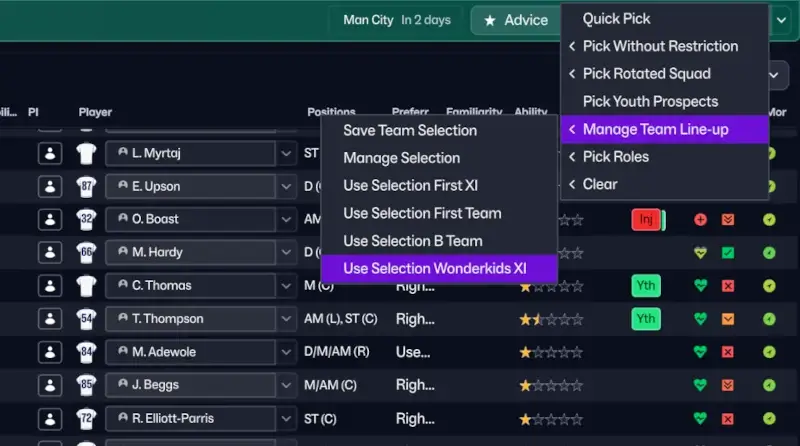
Here you can save multiple team selections. If you got your preferred starting XI, you could save that team selection and name it First Team.
Additionally, you might want to create a second team selection for including your best wonderkids or backup players that you would normally address as your 2nd team. This second line-up could serve multiple services.
- Provide game time and rotations for certain matches for those players that might be benched in the most important matches
- Offer an extra line-up in case of injury crises and multiple key players unavailable, or lacking the necessary match sharpness.
- Provide an additional line-up for the circumstances where you use your secondary or third tactics – meaning you’ll set up a team selection for that specific formation – handy if you like to use 4-3-3 at home matches and 4-2-3-1 at away games.
Finally, you could even make a third line-up where you mix some of the club’s best young talents and wonderkids with established player – offering them experience at an higher level as well as important game time in their development phase, in less important Cup matches, or if the league is settled.
To incorporate your club’s best talent in a team selection, you must click the Filter button and enable B Teams, Reserves, U21 and U18/ U17 squads.
To summarize, I would recommend you to create three different line-ups: First Team, 2nd Team and Wonderkids XI.
However, the amount of team selections you desire will depend on your squad size. If you’ve only got 15 first team players and very few talents that are near first team standard, it might be better to save two different team selections.
Tip 3: Boost Team Cohesion
The level of Team Cohesion will have a greater impact on player’s positioning during matches and how the players’ will react to unfolding events. The more time players spend together through matches or specific training sessions, the more are partnerships and tactical familiarity improved – something that will enhance how well the team performs.
In Football Manager, it’s vital that you manage to gel your squad together. Be aware that the team cohesion will be reduced whenever you make lots of signings in a short time.
To make your tactic perform to its potential, it’s vital to prioritize some training sessions around improving teamwork and team cohesion. Most General Training sessions will slightly increase the level of team cohesion for your squad but there are a few training sessions that you should spread across every training week to boost team cohesion to maximum levels!
Regardless of it’s the pre-season or you got an important match at the end of the week, selecting the Team Bonding session will be smart.
This session asks the team to devote time to social activities to bond players together. This session will also improve Teamwork Attributes for your entire team and greatly increase Happiness – a win win situations.
Apart from the extra-curricular Team Bonding, you could set up a Match Practice session for every week that you only play one match a week. If you got a Sunday match, setting up Match Practice on Wednesday could be favorable.
This session also greatly increases Team Cohesion, but also impacts tactical familiarity and players’ individual roles – two important aspects to improve the performance of your tactics.
In fact, it’s not until your team’s tactical familiarity levels are maxed out you can review your tactics.
At the last training session before Match Day, I recommend to choose the Match Tactics session. This also impacts Teamwork and Team Cohesion. Whilst you prepare your team tactically for the upcoming match on Fridays before travelling to the match, it’s beneficial to pick a Match Review session the day after the match.
To accomodate for any flights back from the match, you could set the Match Review session to happen in the S3 slot, or pick the S2 slot with a Recovery session either happening before or after.
I have provided an example of a well-balanced training schedule that could be used below. This schedule, which I have called Teamwork, can be easily configurated on Thursday’s S3, Friday’s S2 and Tuesday’s S2 and S3 to focus on more specific training sessions according to your tactical system. In this example I’ve just picked notable sessions that looks to improve players decision-making, teamwork, anticipation or off the ball movement whilst also slightly increasing team cohesion.

To edit the training schedules, simply click on Squad > Training > Training Calendar.
Either click on the box to the left where it says the name of the schedule, or click on one of the sessions to manually adjust an existing training schedule. If you want to test my example, you would need to create a new training schedule until the Football Manager 26 training schedules megapack from Passion4FM arrives.
NB! To boost team cohesion even more, you can change one of the Recovery Sessions on Sunday to a Community Outreach session. This will further increase teamwork and team cohesion as the team connects with the local community by doing charity work. Perhaps it will even help to connect your team to your fans and establish a greater relationship.
Tip 4: Keep track of the development of your future stars!
If you care about youth development and player progression, being informed about your wonderkids development within the Under 21s or Under 18s squad is useful. Whenever I start a new save, I always ensure I receive training emails for the Under 21 and Under 18s squad.
This email will inform you about the young talents training performance over the last week. The report, which gives you a recap of notable improvements or regressions, or who has been best or worse in training over the week, is represented through a training rating from 0.0 to 10.0.

Any players with a training rating of above 7.6 could be praised, whilst anyone under 6.4 could be criticized.
This information can be used to not only to establish better relationships to your players by praising them for their development, but also identify potential issues with their individual training intensity or focus early on – for instance, if you see a player turning in one of the worst training performances for the second week in row.
Personally, I try to praise or criticize player’s training performance at least every other week. I try to ensure every player has been talked to throughout the month, so that I’m not consequently praise the same player every week. If too repetitive, the player will not believe in me when I praise him and it will all be counterproductive.
To get these weekly reports about training review, go to:
Club > Responsibilities > Training Responsibility > See Youth Team Training (U21) and (U18) > Enable ‘Receive training emails for Under 21s’

Tip 5: Boost Your Transfer Budget by Potential Buyout Fees
Did you know you can quickly and easily boost your transfer budget with a few clicks at the start of the season? If your club has previously negotiated any future installments and clauses, you should immediate check whether there is a potential to sell any of these buyout fees and thereby get some extra money to spend.
The Sell on Clauses may include anything from:
- future transfer fees percentages
- installments fees which should be paid over a number of years
- fee after a specific number of matches
- potentially buy-back options
- competition or goal bonuses
It’s worth to keep an eye out for these potential buyout fees or Sell on Clauses that can be sold as the board has negotiated a selling fee. Some of these buyout fees unlocks after a few weeks at the start of a new save, others may not be unlocked before the summer transfer window 2026, or later.

For instance, in my beta save with Tottenham, I could boost my transfer budget by €14.46M in August 2025 by selling a future installment.
If you happen to ‘Buy the Clause‘, the other club can not negotiate on the deal but are forced to pay the buyout fee immediately – meaning you can boost your transfer budget with a click of a button.
To find this area, simply go to Recruitment > Clauses > browse the list for a light blue button. In FM26, you can easily browse between ‘All’, ‘In’ or ‘Out’ Sell on clauses.
The ‘In’ tab will list all potential Sell on clauses that will be paid, or the board has negotiated a potential buyout fee for by the owing club.
The ‘Out’ tab will show all clauses where your club owe money to another club – perhaps as you have added instalments that should be paid every 6 or 12 months, or there are money owed if the player manage to play a certain number of matches.
When considering buying a clause you need to consider the amount of money you will receive straight a way with the potential number the fee may rise to, if the player develops or performs well. Getting €500K now compared to 10% of €50M in the future is not a good deal. But if you happen to receive €775K for a player that are at his peak, or not that good, rather than 20% of his transfer value of €4M might be a good deal at that point, compared to risk the player leaving on a free transfer or being sold for half of that value 1 to 2 seasons later.
Tip 6. Improve Your Tactics
6.1 Spot Weaknesses Within Your Tactics | Tactics Analysis
In Football Manager 26 there are several in-game tool-tips and feedback from your staff that might enable you to spot weaknesses within your tactics far quicker and improve your tactical system before you’ve even played a match!
Let us quickly look at a few useful tips to better analyze your tactics in Football Manager 26.
6.1.1. Area Analysis
No matter the Tactics Planner View you are on, whether you favor the Both, IP or OOP Tactics View, you have a little button on the far right side of the pitch. By clicking on the ‘Area Analysis’ button you’ll get a colour-coded grid view which enables you to see areas within your tactic describing which areas on the pitch your system is strong or weak in.
The Area Analysis will range influences of players from low positive to high negative with an overview of major or minor issues.
This analysis gives you a better understanding of which players are responsible for all the different areas of the pitch and how they influence or provide defensive or attacking cover with the chosen player role – depending on you’ve selected the Area Analysis for In Possession or Out of Possession formation.
* This feature is not available in Combined view.

You’ll be able to click on each of the grids to see which players influence each part of the pitch, how the different players relate in terms of influence and how they may help each other out according to the selected player role and the player’s familiarity with it.

Ideally, you want your tactic to be covered with light green areas but if you wish to create certain overloads there might be required to take some risks by reducing the responsibility of an area of the pitch to simply one player. It all depends on how good this player is at defending and covering this zone – a player with an higher Work Rate, Determination and Aggression might cover larger area of the pitch.
For instance, if we click on one of the grids, you’ll get an Area Analysis of the players who influence on that area through a list of positive or negative influences – either as the player drops deep into the space to provide support, or the player may help out in this area of the pitch from time to time. Perhaps, you’ll even come across high negative influence where you’ll discover that a player may lack support from the rest of the team and despite he is well suited to his role and duty, he may encounter some problems in that area of the pitch.
Selecting a grid where you only got one player in cover and with multiple attacking players around him, may let you see a red or orange colored grid – indicating minor or major issues.
The Area Analysis in Football Manager enables you to spot major issues within your tactical system and thereby make subtle changes that makes your tactic more balanced, as you can directly see which areas of the pitch a player or role may cover!
However, this feature is not a standalone way to analyse your tactics. Remember that you can also use the new Visualiser to see how players position themselves in buildup phase, progression or final third – providing additional information apart from these area analysis.
6.1.2. Get Advices About Your IP / OOP Player Roles Selection
Apart from the Visualiser which can also help you to spot strengths and weaknesses within your tactics, a more direct feedback of your chosen player roles for in and out of possession system is available at ‘Advice‘.
Here you can get an evaluation of your Tactics by clicking the ‘Tactics Evaluation‘ button.
Within this screen you’ll get an overview of certain pros and cons within your tactics – for instance how certain player roles should not be used together as their behavior and movements will inflict with eachother.

Although the player roles got a little icon above their player role abbreviation – showing you whether they will try to move inside when the team is in possession of the ball, track back once the ball is lost, or move out of their position to initiate a press, the evaluation of your tactics will definitely come in handy to better understand which roles could work well together, or not.
For instance, you’ll get to learn that the AM doesnt work well with an IF as both players makes runs into the same channel, or that the single DM and Pressing DM doesn’t work that well together in an Out of Possession Tactics as it leaves a greater space in the midfield line which the opposition can take advantage of.
This enables you to make necessary changes to your tactics quicker according to how the match engine incorporates the roles.
P.S. If you move your mouse cursor above the purple or green icon you’ll get information about the player role movements – handy to visualize how they behave in the defending or attacking phase of play.
6.2 Read Descriptions of Instructions & Roles
Building tactics on Football Manager 26 or want to improve the performance of your system? Then, one of the best tips for everyone new to the game is to read the descriptions of team instructions, player instructions or the player roles.
In fact, Football Manager brings several helpful tools to better understand your tactics. Apart from the Visualiser who let you see the player’s positioning in the different phases of play, the new and improved layout for team and player instructions provides you with the option to change instructions easily with a arrow toggle beneath the icons.
However, instead of simply selecting narrow or wide width, short or longer passes, lower or quicker tempo, you must take a minute to familiarize yourself with what the instruction will do if you change it!
By clicking on the team -, or player instruction, you’ll be able to open a Card that let you easily see strengths and weaknesses by applying the instruction.
Lets use width as an example.

Setting the appropriate width of your tactic is crucial to actually let you see your tactical vision come to life. How wide you want to play will affect both the overall player’s positions within your shape – affecting how well they are connected, but it also affect how well your team is able to initiate a press as a collective unit or passing accuracy, or its risk.
Too wide will look to stretch the opposition and make your players stand further apart – making the opportunity to effectively counter-press and play short passing football less effective.
At the same time, playing too narrow will congest play to a smaller area of the pitch – making it easier to connect the players but may make it easier for the opposition to defend against your attack as you try to focus play through the middle and thereby make it harder to score many goals.
For instance, if you’re struggling to score goals with a possession-oriented football, increasing the width slightly may be advantageous. Similarly, if you wish to take advantage of spaces by counter-attacks or movements, you might want to play with a wider width.
But setting up the width is not only a team instruction that you can modify alone. In fact, the width is also based on your chosen match mentality, your formation and the default behavior of your selected player roles. Some roles will naturally stay wider than others.
However, in FM26, you can actually set the width of certain in possession roles that is separated from the team instruction. In fact, you can ask you team to play narrower but ask a player to stay wider – making him a counter-attacking opportunity as he becomes available for diagonal passes or switches of play.
This is just an example of how all relates – mentality, team instructions, player roles and player instructions. We’ll look closer at all the different team instructions in Football Manager at a later date.
Understanding that all tactical decisions you make has it’s pros and cons is necessary.
Then, you can pay attention within the match and consider tactical changes that may let you come to goalscoring opportunities more easily. Perhaps, you wish to make a few changes in the latter stages of the match to get that winning goal, or reduce the risk of your instructions by trying to rescue a point.
6.3 Build Tactics According to Role Style
Another smart tip coming from our tactical expert and partner DarkhorseFM I feel the need to mention is this one!
If you’re creating a tactic in Football Manager, you could use the player role style to build a balanced tactical system. In the player role description, the game will now not only provide a clearer description of the role but also label the role according to his ‘Role Specifics‘. He may be either a creative threat, expressive, goal threat, drift / stay wider or move inside.
All in all, it gives you a better understanding of how the role operates within your tactics and how you can spread the roles around according to who shall create chances and who shall be on the receiving end of making goal-scoring opportunities.
For instance, you don’t want too many expressive players, too many goal threats, or too many players moving inside. Although the role movement icons will be handy in this regard, you can make more informed decisions when creating your FM26 tactics by having the understanding of who may look to score goals, who may make the assists and where those come from, and how players will move according to each other.
Creating tactics in this way is not new, but an alternative way to think about creating your attack. Previously you had to pay attention to their key attributes to get a better understanding of whether the role was more creative, a finisher, sprinter or ball winner.
Watch the video here to see how he approaches it.
7. Prepare For Your Next Match With Upcoming Match Plans
Do you got a special match coming up where you might want to change your tactical system, or alter your approach? In the Advice section within the Tactics Planner, you’ll get feedback from your staff about how they believe you should approach the Upcoming Match.
THis staff meating will be delivered ahead of any matches and should be read, and assessed. You should spend a minute reviewing these advises and consider if there is risk or reward attached to changing your tactical game plan for the upcoming match.
Entering the Upcoming Match Centre provides you with Advises about tactical changes you might want to apply for the next match according to analysis of the next opponent, or apply for all upcoming fixtures.
Here, the Assistant Manager has broken down certain weaknesses within the opposition team that you could exploit.

You’ll be presented with recommendations for changing mentality, of team instructions and opposition instructions to apply according to tendencies from statistics and data your performance analyst have compiled about them, or player fitness concerns.
You’ll get notified of players who are lacking match fitness, and may not be considered a starter.
This staff meeting will deliver key information about your next match and the upcoming opponent that you should be aware of! Disregarding these little hints and advices from your backroom staff may hurt you in the long run as you’re risking losing valuable points.
Before applying all of the advices, you should take a note of the most essential feedback that has an affect of your preferred tactics and its performance – for instance if they are suggesting you to change your mentality.
This is your time to head to the Opposition Report card and browse through the formation analysis and goal analysis. Are they fragile against a certain formation – making your second tactics a suitable choice? When do the opponent score most of their goals? When do they concede? Which area of the pitch do they tend to score most of their goals from?
From this knowledge, you can consider how you shall approach the match – be more progressive and on the front foot by taking risk, or be more cautious? Could it be smart to start off the match with the recommended Balanced Mentality to assess the game and thereby make changes after 15 to 20 minutes?
Since all matches must be approach differently, not only according to who the opponent are but also based on your football philosophy, we can’t give you a direct recommendation – or go-to solution that you can apply for every match. Instead, all we can do is to recommend to pay attention to the information from the pre-match staff meeting and digest the information within the opposition report.
Keep in mind that if you have a tough fixture a few weeks down the line, it may be smart to send one of your scouts to deliver a team report about the club – gaining better knowledge of their players and learn more about how they play. You can do this by going to the club and within squad select Get Team Report.
Learn more in our Football Manager guide to scouting and analyzing the next opposition.
Be aware!
Frequently changing the tactic may influence the tactical familiarity of your primary tactic negatively to a greater degree. The development of familiarity will either stagnate or take much longer time to get fluid, if it’s not already fully learned. See the Familiarity bar within the Tactics Planner.
8. Training Tips & Development of Players
Training is an important part of Football Manager. Not only should training revolve around preparing the players for the upcoming match by better understanding the game plan but it shall also improve their abilities and familiarity with their player role.
Regardless of you’re a hands-on manager, or favor to give some of the control to your assistant manager, there are some notable pro tips regarding training on Football Manager 26 you must apply!
8.1 Training Intensity & Rest
Once starting a new save, you should head over to Training Intensity to edit the rest of players according to their condition.
You’ll find the opportunity to handle automatic training intensity levels at: Squad > Training > Training Intensity
In FM26, you’ll have the option to set training intensity and rest based on five different condition levels. At default it’s:
- Very Poor condition: No Pitch or gym work = 0x
- Poor condition: Half Intensity = 0.5x
- Average: Normal Intensity = 1x
- Good: Normal Intensity = 1x
- Superb: Normal Intensity = 1x
Depending on the intensity of your tactics, your training schedules, how large squad you got to work with, and your players age you can edit the training intensity either individually or for the entire team.
Personally, I favor to select Double Intensity for any players with Superb conditions – meaning they are working harder those days, or weeks, you have a lighter fixture schedule. By choosing the double intensity level, you’ll increase the impact of attributes by 2x. However, the calculation will also depend on the priority focuses for the selected training sessions through the week. It’s actually a rather complex matter that goes beyond this post.
However, you should also consider to override the automatic intensity selections for players who got:
- high injury susceptibility and generally high injury risk to sustain injuries – perhaps due to high match load or current long-term injury
- for players with lower levels of Natural Fitness and Stamina it might be smart to set up a specific training intensity for that player
- for older players who may not develop that much and is considered a key player for your side
Changing an individual player’s training intensity can be done either via the Individual Training screen, found under Training Overview, or via the Actions drop down menu within player profiles.
Inside the Individual Training screen you can either change the view to a List View, or click on a player with poor condition to edit his default training intensity.
At the Individual Training screen, you’ll notice the opportunity to praise/criticize their training and development, change individual training focus or select the IP role and OOP role according to your tactic, which should be done!
8.2 Set Individual Training Focus to Rehab for Players Returning from Injury
A great tip, whilst we’re on the subject of setting up individual training on Football Manager, is that if you notice any players out with injury, or is coming back from injury, you should change their Individual Training Focus to ‘General Rehab‘.
In FM26 there are 5 different Rehab Individual Training Focuses:
- Quickness Rehab – Acceleration and Pace
- Agility and Balance Rehab
- Strength Rehab
- Endurance Rehab
- General Rehab
You can then target specific attributes that may have declined during long-term injuries to speed up the recovery of the player’s fitness. Pay attention when players are starting to return to fitness after long-term injuries and change the Training Focus to a Rehab focus immediately!
This ensures that physical attributes, such as Strength, Natural Fitness, Stamina or Pace can be regained quicker.
By having the ability to change a specific rehab program, you can focus your attention around attributes you notice have dropped during his long-term injury. For instance, if you see the player’s Strength has declined, choosing Strength or General Rehab may be beneficial.
8.3 Rest
The automatic training intensity level where you give players rest if their condition is low, or a less demanding training intensity if they are tired is a wonderful feature that makes you able to focus your attention on other things. However, since player’s condition is so important to ensure they are able to play to their abilities, I normally give rest to any players in the starting XI after every match.
In FM26, you simply select all the players with a dark yellow heart, right click and select Training – Rest Player – 1 Day.
You can also select multiple players to change their training intensity – either set all to Automatic, Half Intensity, Normal or Double.
Resting a player will reduce the risk of increasing the injury risk as well as making sure he can still play to his level of attributes. A player with less natural fitness won’t be able to regain fitness as fast as one with 15 in Natural fitness, or higher.
A tired player will also see his actual attributes be slightly less in the match engine – meaning if a player is both tired, got low natural fitness, low concentration or stamina he might not be able to move as fast around the pitch and cover as much ground in the latter stages of the match, than if he was fully fresh. Although the drop in attributes isn’t visible in his player profile, it may be visible in his performance – making more mistakes, not playing as good by squandering passes, making more inaccurate crosses or simply make poorer decisions.
This is why it’s important to give tired players 1 Day rest after every match.
You can use the Medical Centre to get a risk assessment. The screen is found within the drop down menu of Squad.
In the Risk Assessment of the Medical Centre, you’ll get a breakdown of your squad listed between:
- Very High Injury Risk
- High Injury Risk
- Increased Injury Risk
- Normal Injury Risk
- Low Injury Risk
You should pay particular attention to those with Very High or High injury risk. These players may have recently been injured or got a low condition due to high match load – meaning it may be smarter to balance his game time more, and set him up for either a rest or a lighter training intensity.
Those with Increased Injury Risk may be a mix of players with low match sharpness and those who have picked up less crucial injuries. Take a note of any players with high injury susceptibility and who are likely to sustain recurring injuries.
9. Manage Player Happiness
If you want to have on-pitch success and experience better player performances, you must manage their happiness! Keeping your players happy is an important part of football in general. In FM26, there are both promises, expected playing time and short-term and long-term plans that may affect the overall well-being of your players.
Since unhappy players can have a serious effect on the team morale and performance, maintaining the player happiness is vital!
As part of man to man management, you need to address player’s ambitions and ensure their needs or concerns doesn’t affect the team cohesion and overall dressing room atmosphere. Unsettling an influential player by transfer listing him could be the worst decision you’ve ever done – resulting in that you upset several players within your club.
Taking into account the squad hierarchy is therefore important before making decisions that may upset an individual.
9.1 Agreed Playing Time
When entering a new squad, every player has an expected playing time according to their squad status. Important and First-Choice players expects to play most of the game, squad players and regular starters will understand that rotations may happen and won’t be upset if they don’t play every match, whilst backup players won’t have high expectations to get 90 minutes of actions every single match.
The issue is if you treat an important player as a backup option, or a player doesn’t get enough playing time as he wishes. Then, the player may become unhappy. In fact, it’s the same if they starts to loose support of your management, perhaps due to poor results or bad handling of press conferences, team talks or other scenarios where they feel you’ve handled the situation wrongly.
In Football Manager, you can easily address the expected playing time. This is a great way to avoid further issues or unhappiness down the road, as you can talk to the player about reducing or improving his squad status according to how many matches you perceive giving him.
Go to Squad > Dynamics > Happiness
Here you can monitor potential issues and discover player’s current happiness and hierarchy within the squad. By clicking on the Happiness header you can sort the list of players from Delighted to Unhappy.
You should click on any players with Content, Slightly Happy or are unhappy to address concerns.
To change the agreed playing time, simply click on the player’s name, select Actions and hover your mouse cursor over Squad > Agreed Playing Time, and make necessary changes.
Keep in mind that if you change the agreed playing time to something that’s far from his ambitions, e.g from Important Player to Impact sub, you will upset the player further. So try to be realistic when changing agreed playing time.
9.1 Build Connections
Another way to build relationships with your player, improve both morale and happiness is by talking to the player. By clicking on the Actions button, move to Interactions and Praise him could be a great way to get his support. Praising his last game could be a morale boost if he has played very well – made some assists, scored a goal or basically had an average rating of 7.5 or above. However, you shouldn’t praise the players’ too frequently, but from time to time it will be advantegous.
To build positive relationship with your players, I like to Praise Conduct. This is if he hasn’t made any bookings and you feel the player has contributed to the dressing room atmosphere with his personality, happiness and performance. Tryt o single out a handful of players within your First Team, Reserves and Youth Team every month that might warrant praising, and try to avoid praising the same players every time.

Making sure you win over the support of the most influential players and team leaders early on in your save can be a massive performance boost!
Praising player’s training and development is also a great way to build relationships, as discussed above.
10. Sell Players ‘Faster’!
Powered by TransferRoom FM26 features a brand new tool where you can find potential transfer opportunities or describe certain requirements you need to improve your squad. The TransferRoom Out is a great option to see what club’s around you are looking for both in terms of positions they look to strengthen, age or playing time. It can be a great way to monitor the interest of a player within your squad and offer a player who matches the requirements to one or more clubs.
By clicking on Recruitment > TransferRoom Out, you can browse by Transfers or Loans.
To better find potential moves, you can use the Filter and select only clubs that are looking for players in a particular position, or under certain criteria. For instance, I like to try to sell Kevin Danso or Richarlison and would then filter by clubs who only are after a striker, or a centre back.
The filter enables me to narrow the list of clubs according to age, playing time or required role in or out of possession. Quite handy!

If you click on a club your Director of Football will list any players within your club who matches the criterias. Then you can try to make an offer. Hopefully the club will return with a bid.
You should try to find clubs who have already shown interest in a player. This way you increases the chance of getting a deal done.
You can then offer the player to the club. This may help to sell a player faster than if you put the player on the transfer list. This way, you can also try to sell the player for his actual transfer value, or set a price you deem fits your value of the player.
Be aware that the player may become unhappy if you’re offering the player out. It’s not like you’ll put the player on the transfer list, but will signal to the player that you are looking to sell him.
Browsing the TransferRoom Opportunities will be useful within transfer windows and as the deadline day nears, club’s may become more eager to sign players.
We have now given you a lot of beginners friendly and pro tips for Football Manager 26! We hope you’ve found some of these FM26 Tips useful! To ensure the guide won’t be too lengthy we will instead return for more Football Manager tips and tricks later on, perhaps looking closer at tactics, training or scouting in unique guides! If you’ve come here to find great tips on how to scout and find wonderkids on Football Manager, please read out comprehensive guide.
So happy managing and make sure morale and happiness is great! That’s one of the secrets behind success in Football Manager!