Starting a new Football Manager 2026 save is one of the best feelings in gaming — the clean slate, the tactical possibilities, the dreams of Champions League glory with your newgen wonderkid lifting the trophy. Getting your Football Manager 2026 save off to the perfect start isn’t just about picking your club or tactics — it begins long before kick-off. One of the most important, yet overlooked setup choices is your database size.
Setting it up correctly can make or break your FM26 experience — influencing everything from performance and loading times to the realism and depth of your career.
It might sound technical, but getting your FM26 database setup right can make a massive difference to how your save performs and how realistic it feels, both in terms of recruitment but also how much accurate player data and statistics you see.
In this guide, we’ll walk you through what it is and what it does by exploring how to set up your database size in FM26. On the one hand you’ll learn how to find the perfect balance between performance and depth before taking a closer look at how we set up our database size in FM26 with the objective of finding those hidden wonderkids in Football Manager 26 at Passion4FM.
What Is the Database in Football Manager 2026?
The Football Manager database is the heart of your save. It stores every player, staff member, club, competition, and nation that exists in your game world. With Football Manager 26 bringing both the ability to manage in Men’s and Women’s clubs, the default database increases – giving you both more opportunities but also more control to customize your database size that reflects your vision for your FM26 save!
For FM26, the total database size counts to 750,000+ people across 58 playable nations and 156 playable leagues. It’s the biggest ever database and features a greater depth than ever before!
Believing you can play the game with the full database size is perhaps unrealistic, unless you’ve got a CERN computer or a desktop featuring the latest specs and 64GB of RAM.
When you choose your database size, you’re deciding how many of those people exist in your game. Do you want to load a career with only female players, men’s only or a mix of both?
A larger database means more players, more scouting opportunities and deeper realism – but it also requires more computing power. A smaller database size increases the speed of Football Manager as there are fewer players and active nations…
Or, frankly, that’s a statement with modifications as you can create a balanced save that takes into account both performance and speed, as well as increasing the number of people to recruit.
If you’re curious on how to get the ultimate Football Manager 26 game setup that includes both matters, this guide to the ideal database size on FM26 is for you!
How to Set Up Your Database Size in FM26
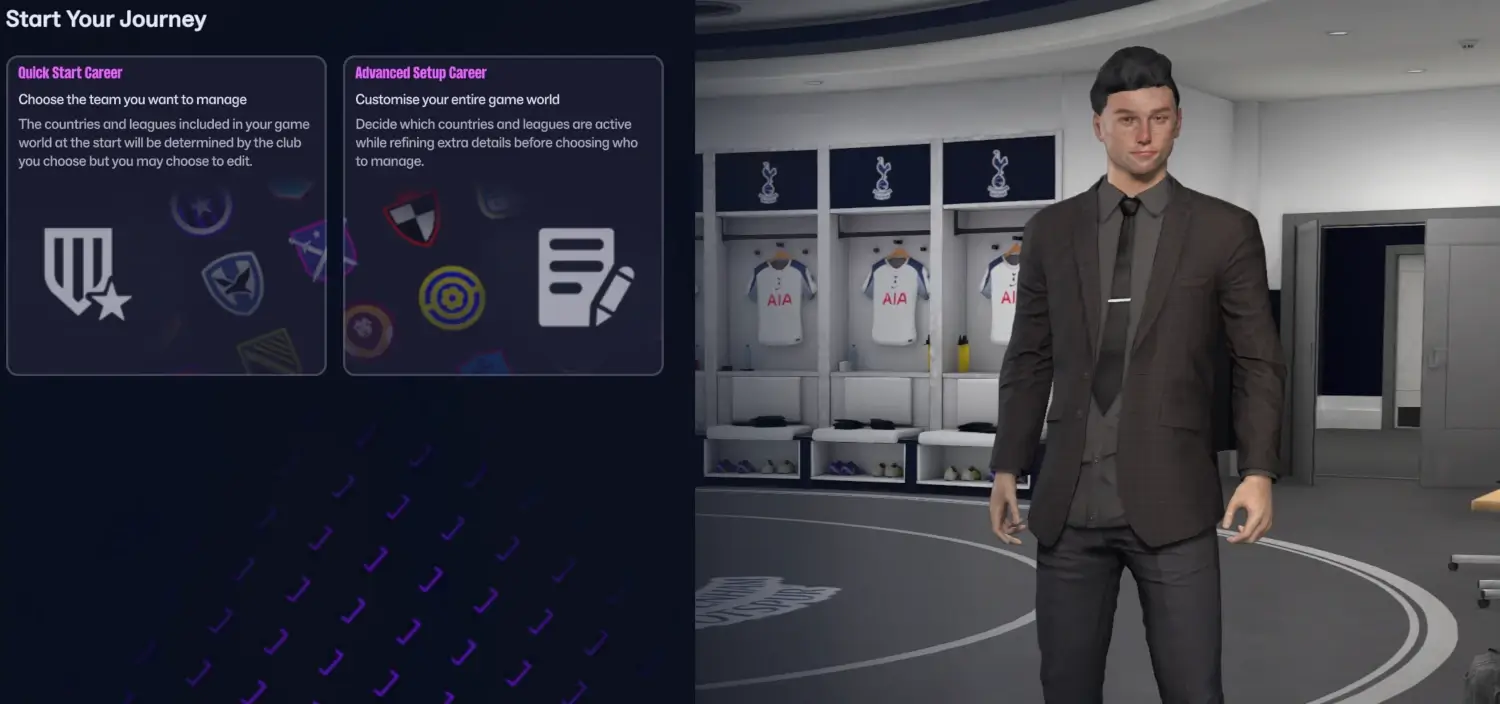
- Start a New Career
From the main menu, click on “Start a New Game” → “Career”. - Click “Advanced Setup Career”
Instead of jumping straight into your save by selecting the ‘Quick Start Setup’, click on Advanced Setup Career. This gives you full control over database options. - Select Active Leagues
Before choosing your database size, pick the leagues and nations you want to load. This determines which parts of the world will be “active” in your save. - Choose Your Database Size
Under the Database section, you’ll see three preset options:- Small – Fewer players, faster performance. Ideal for older PCs or faster saves.
- Medium – A balanced option between realism and performance.
- Large – Includes the maximum number of players for richer scouting and realism, but can slow down weaker systems.
- The final option is the ability to select a “Custom” Database – where you can tailor the maximum players or staff you want within your save (such as “players with continental reputation” or “players from top clubs”). This is perfect for tailoring your experience.
- Check Your Estimated Game Speed
FM26 will show you a “Game Speed” indicator based on your settings. The estimated game speed will range between:- Fast = fastest gameplay possible
- Quick
- Efficient
- Balanced
- Relaxed
- Patient
- The more active nations you select, or the higher player count you select, the more it requires of your computer to run the save – meaning you require more available RAM to play with a maximum database size than with a small database setup. At default, the game requires around 2.5Gb with more power required as you advance further into the future
- Adjust your database or active leagues until you find the right balance. Ideally, you want at least Balanced or Efficient.
- Confirm and Start Your Save
Once satisfied, hit Confirm and start your managerial journey(!)…or wait let us take a deeper look at what options you got!
What’s the Best Database Size for You?
Here’s a quick guide to help you decide:
| Your PC Type | Recommended Database Size | Why |
|---|---|---|
| Low-end / Laptop | Small or Medium | Keeps the game smooth and responsive. |
| Mid-range PC | Medium | Offers realism without major slowdown. |
| High-end / Gaming PC | Large or Custom | Handles big databases easily for maximum depth. |
However, as you’ll discover you’ll be able to get the best of both worlds with the ideal database setup in FM26. It’s just a matter of smartness.
Why It Matters
Choosing the right database size affects way more than just how fast your game loads:
- Scouting: Bigger databases = more wonderkids and hidden gems.
- Transfers: More players mean a more realistic market.
- Statistics: More Active Nations means more detail level and accurate statistics and data as the playable divisions and active nations are processed with a different match engine than if the nation was run in the background / unplayable – since this uses the quick match engine.
- Performance: Smaller databases keep things running smoothly for long-term saves.
To be honest, the ideal Football Manager database size and how you set up your save will vary according to your vision and challenge level for your save.
Are you considering a journeyman save, the foundation for your save changes. Same, if you’re embarking on a zero to hero challenge in the lower leagues… or you’re considering a youth to gold save where you only want to sign under-23 players in the different corners of the world.
Finding the sweet spot keeps your save realistic and enjoyable.
Let us take a closer look at how you could set up your Football Manager database size by delving into a few different save scenarions, challenges or objectives, such as finding wonderkids around the world.
The Ideal Database Size for Finding Wonderkids in FM26
‘When in Rome, do as the Romans‘ is a well-known saying. While Italians loves their pizza, at Passion4FM it’s wonderkids.
For me, it’s nothing more satisfying scouring the world for wonderkids. Whether it’s finding the next gem in Eastern Europe or coming over a potential future Ballon D’Or winner in South America. Some of you might have seen the incredible Kazakhstani wonderkid Daulet Orynbasar, which we showcased at X (formerly Twitter) a few days ago.
Some of you might have tried to search for the player in Football Manager 26, but has not been able to find him. A legit question of yours is probably how we found him, or what measures do you need to take to identify hidden wonderkids like him, or other hidden gems across the world. The answer is as easy as it’s smart.
In this regard, we need to setup the ideal database size which enable us to track down wonderkids or hidden gems across the world.
Creating the foundation to scout for players in Football Manager is basically done via two things:
- how many nations you activate and playable divisions you select
- the number of players within your database = the total player count within your save
When we are searching for players for our renown Football Manager 26 wonderkids list we must naturally create a save that is as extensive as possible – enabling us to see as many players within our game world as possible.
However, it’s not a playable save to add all possible nations or extend the database size with an advanced setup counting over 400,000 players, eventhough that’s what I did to find the 16-year-old Qairat wonderkid. This means, it’s not a save I’ll be using for several seasons!
In Football Manager 26, you’ll get a warning sign if you exceed the database size of more than 125,000 players. That doesn’t mean it’s impossible to create a rather quick and playable save if you exceeds this number. It only means that it might take a longer time to process through a season.
For instance, a mid-range to high-end computer will easily handle activating all the top 10 playable nations in FM26, e.g. England, Spain, Brazil, Germany, France, Italy, Argentina and so on. The player count may easily get to 100,000 players.
As mentioned in our previous guide to how to setup your first save, which nations you pick should relate to the objectives of your save. How extensive database you require will be a matter of how far up the league you’re managing and how great of a reach you want when scouting and recruiting players.
Naturally, you’d like to activate more nations within the region you’re managing in. If starting a save in Croatia, you might want to add neighbouring countries, or nations which you can recruit players from, such as Slovakia or Serbia.
When choosing your game world, you can either go scientific or pick random nations you desire.
In the matter of finding wonderkids there are a few nations that are a must. If you you wish to identify future newgen wonderkids, selecting those nations with the highest youth rating in Football Manager is a must as these countries has a bigger probability of generating wonderkids at the annual youth intake than those smaller nations with lesser youth rating.
On top of that, you’ll certain nations famed for their ability to produce world-class players, which you can consider to active the nation of. I’m speaking of Colombia, Mexico, Türkiye, Japan, Croatia and Serbia if we consider where the best youth academies in the world of football are outside the top 10 nations.

However, rather than activating a bunch of nations and leagues which results in thousands of matches having to be processed every gameweek, a great tip for Football Manager is to take advantage of the custom database size and use a custom setup that adds more players to your game without dramatically affect the game speed.
Normally, I prefer to use a Large Database to extend the number of the Total Player Count to as high as possible.
By clicking the ‘Total Player Count’ button, it will open a pop-up window where you can add more players within:
- Continents
- Regions
- Nations
Within each screen, you’ll be able to select between:
- Current International players
- Players based in nation
- Players of nationality
- Players from top division clubs
- Players with Contintental reputation
- Players with National reputation
- Players from clubs in contintental competitions
This enables you to unlock more players that would probably be ‘hidden’ due to their reputation, your club’s knowledge or for any other reasons would not be featured in your save, if picking just a handful of leagues.
For finding wonderkids, I prefer to increase the player count by adding more players within the Contintents of:
- Europe
- South America
- Africa (optional)
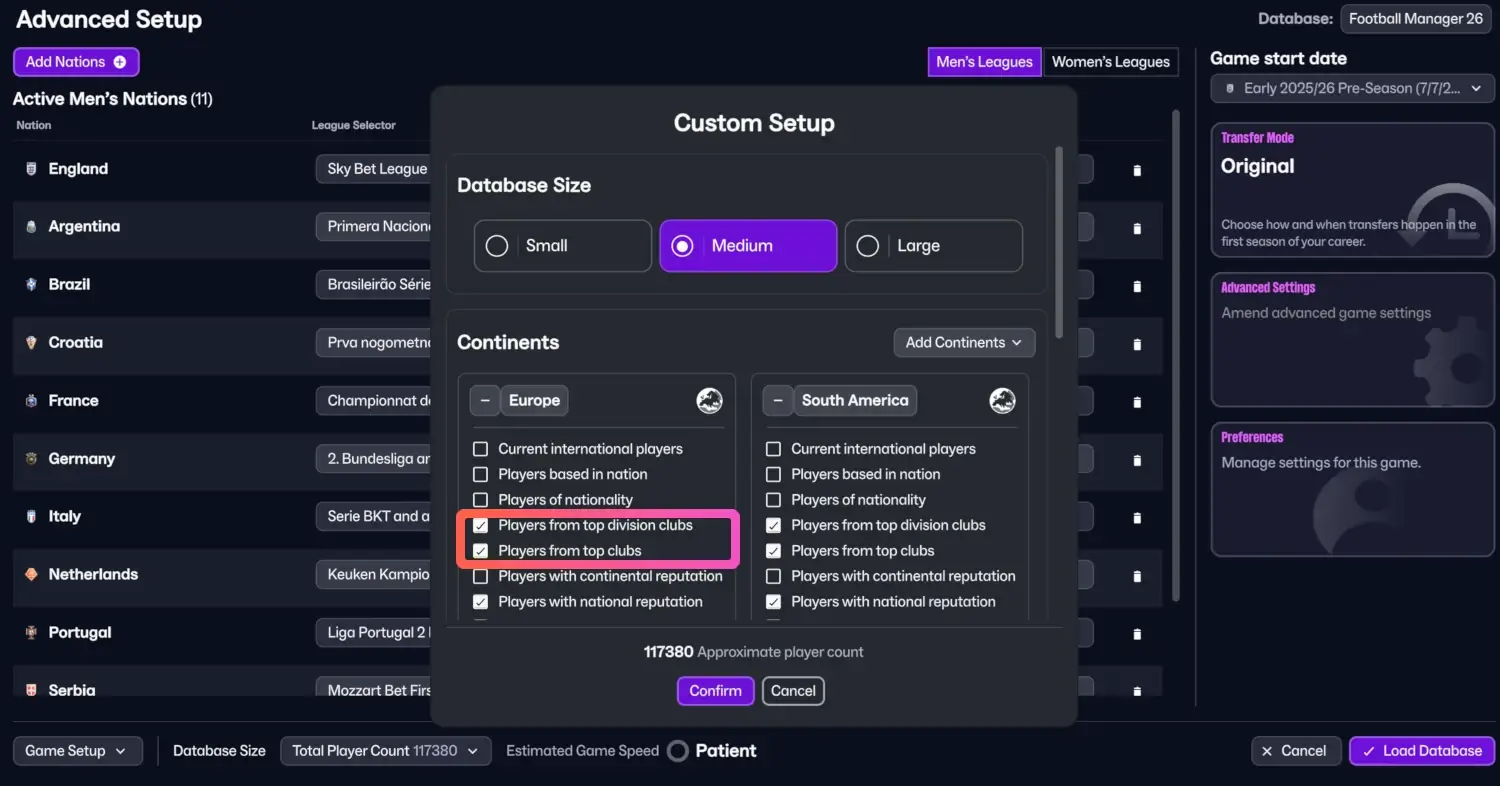
Traditionally, my go-to preference when using a custom setup is to select:
- Players from top division clubs
- Players from top clubs
- Players with national reputation (optional)
The option to select ‘Players from top clubs’ is a really nice feature, and thereby recommended, for any nations that does not got a playable league, such as Nigeria, Ivory Coast or Ecuador. It enables you to load all players represented within the FM26 Database and make sure the biggest clubs within those nations has First Team players.
For instance, if I load all players from top clubs in the continent of Europe, I will still see the entire squad of Dinamo Tblisi, Jagiellonia, Slavia Prague and so on, despite I have not made any of these nations playable.
When using the preferred settings above, it will bring the database size up to around 120,000 players – a rather decent player database for scouting both wonderkids, bargains, hidden gems and still provide enough depth to make your save feel as realistic as possible as most big club’s got all the players within the FM26 database.
It enables you to be in advance of any progression you make within your save and help to find players across the world as you’re 1, 5 or 10 seasons in your save.
With these settings you’ll still get wonderkids with Continental reputation popping up in your save, such as Kanta Doi although I have not deliberately activated Japan as a playable nation.
However, by choosing to add players with national reputation within the Continent of South America, you’ll be able to get Zinadine Zidane Bedoya in your save – a 16-year-old attacking midfielder labelled as the next Max Dowman!
Pro Tip: If you mainly manage in one region (say Europe or South America), use a custom database to load more players from that area. You’ll get depth where it matters without tanking performance.
The Ultimate FM26 Database Setup for Journeyman Saves
If you’ve ever wanted to embark on a Journeyman save where you start off with a random club and try to move up the ladders across a region, it requires a quite different FM26 database setup than if you’re managing a major club.
For journeyman saves in Football Manager, you need to have an idea of where you wish to start your journey. Should you be starting unemployed or pick a random club between a few hand-picked nations that you fancy managing in.
Let’s say you wish to start a journeyman save across the Danube River. It flows through the Central and Southeastern Europe – meaning there are 8 different nations to start your journeyman save in.
At the start, the objective may be to start in one of the smaller nations and end your journey in Germany before moving further. However, let us assume you want your journey to begin in either Hungary, Slovakia, Romania or Ukraine.
Then you activate those nations. If you’re computer can handle it, you can go ahead to select more. My point is that you don’t need to activate all at the start and instead add more playable nations and leagues as you advance in your save. Starting to get bored of managing in Slovakia after a few seasons, you can unlock a new nations within your game!
This enables you to start of your game world with a rather quick database size focusing on only a few nations.
Rather than loading all players within the continents of South America, Europe or Africa, you can select a game world tailored to the objective of your journeyman save.
It’s perfectly fine to choose to load all players from top division clubs within the continent of Europe but you can use Regions to tailor the database around certain nations you’re considering managing in – and recruit players from!
For instance, load all players from top clubs in South Eastern Europe, Eastern Europe, Central Europe and Western Europe if you’re considering a journeyman save up the Danube river.
Then you might even want to load all players based in nation of South Eastern Europe if you’re considering a lower league management save at the start and work yourself up the ladders to Bundesliga football and Champions League glory.
What about LLM Saves?
Another scenario is how to setup your FM26 database size for lower league management saves. When embarking on a LLM save, you’ll be limited with a little to none transfer budget and the possibility of signing players from abroad is none existing.
In this regard, a great tip is if you’re managing a lower league side in a smaller nations is to load all players based in Nation, rather than prioritizing loading players in specific regions or within your Continent.
Starting a save with a custom database in the lower leagues of Poland, Scotland or England and considering doing a one nation save only, you can browse down the Custom Setup to choose to load all players within that specific nation.
Perhaps you’ll even like to load all players within the neighbouring country where it’s natural to find free agents in – e.g. Scotland and England playable if starting below Enterprise North/South, or include all players in Germany if you’re starting a LLM save deep down in the Polish league system.
On top of that, you should also amend the advanced game settings! Here there are two options to tick:
- Add Players to Playable Teams
- Add Key Staff
For a more realistic save and increase the challenge level you might even untick ‘Allow First Transfer Window Activity’ meaning you’ll start off with the squad your club had at the end of the latest transfer window.
Final Thoughts
Before you pick your first tactic or scout your first newgen, take a minute to fine-tune your Football Manager 2026 database settings. It’s one of those behind-the-scenes tweaks that can completely change your experience — making your save smoother, more immersive, and way more fun.
So, next time you load up FM26, remember: the road to footballing glory starts in the Advanced Setup screen!