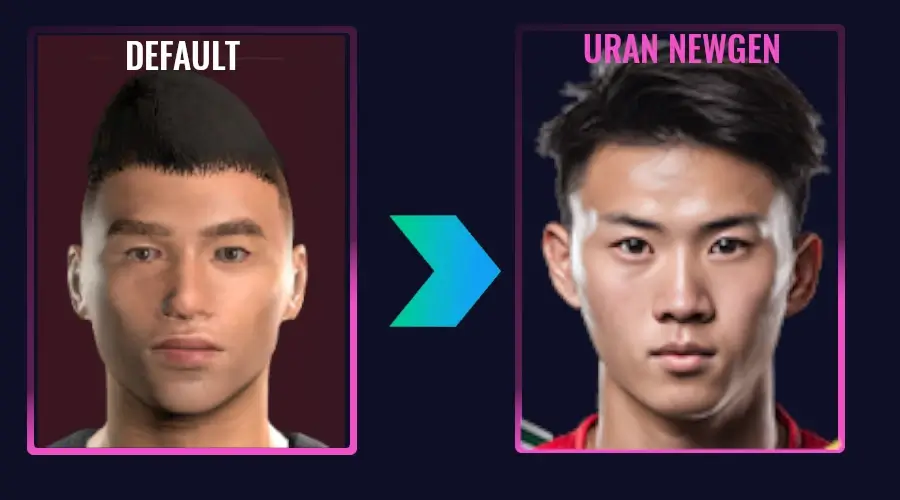
Do you find the looks of newgen faces in Football Manager 26 too simple, or awkward-looking, and wish to make the apperance of newgens in FM26 more realistic? Enhance the authenticity of generated players and staff on your FM26 save with the URAN Newgen Faces for Football Manager 26 by FM.Zweierkette.
After last years release of the Ultrarealistic NewGan facepack, Tery at FM.Zweierkette returns with the FM26 Uran Facepack. This megapack of newgen faces gives you the ability to update the appearance of newgens in FM26 with 7,000 images for players and staff.
No more 15 year-olds looking like they are in their 40s, or get wonderkids with strange looking skin texture or hair styles. This is your chance to vastly improve the looks of newgen faces on FM26 with AI generated faces.
Explore the wonderful URAN Newgen faces for Football Manager 26!
Quick List of Content within FM26 NewGen Faces Tutorial
Table of content
All you need to know about the Football Manager 26 URAN Facepack

As previously mentioned, the Football Manager 26 URAN Facepack will let you automatically apply a maximum of 7,000 newgen faces on FM26 thanks to the wonderful work of Bassyboy who found a trick to load a facepack that automatically assign images to newly generated players, for instance at youth intakes.
By swapping up one file within the game files, it enables us the ability to replace all those newgen faces on Football Manager with a more realistic megapack of player images.
Now the most attentive reader will probably notice that for FM24 you could load 55,000 images by using the Ultrarealistic NewGan faces. However, although you can still use the megapack to manually change the appearances of newgen faces on Football Manager 26, you’ll be limited to only 7,000 images if you want to install the full facepack of newgen faces offered via the URAN Facepack.
In Football Manager 26, the handling of generated faces is easier than ever!
Once the youth intake happens, the game will automatically assign player faces to all the youth graduates without having to export the Newgens‘ IDs beforehand.
This means that you can install the URAN Newgen Faces for Football Manager 26 once – and the game will take care of assigning a player image to their face forever!
Simple and easy!
However, although it offers you the ability to make the appearance of newly generated players (and staff) look more alive than ever before, there are a few drawbacks
- due to the number of Newgen images is currently limited to approximately 7,000 faces, there will be significantly more duplicates appearing in the game than before!
- In FM26, the assignment of newgen faces is based only on ethnicity – meaning nationality is no longer taken into account resulting in some cases that the application of faces does not work properly.
- Newgens in women’s football are not included. If anyone is interested and has the capacity to create the corresponding images, please get in touch with FM.Zweierkette
- Discrepancy with the 3D game: Image assignment does not take hairstyles into account. To match the Newgen image and 3D representation, you have two options:
- Use the in-game editor to adjust the player’s appearance in the 3D game.
- Assign an image to your Newgens manually (see below).
How to Install the Uran Newgen Faces
- Download the file by clicking the button above. You will then be offered two options – either downloading the URAN Newgen faces from Discord or support the creator by subscribing to their Patreon.
- Place it into FM26’s installation folder:
- \Steam\steamapps\common\Football Manager 26\fm_Data\StreamingAssets\aa\StandaloneWindows64
(Save the original file in another location beforehand in case you want to revert to it later.) - To find the correct path for Epic Games or MAC OS, please follow the same process as when applying the speed mod – proceeed to the guide on speeding up Football Manager 26.
- \Steam\steamapps\common\Football Manager 26\fm_Data\StreamingAssets\aa\StandaloneWindows64
- Open Football Manager 26 – Go to Preferences – Detailed – Audio & Visuals
- Tick the following two boxes in the settings:
– Show pictures of players (and staff) who have been generated by the game
– Use pre-generated pictures of players (and staff) rather than dynamically-generated images
- Tick the following two boxes in the settings:
Manually Add Your Own NewGen Faces in FM26
To ensure that your own Newgens in Football Manager 26 are guaranteed to be unique, you can assign them their own image manually. Download the entire pack with 55,000 images so that you have the maximum selection.
- Select the image you want
- Place the image in your user folder under graphics\players\Newgens and name it after your player.
- Save this Config.xml there and open it with a text editor
- Display your player’s ID in Football Manager (Settings > Show ID)
- In the Config.xml file, add the file name of the image (without the file extension!) and the ID of your player (instead of „Kennzahl“) in a record line.
- Save the Config.xml and restart Football Manager.
- Done.
You can add as many record lines as you like to the Config.xml file if, for example, you want to add new pictures for your entire team.
Credits
Thanks to Tery at FM Zweierkette for giving us the permission to re-distribute this wonderful newgen facepack for Football Manager 26 to our audience. If you’re German or wish to find more wonderful Football Manager graphics, tools and other resources, check them out!
Follow us on Social Medias
X / Twitter: @FMzweierkette
Website: https://fm.zweierkette.de
Discord: FM.Zweierkette
Support their work at Patreon: FMZweierkette