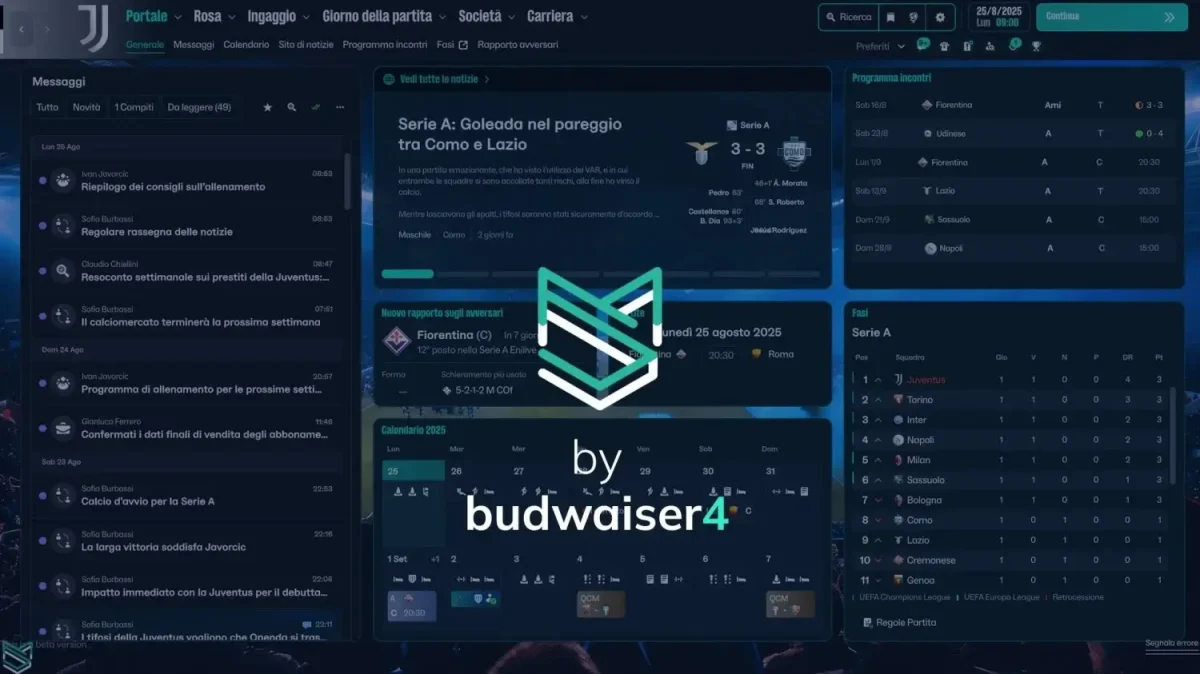
Do you find the default user interface of Football Manager 26 too cluttered, too purple or in any way miss the opportunity to download and apply a custom skin for FM26? Fear not, thanks to budwaiser4 we are able to offer the Material Skin 26 for Football Manager 26!
This custom Football Manager 26 skin changes the appearance and theme colours of the current UI on FM26 to replicate the colours of the dark skin made for previous editions of Football Manager.
With a few tweaks and applying a few files, you can easily change the ‘entire looks’ of Football Manager 26! By re-colouring FM26, the Material skin makes it look way better than the default FM26 skin.
You’ll discover that the purple colours of Football Manager 26 has been replaced by light green colours for all headers / titles and buttons. Unfortunately, that’s only what’s possible at this stage as it’s an entire new architecture to understand before further improvements to Material Skin 26 could arrive!
OTHER MUST-HAVE GRAPHICS
- Football Manager 26 DF11 Faces Megapack
- Football Manager 26 TCM26 Logos Megapack
- Football Manager 26 Real Names Fix – Get Real Clubs & Competition Names
Alongside changing the theme colours within the current interface, the Material Skin 26 for Football Manager 26 arrives with a dynamic background for specific competitions.
You’ll notice that you’ll get a new background for UEFA competitions such as Champions League, Europa League or Conference League. On top of that, you’ll even get a dynamic background for the top three divisions of the English league system: Premier League, Championship and League One.
With the latest Material skin at your disposal, you’ll get one step closer to enjoy Football Manager 26 as it brings a new experience to your game world. This Football Manager 26 skin is also compatible with both Windows and MAC*.
NB! In this version i removed the gradient for the player and no player. If you want to restore it read the instruction txt in the file you download!
Download Material Skin v1 now and experience a better-looking Football Manager 26!
Version: 2.2.6
Latest Update: 30.06.2026
Compatible with FM Skin Builder
PS. For now, this version is based on the game still in beta, so there may be structural issues unrelated to the skin but the creator is constantly improving the skin with new additions.
Screenshots of Football Manager 26 Material Skin


Discover more screenshots of the Material Skin 26 here.
How to Install the Material Skin on FM26
The Material Skin is ready for you again this year! Here’s how to install the brand new skin for Football Manager 26!
Step 0. Quit Football Manager 26, if you’re playing it.
Step 1. Download the file above
Step 2. Extract the contents within the pack by using an archiver tool such as WinRar or 7-Zip. Once extracted, you’ll discover these files that makes up the entire Material Skin 26:
- ui-backgrounds_assets_common.bundle
- ui-charts_assets_all.bundle
- ui-match_assets_all.bundle
- ui-panelids-uxml_assets_all.bundle
- ui-prematch-backgrounds_assets_common.bundle
- ui-recruitment_assets_all.bundle
- ui-styles_assets_common.bundle
- ui-styles_assets_default.bundle
- ui-tactics_assets_all.bundle
- ui-tiles_assets_all.bundle
- ui-widgets_assets_all.bundle
NB! * the number of files may change for future updates of the skin.
Step 3. Find the installation path of Football Manager 26.

- For instance, you can go to your Steam Library and find Football Manager 26. On the overview page of FM26, click that minor cog and select browse local files. This will let you get directly to your Football Manager installation directory.
Steam: \Steam\steamapps\common\Football Manager 26\fm_Data\StreamingAssets\aa\StandaloneWindows64\
MacOS: ~/Library/Application Support/Steam/steamapps/common/Football Manager 26/fm.app/Contents/Resources/Data/StreamingAssets/aa/StandaloneOSX
NB! you might have to show hidden files to discover these folders.
Step 4. Locate the original files with the same file names as above, and make a backup copy before proceeding.
Step 5. Copy and paste the files of Material Skin 26 and select to overwrite or replace the existing files.
Keep in mind!
NB! Remember that if Football Manager 26 is upgraded or patched, or you verify game files for any particular reasons, or apply any other FM26 mods that makes changes to the appearance and UI colouring, e.g. changing attribute colours, these files will be overwritten and you need to re-apply the files that makes up the FM26 Material skin.
Changelog
v2.2.6
– Redesigned panels for World Cup
– Added the possibility to use 2 different templates for the player profile (read the readme inside the file you download)
– Added faces instead of kits in formations during the match
– Fixed bg of some buttons
– compatible with FM26.
v2.2
- compatible with the FM26.3 update
- features some improvements like the faces in the tactics screen or big face in the profile player!
v2.1
- Compatible with FM26.2 update and hotfix
- Fixed everything after update
- Fixed picture staff overlapping text
- Resized some fonts (match commentary, attribute name etc)
- Fixed some bg button that was too bright and no readeble (button make offers, button in prematch press conference etc)
v2.0
– works with FM26 26.1.3 update
– Redesigned some screens using FM Skin Builder
– Changed fonts
v1.2
– Fixed everything after update break all
v1.1
– Fixed everything after update break all
v1.0
– Fixed everything after update break all
– Added colors of number sub in the prematch pitch
– Removed circle background from player (maybe not everywhere)
– Removed gradient for player, no player, retired player (read the instructions in the file you download because I also included a version that restores the gradients for those who like it)
0.7
– Fixed everything after update break all
– Removed, for now, colors of number sub in the prematch pitch (i need find a way to restore it because they change the code of that files)
v0.6.1
– Fixed crash on tactics screen when you a role without player assigned
– Fixed crash when ask agent about teams that are interested in player
– Fixed crash on Data hub on Mac (it should not be)
v0.6
– Fixed recrutiment highlighted search by role
– Fixed press conference pre-match
– Fixed preference menu
– Added Mac compatibility
- Compatible with 26.0.5 update
v0.5.1
Works with new update and fully compatible with Windows.
* For Mac users, the two files that were causing problems have been removed for now because I still have to test it
v0.5
– Added Mac compatibility
v0.4
– Fix color label trendy in inbox message
– Fix bg number popup search result
– Fix circle end graphics total income in finance income popup
– Fix number in nxgn for list player
– Fix calendar purple in processing panel
– Fix circle this month total income in finance income popup
– Fix circle this month total expenditure in finance income popup
– Fix border bottom tab income breakdown tab
– Fix border bottom tab expenditure breakdown tab
– Fix bg opposite team news prematch
– Fix pitch lineup prematch
– Fix bg staff advice prematch
– Fix bg top card offer player
– Fix color label CL, EL, Conference in league table
– Fix color of current transfer budget cost text
– Removed gradient bg of transfer budget cost text
v0.3
– Fix everything after update break all
v0.2
– Fix colour circle news unread
– Fix color icon news
– Fix color must respond button
– Fix color icon and sub number in pre-match table
– Removed green bars in tactic panel
– Added new pitch for pre-match
– Fix color league table in pre-match
– Added file for default color attributes and instruction file
Worth to know!
IF YOU DO NOT WANT TO USE THE DYNAMIC BACKGROUNDS THAT ARE USED IN SOME COMPETITIONS SUCH AS CHAMPIONS, EUROPA LEAUGE, CONFERENCE, PREMIER, CHAMPIONSHIP, LEAGUE ONE DOWNLOAD AND UNZIP THIS FILE AND INSERT IT IN THE SAME PATH REPLACING THE EXISTING FILES
https://www.mediafire.com/file_premium/lfpu4zfon2wuhrj/bg-default.rar/file
Credits & Social Media
A major thanks to the skin creator budwaiser4, who has given us permission to re-distribute the skin to our community.
Please visit the original thread at the Sigames Forum for further updates that is not posted here, or to contact the creator directly about requests, feedback or bugs.
Follow the creator on social medias to get notified about future updates of the FM26 Material Skin
X: budwaiser4
Sigames forum: budwaiser4
Instagram: budwaiser4
Do you enjoy my work, all donations are appreciated.