Welcome our guide to setting up your Football Manager 26 saves. Here we will walk you through the essential decisions and important tasks you need to complete when starting a new career.
After a long wait, Football Manager 26 is finally here! Whether you’re a seasoned veteran or diving into the series for the first time, setting up your initial save is one of the most crucial (and exciting) steps on your quest to success.
With a new UI, revamped features, updated squads and deeper tactical systems, FM26 offers endless possibilities. However, before you can guide your team to your first-ever trophy in FM26, you’ll need to decide where to begin: Which club will you manage? How deep should your database go? What are your objectives and challenges with your first FM26 save?
To help you lay the foundation to future success in Football Manager, this Football Manager tutorial will walk you through everything you need to know to get your first Football Manager save up and running.
From choosing playable nations and leagues, customizing your game setup for the perfect blend of performance and realism, creating your Manager profile and choosing a team that fits your style, it’s time to share my blueprint for setting up a new Football Manager save.
Whether you wish to channel your inner Pep Guardiola or rebuild a fallen giant, it’s essential to put strategic thinking and tactical planning in front. What you do before even playing your first match is as important as the tactic itself.
Going through the process of setting up your save with all that it entails, can be the difference between failure and long-term success.
Let’s get your managerial career off to a winning start.
1. Customizing the Preferences
Before starting a new game, it could be advantageous to spend a minute or two looking through the game’s preferences. Here you’re able to customize the look and feel of Football Manager, from selecting the text scaling and other interface related decisions, its language and currency, to match graphics quality and other changes to the game’s Match Day experience and processing.
In Football Manager 26 you’ll have less opportunities than in FM24 as you won’t be able to change the skin, or determine what landing page you would be taken to if you click on a Player’s name or the Squad Name.
However, selecting what language or currency, your graphics quality and how often auto saves should happen could be a wise start.
2. Creating your Game World on FM26
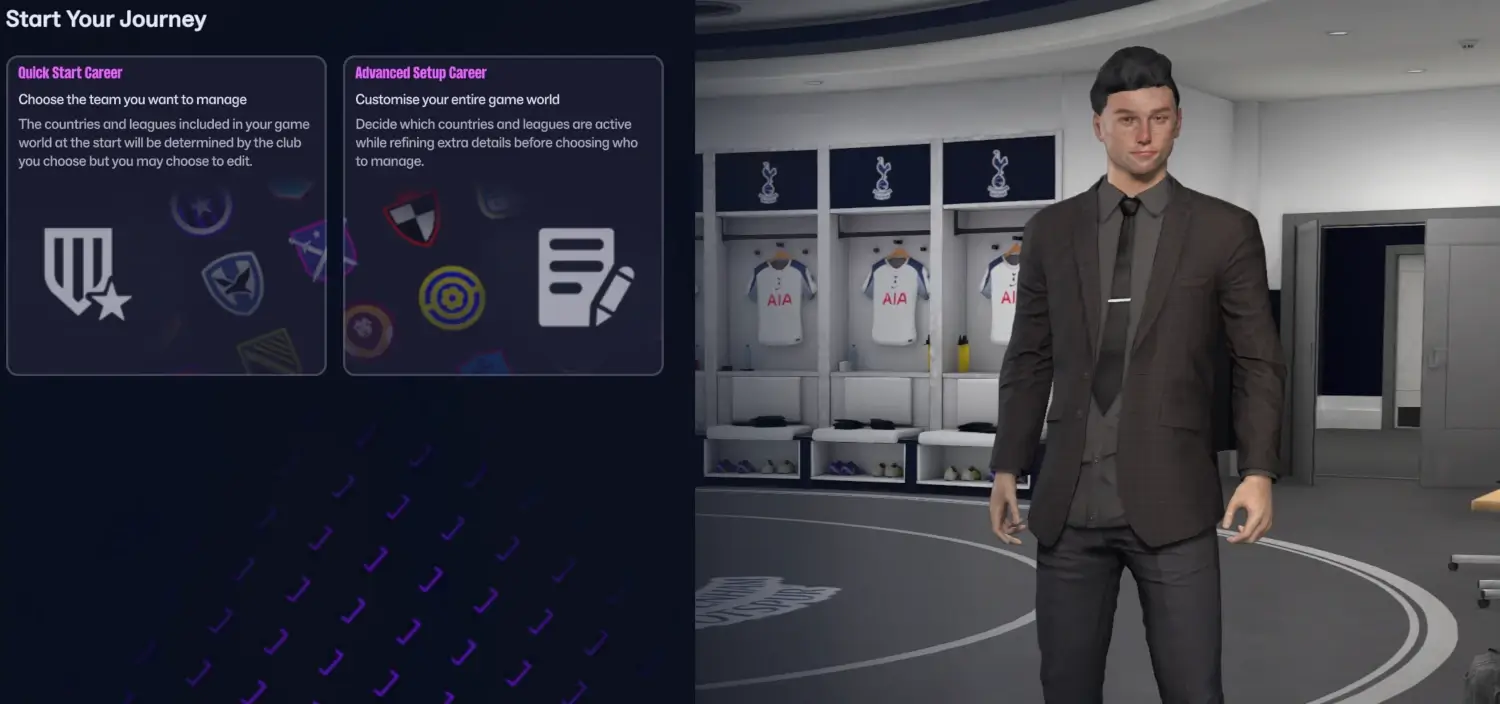
When loading up Football Manager 26 for the very first time, you’ll be able to kickoff your Career through either the Quick Start or Advanced Setup – helping you to create your game world either as basic or immersive as you want.
2.1 Quick Start Career
The Quick Start Career is the most user-friendly game setup as you can pick a team to manage and the game will automatically build a game world according to the club you choose. It offers a ready-to-go experience where you do not need to spend much time detailing your new Football Manager 26 save.
The quick start option will load the game with a minimal number of active leagues and playable nations. Frankly, the game will randomly fetch some recommended major nations that could be handy for you to sign players from, whilst also maintaining the highest game speed.
Based on the nations you’re managing in, Football Manager will behind the surface select a few major nations, some neighboring nations in additional to possible nations of interest.
Normally, the game will load around 5 different countries with a few active leagues down to the third or fourth level depending on how far down the pyramid you are managing in.
For instance, if you pick a club in the German 3. Liga, it will automatically pick nearby nations such as Austria, France, Italy and Türkiye with a medium database size.
When loading a game in quick start career, you may still be able to edit the number of playable leagues within the setup process but it will automatically choose men’s or women’s leagues that relates to your club.
If you decide to remove any of the suggested nations or playable leagues, you will still have the option to add as many nations or playable nations as you desire. If you prefer to customize your game’s setup, it might be better to choose the Advanced Setup Career.
2.2 Advanced Setup Career
Starting a new career in Football Manager begins before you have even selected your team to manage – this is especially true when using the Advanced Setup.
The Advanced Setup enables you to get full control of your coming game world.
It enables you to tailor your save how you see fit by selecting the database size, picking active nations and playable leagues or determining the game start date.
Another benefit of the Advanced Setup is that it enables you to thinker with the Preferences and Advanced Settings before embarking on a new journey.
One of the greatest benefits of the Advanced Setup is that you can save your preferred game setup – if you have a certain way to create your Football Manager career – and use that file to quickly load the same setup of leagues and nations when starting your next FM26 Career.
2. Selecting Playable Nations & Leagues
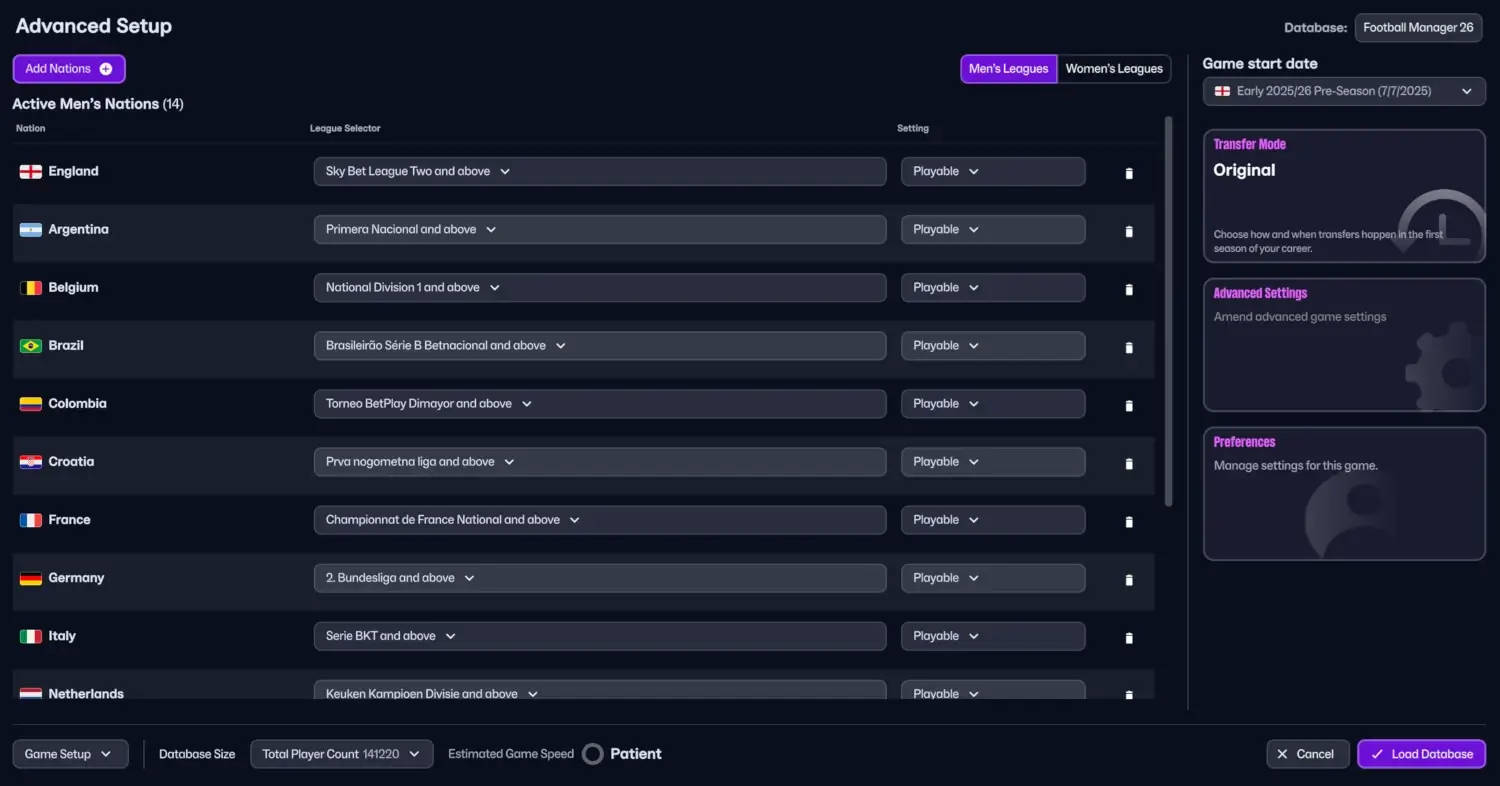
For the first time in the history, Football Manager 26 brings the most extensive playable nations and active leagues than ever. In FM26, you’ll have 58 nations you can activate – with 11 different Women’s nations to choose from.
You can mix and match between activating Men’s and Women’s Nations, or determine whether you wish to start your Football Manager 26 career with a men’s only or female only game world. If you choose both men’s and female leagues you are able to move seeminglessly between managing both men’s and female clubs throughout your career.
You’ll have full control to select which active nations and playable nations to complement your career – bringing you a huge chance to create that storytelling that makes your game world more immersive.
When selecting active nations and leagues, you can tailor whether you want to have only the top flight leagues active or enhance the game details by using the drop down menu to select the lowest playable league and above, to gain more accurate statistics and data accessible for you within your game world, or whether some nations and leagues should only be View-Only.
When selecting playable nations and leagues you get the opportunity to hand-pick which leagues that should be playable, and thereby being processed in the background. You also got the opportunity to set certain top divisions as playable while the divisions beneath are View-Only. Or, for faster game speed, set certain minor nations as View-Only.
By selecting View-Only you will not be able to control a club within that nation or the division, but you will still see clubs, related players and staff according to your club’s scouting knowledge.
What’s important to consider is that which nations and leagues are activated and thereby playable will influence on the accuracy of statistics and data and detail level.
Whether you select a league as playable or View-Only will have a dramatic influence over your career – how accurate statistics and data are relating to what type of match engine will be used for processing matches.
Any ‘View-Only’ nations or leagues will be simulate the league in less detail in terms of players performance and match results by using the Quick Match Engine. This will result in statistics and data will be not as accurate or more limited than if the league was simulated with the Full Match Engine.
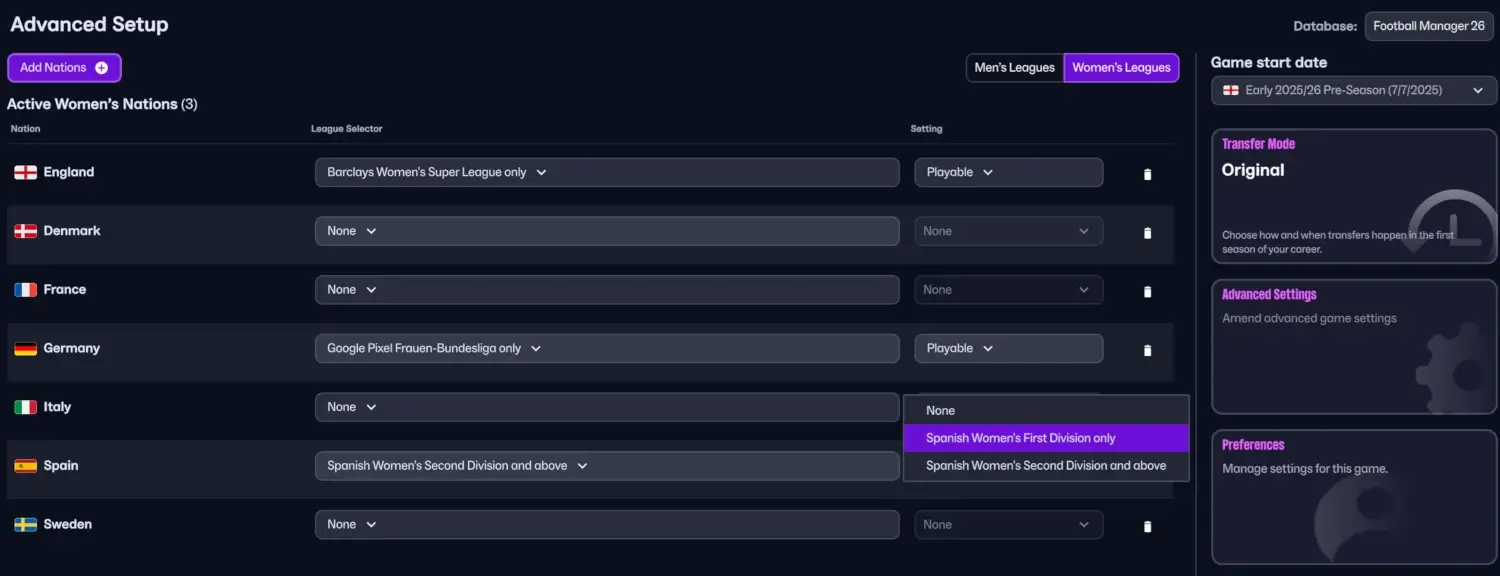
A little tip! If you select a nation e.g. England who offers the opportunity to both play with Men’s or Women’s leagues and you wish to either play with a Men’s Only career or a Women’s Only Career, you need to select ‘None’ in the League Selector of those nations you don’t want to incorporate.
2.1 How many playable nations and leagues to add?
How many playable nations and leagues you wish to add depends on how immersive or extensive your game world should be, as well as how many leagues your computer may tolerate – the game speed.
Which nations and leagues you select as active and playable depends on the type of save, your vision for your save and where you are going to manage.
It’s useful to have a plan for your save relating to recruitment of players and whether or not you’re going to install a specific transfer policy in your save.
Personally, I prefer to activate the biggest nations in the world, like England, France, Germany, Spain, Brazil and Italy regardless of where I’m managing.
Then, I consider the level of the league and which areas of the world I can potentially attract players from. For instance, it’s not useful to add a lot of minor nations if you’re going to manage one of the biggest clubs in Europe. This will only make Football Manager run slower. The players in these leagues are rarely good enough either to be signed as their best players current ability is lower than a backup option for any of the top sides.
You could even consider which nations that would traditionally create the best newgens at the annual youth intake by picking nations with the highest youth rating.
In fact, I have four criterias when selecting playable leagues and active nations:
- The club’s geographical placement. You will want to add neighboring nations and leagues where it’s potentially easier to integrate players into your squad based on a cultural and social aspect. For instance, if you’re going to manage in Croatia, I would have picked, Italy, Austria, Slovenia, Serbia and Poland. If I would manage in Norway, I would add England, Scotland, Sweden and Denmark.
- The nation’s historical and cultural legacy both in terms of language spoken at the moment and previous emigrations and colonies. For instance, if you’re going to manage in Italy, it could be purposeful to add Argentina and Brazil. Players from Argentina often holds a Italian passport as Italy are their second nation. This means that they won’t count towards the non-EU work permit rule.
If managing in Spain, you’ll want to include Argentina, Uruguay and Brazil due to the history of signing players from these nations. - The Squad Registration rules relating to work permit rules towards the number of foreign players is also something to take into account when picking playable nations. No need to include the nation of Israel, Hungary or South Korea if you’re managing in England with the current Brexit rules as it’s less likely they will gain a work permit as long as the reputation of their league and number of international appearances are low.
- The nation’s or its league’s reputation and thereafter its quality of players compared to your team’s. for instance, it might be more beneficial to load third division of Portugal and above if you’re playing in Spanish First Division since the level of current ability is roughly the same, as well as the availability of players increases when there is a neighboring nation. On the other hand, the nation of Cuba won’t be able to attract the best players in Europe. At the same time, it’s fewer potential signings in Bosnia who are likely First Team options for any of the top 5 European leagues.
To summarize, I try to consider which leagues that I have the best chance of buying players from, or the quality of players around me and their teams compared to my team.
Adding Egypt, which is a new playable nation in FM26 is probably not the best if you’re considering managing in the Swedish lower leagues as the chance of buying players from the topflight of Egypt is slim. Same goes for England and Egypt as it may be difficult to obtain a work permit of Egyptian players.
2.2 How many divisions in the pyramid to activate?
The short answer is that it all depends on where you are going to manage and which teams to take on.
- If you’re going to manage in any of the top divisions, it’s less likely you will need to load any of the bottom divisions of nations far away from you e.g. third division in Portugal when managing in the Japanese top division.
- Which playable divisions to activate will depend on the player quality within your nation and its reputation and thereby chance of signing players from other nations around you of a similar standard. For instance, if managing in Serbia, it might be adviseable to load Croatia as it’s a neighbouring nation. Due to the nation’s reputation you might also consider activating the top divisions of Czechia, Switzerland, Belgium or Austria to find suitable transfer targets.
- Loading divisions beneath or above your playing level is recommended as you can loan out players to clubs below you so they can gradually increase their playing experience. This means that you should not only add divisions below your playing level but also divisions at a similar reputation which you can send your players out to.
- Finally, which nations you load will be a mix of Manangers Added, Neighbouring nations and Major Nations which you can find quality newgens in as you progress into the future.
- IMPORTANT! When deciding on the number of active leagues, it’s important to not go overboard. The more active leagues you got, the more processing power the game requires. Keep in mind your PC’s hardware such as RAM and Processor when setting up your save. The further you advance in your game, the more RAM it requires and thereby the speed of the game may be slower as more matches must be processed within a save with 10 active nations and 15 playable divisions compared to a save with only three nations but every possible division activated.
3. Selecting Your Database Size
Once you have picked the nations and leagues you want for within your game world, you have the possibility to increase the depth of your database. The database size is pre-set to a balanced mode – incorporating the most necessary players and staff within the chosen active nations and leagues.
By clicking on the ‘Total Player Count’ menu in Football Manager 26, you can choose between Small, Medium Large or Custom database size.
This will increase or decrease the depth of your game world. Within the game, the database size will influence how many players, or staff, you’ll have at your disposal within the Player Database or the Staff Database.
A Large Database size may let you get thousands of more players and staff than if you choose Small.
The greatest benefit with the Advanced Setup is the option to customize the database size how you see fit – enabling you to dramatically increase the database size to spot more players around the world – even in nations you haven’t loaded as active nor are managing in.
You can get more recommendations about setting up the database size within our Football Manager guide; how to scout for wonderkids and best newgens.

3.1 Custom Database
To increase the depth of your game world, customizing your database size in Football Manager 26 enables you to add more player data at Contintents, Regions, Nations or Divisions level – unlocking more players and staff that may in other circumstances be ‘hidden’ due to their lower reputation or division they are playing in.
For instance, it enables you to select all players within the top league of Bolivian football, or add all available players within the FM26 database based in Italy.
It offers you the ability to increase the depth by adding:
- International players
- Players based in nation
- Players of nationality
- Players from top division clubs
- Players with Contintental reputation
- Players with National reputation
- Players from clubs in contintental competitions
This means that you can literally use the Custom Database to create a more immersive game world that enables you to track down more players and staff than what Football Manager offers by default.
Increasing the player count by increading the database size will have less influence on the game speed than adding all the nations within that region as playable. The reason is that all the matches must be processed for every gameweek.
By selecting fewer active nations but loading all players from a specific region you can ensure the game loads and runs quicker than if you should select all nations in Europe and its available divisions. Basically, the more playable leagues you load the slower Football Manager runs as it requires more processing time to simulate all matches in the background.
By loading the top 10 nations in the world, the player count will be around 66500 players compared to around 100000 if you add players from top division clubs and top clubs within the European continent..
If you got a high-end processor with 16GB RAM , or more, you can easily load a save with 10 nations active and up to 150000 players loaded, and it will run Football Manager quickly.
Why considering player count & database size?
Until now I’ve talked a lot about the player count and database size. For a beginner to Football Manager you might wonder why. The short answer relates to the recruitment of players. A bigger pool of players increases the chance of finding potential signings that fits your playing level and might be affordable to your playing level.
The more extensive the database is, the better chance of finding more Football Manager 26 wonderkids that are either hidden or erupts in minor nations as the game progress through the annual youth intake.
4. Transfer Mode
From Football Manager 2024 and beyond you’ll be able to choose from three different transfer modes – each offering you an unique starting experience of your coming Football Manager 26 save.
In FM26, the different transfer modes enables you to choose how and when transfers happen in the first season of your career.
Original
The original transfer mode is the traditional way of playing Football Manager. By choosing this option, you will get the updated squads from the latest transfer window happening at the start of every new Career regardless of when these transfers occured in real life.
This means that even transfers that has not happened yet according to the start date of your Career has been made in your upcoming save. This means that you will find a Deadline Day signing, which happened in August 2025 in real life is already incorporated into your Squad with the transfer budget reflected
Transfer budgets will be reflected according to how much money the club spent on transfers within the past transfer window.
Real World
The Real World game mode will reflect how transfers and manager movements has gone by within a season.
You will start off with the same squad your club had at the beginning of the season (30.06.2025). Then, as you progress forward, all transfers will occur at their actual dates – resulting in players moving to their new club at the same date as they did in real-life.
If you are starting a new save in February 2026, the game will not include the latest transfers and updated squads of the Winter Transfer Window. It’s not until you reach the exact date of a real-life transfers, Football Manager will reflect that signing.
This opportunity offers an unique experience where you can experiement with rebuilding a team or simply define the squad as how you see fit without having to consider any real-life transfers that may have happened.
Note: Real World Mode uses a larger database than other Game Modes and processing times may be affected accordingly.
Your World
The Your World tansfer mode enables you to create your own story and have the freedom to rebuild your club’s squad according to your own preferences. You will start out with the same squad your chosen club had at the start of 2025/26 season – meaning no real-life transfers will be reflected after that date. Your club’s transfer budget is also modified – meaning you might have more money to spend to build a team to your liking.
This means that the transfer of Alexander Isak to Liverpool, or Bryan Mbeumo to Manchester United never happened, at least not if playing in FM26, and any transfers taking place onwards will not happen.
This offers an alternative reality where you can create your own story without getting the most realistic squads at the end of summer transfer window 2025.
Since many transfers has not been made, the club’s transfer budget is reflected to what they got before the 2024/25 summer transfer windowed opened up.
5. Misc Settings
5.1 Game Start Date
When setting up your Football Manager 26 save, which team you manage or what active nations you choose will give you a list of possible game start dates. The game will automatically pick the one that fits your selected league – the playable nation you choose first.
From the list of nations and leagues you’ve picked, you have the option to pick from a list of different start dates. In Football Manager that means you can select a start date
The game start date let you decide on the length of pre-season and from when your managerial career shall begin.
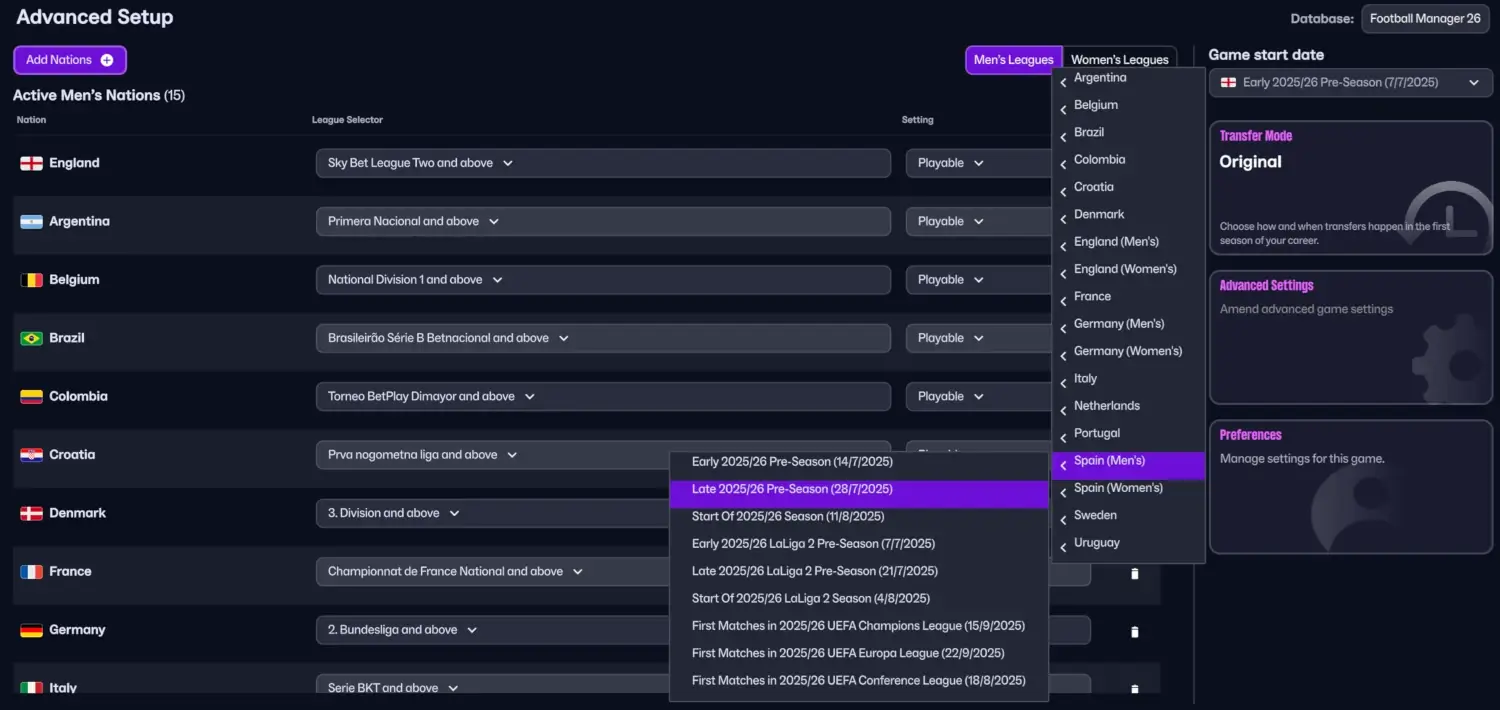
Which nations start date you prefer is all up to you. There are no other consequences than a later or earlier game start date other than the pre-season period will be extended or reduced.
If picking a game start date from another nation than the country you will manage in, players might be at holiday meaning you won’t be able to setup pre-season training until they arrive back from holiday.
Personally, I prefer as long pre-season as possible, despite you might not be able to schedule friendlies or call the players back from holiday to quickly kick-off the club’s pre-season training.
However, it gives you a few extra days to take care of other typical day one tasks and get acquinted to your club, your players and other potential future transfer targets.
5.2 About Advanced Settings
The Advanced Settings enables you to add and allow certain things within your game world – from allow or reject you to use the In-Game Editor, add players or key staff to your playable team (handy if you are managing in the lower leagues or at a minor nation with less game detail) or decide whether you want to allow player attribute masking to happen.
Here you will have different options to enhance or reduce the realism of your save. Rather than explaining each and every one of them, as you can hover your mouse cursor over the information icon to learn about each of these settings, I will go through the most important ones (at least in my opinion).
5.2.1 Use Real Fixtures [enabled by default]
Matches are scheduled to happen according to real-life fixture lists according to any leagues it’s available. If unticked, fixtures are randomised and may happen differently to real-life events.
5.2.2 Add Players to Playable Teams [unticked by default]
Ticking Add Players to Playable Teams can be a useful option if you’re intending to start a save in the lower leagues where teams might lack enough players to make up a full 21-man squad. It might be databases created within the editor which unlocks new nations or divisions where players and staff have not been added. By enabling this option you will ensure sufficient number of personnel (players) are added at the start of a new save.
5.2.3 Add Key Staff [unticked by default]
In the case of managing in the lower leagues, make sure to enable Add Key Staff – this will ensure your club adds key backroom staff at your appointment. Newgen staff such as Technical Director, Chief Scout, Director of Football, Performance Analysts, Assistant Manager’s and/or coaches will then be added to your teams if they already do not have one of them.
5.2.4 Allow First Transfer Window Activity [ticked by default]
This setting will enhance the realism of your save if used correctly. Since Football Manager starts a new save in the same pre-season that have just happened in the real world, a club’s squad and transfer budget reflects what’s happened in real life.
By disallowing transfers in the first transfer window you will ensure you’re not allowed to make any additional transfers in the same transfer window as what’s just happened in real life. Leaving it on, enables you and other clubs around you to make futher signings that would not have happened in real life – giving you more control to affect your team from day one at the expense of reducing the realism.
5.2.5 Allow Player Attribute Masking [ticked by default]
By default, any new game you create will have Allow Player Attribute Masking turned on.
Attribute masking is a concept where certain attributes, or all, are not visible for the Human Manager because the game assumes the manager because of the team’s scouting knowledge or reputation doesn’t necessarily know everything about every player within your game world.
The player profile will be limited with data such as player’s attributes are represented within a range, rather than the exact number, or if no knowledge displayed as ‘-‘.
It’s like incorporating a ‘fog of war’ and the detail levels of players and staff will be improved by scouting and gaining more knowledge.
By Disabling Player Attribute Masking you will know more about any player within your game world, as the player profile is similar to what you would see if you had extensive knowledge of the player.
By keeping it ticked, it maintains a level of realism as the game assumes the Human Manager not necessarily know everything about every player in the world. You can improve your knowledge about players around you by scouting the player or interact with him in various ways to learn more about him.
5.2.6 Allow use of the In-Game Editor
For anyone fancy making in-game edits or discover hidden data about players, staff or clubs, the In-Game Editor is an extensive tool that enables you to do all sorts of things.
You can use it to cheat your way to the promise land and move players to your club without paying a quid, or use it to discover wonderkids’ current and potential abilities.
If you don’t want to use the In-Game Editor on FM26, you can deselect the option.
5.3 Database
The final settings within the Advanced Setup Career is the type of database you choose. By clicking the Football Manager 26 button it opens up a window that enables you to select editor data files you or the Community has created.
It offers you the opportunity to select/unselect databases and other editor data files that enhance your game world with more new wonderkids, such as the NextGen wonderkids database, or makes Football Manager more realistic by adding more new playable nations and active leagues.
6. Creating Your Manager
Football Manager 26 brings the most immersive manager creation and game setup experience to date! With greater possibilities to express yourself and create that background story that defines your personality, football philosophy and level of experience, you can tailor ‘Your Manager’ how you see fit – enabling you to step into the dugout ready to embark on a journey where you are you, or whoever you want to be!
Once you’ve defined your Football Manager 26 Career, set up the game database and picked who to manage, it’s time to create your Manager.
In Football Manager 26, the customizing of your Manager brings the most immersive experience ever with more opportunities to tailor your avatar than ever before.
Featuring both new appearances, hair styles and skin texture to create a model that either looks as close to yourself as possible, or enables you to create a character to your liking, you will have nearly endless possibilities – whether you wish to be a female or male character on Football Manager.
Once the personal bio, attire and character model is selected, the nitty gritty of completing your Manager profile – enabling you to embark into your game world with the reputation anc coaching badges that fits your Football Manager 26 save.
How you create your manager profile in Football Manager can both give you certain advantages and disadvantages within the game – basically determining the challenge level of your game.
6.1 Selecting your nationality
Which nationality, or secondary nationality you choose in Football Manager has an affect on your career.
Whether you wish to create a character that fits your chosen team, recreate yourself in Football Manager, or select a place of birth and nationality that provides certain advantages, that’s up to you.
However, it’s worth to know that what you select of primary and secondary nationality will impact your scouting knowledge of those nations – something that may increase the club’s overall knowledge of those specific nations.
Which nation you select will thereby affect the number of players and staff available to you in your game world, and thereby influence which players or staff your managing club has knowledge about.
For instance, if you decide to select your nationality to be from Senegal, you might see more players from your home nation in your club’s scouting pool and discover more information about those players who are available/visible to you. For instance, attributes are visible rather than displayed within a range, if attribute masking is turned on.
6.2 Setting your credentials: Past Experience, Reputation & Coaching Badges
In the next step of the process, you’ll have the opportunity to input credentials such as your past playing career, your experience and qualifications in football management.
These steps have been vastly revamped for Football Manager 26 and bings a new way to determine the manager abilities, reputation, coaching style and tendencies – bringing you more choices to create a backstory and a profile that fits your coming journey, or the story you wish to tell.
However, before you can embark on all those crucial day one tasks, you have some important steps to go through.
Everything you select within the next three steps will have a huge impact on the profile of your Manager – from determing the Manager’s abilities relating to technical, tactical or mental attributes, reputation and Managerial style.
What you select within these three steps of the Credentials process, will be used by Football Manager to calculate your overall reputation and Manager Attributes. An higher past playing or non-playing experience along with higher coaching qualifications will affect the levels of your attributes and skills.
6.2.1 Your Past Playing Experience
Over the next two steps, you’ll be able to determine your levels of the Manager attributes and how other players, staff and clubs within your game world looks at you by selecting your past playing and non-playing experience.
Selecting your past playing experience will determine your Manager’s reputation – how well known within your game world, what you are recognized from and what sort of challenge you feel you’re ready for.
In FM26 you’ll have 7 different levels of starting reputation – from none to Global.
Generational Superstar – You defined a generation on the pitch, winning the highest individual honours.
Continental Icon – You were not only an important part of club success domestically, but translated this into contintental triumphs too.
Domestic Champion – You consistently contributed to the winning of domestic club honours.
Top Tier Contender – You consistently appeared in the top tier of domestic football.
Second Tier Star – You were successful in the tier immediately below the top of the domestic pyramid.
Lower League Veteran – You consistently turned up in the lower leagues, including Semi-Pro football.
None – You didn’t play above amateur level.
6.2.2 Your Past Non-Playing Experience
Another step which will affect the reputation of your Manager character is the ability to decide on your characters previous non-playing role. You can create a background story where your character is recognised for working in a non-playing role before embarking on your managerial journey.
You will be able to choose between five different options along with how well-known you are within the world for it.
Coaching – You can select from your past Coaching role – whether you’ve previously worked as Manager, Assistant Manager, First Team Coach, Set Piece coach, Goalkeeping Coach, Fitness Coach or Youth Coach.
Recruitment & Football Operations – You can determine whether your past experience lies in Recruitment or on the organisational side of the game, whether it is being a former Director of Football, Chairperson, Head of youth Development, Director, Scout, Analyst or Agent.
Medical – choose whether you worked as a Doctor, Physio or Sports Scientist in your former non-playing role
Punditry & Media – Perhaps you are more known for your observations and commentary as a member of the football media – being able to choose between Journalist, Pundit or Commentator.
Referees & Match Officials – Or, perhaps you have experience with rules and regulations by picking between Referee, VAR or Assistant Official.
None – Finally, you can also choose that you have no previous experience in any non-playing role – enabling you to fully embark on a journeyman save with no reputation and no coaching badges.
How well known you are for it ranges from Recognised Worldwide, across Continents, in own Nation, Locally, Part-Time or Amateur.
6.2.3 Coaching Badges
The final step within the process of generating your Manager skills and overall reputation is selecting your character’s coaching badges.
In Football Manager there are 8 levels of Coaching badges. These coaching qualifications influence on your knowledge level and ability to work within the game. From worst to best, these are;
- None
- National C Licence
- National B Licence
- National A Licence
- Continental C Licence
- Continental B Licence
- Continental A Licence
- Continental Pro Licence
There are four different levels of coaching badges in Football Manager with a degree that ranges from A to C.
Continental Pro is the highest coaching qualification possible and means you are the elite in the game.
If you have set the highest possible past experience in the two previous steps, you will start off your journey with a Global Reputation.
The Continental level has three sub-options – A, B and C. This stage means you’re well-known within the world and are prepared to work at the higher levels by learning more with each stage of the Continental Licence.
The Continental A Licence may result in a Global reputation, while the B and C licence will reduce the reputation slightly to Continental.
The National licence levels means you are an up-and-coming aspiring manager who is focusing on education, development and a progression pathway. It will slightly increase your Manager’s reputation with each level of learning you step up.
The final option is to select No coaching badges entering the game world rather inexperienced. You will then be forced to progress through your career by gaining knowledge and reputation by taking coaching courses.
With a greater degree in coaching qualifications, together with a higher experience level, brings more coaching points that will be allocated to your profile.
No badges will mean you are “useless” or poor in that specific area while a Continental Pro Licence ensures you are on the top of the game by being both a great resource at the training ground and able to work worldwide regardless of the level of the league.
6.3 How will the level of experience and reputation affect your game?
Your reputation will have an extensive influence over your career and how “easily” or “hard” things will be for you in your save.
A lower levels of reputation will definitely increase the challenge level and make things harder – especially if you start at a top club with little to none reputation.
With a higher level of reputation, your name will carry more weight and other clubs and players around the world will recognize you more easily. When hunting for a job, you will be able to attract the attention of bigger clubs. In terms of recruitment of players or staff, they are more likely to join your club as you got a name in the footballing world that makes them wanting to work with you. This enables you to make more prestigious signings, or basically get the players on your shortlist as long as the finances are in order.
Entering a club with lower reputation will give you more time to succeed but may make it harder for you to actually reach those objectives and goals.
However, the higher expectation the more demands of success is set on you. The board will be less patient with you in terms of performances and achievements and will be less forgiving when things go wrong as they want the targets to be achieved in a shorter period of time.
Basically, they expect to get return of their investments by reaching their seasonal goals agreed upon in the Club Vision and Expectations Meeting that you will be invited to at day one of starting a new save, or at certain points throughout the season (half-way and end of season).
On top of that, it will affect how your Board treats you and how patient they are with you. It may go as far as how likely they are at accepting or denying Board Requests. With an higher reputation they may be more lenient to approve board requests than if your reputation was at amateur level.
As you advance into the game, you will experience that your level in certain attributes can affect how your players react towards you and your decision-making. For instance, a lower level of discipline can make the players slack off at training and complain more, or a lower People Management can have an affect at player’s reactions at team meetings and team talks.
As you see, there are good and bad things with what reputation you select – it all depends on the challenge level you wish to have according to the league you are managing in and the overall storytelling.
7. Selecting your Manager’s Coaching Style
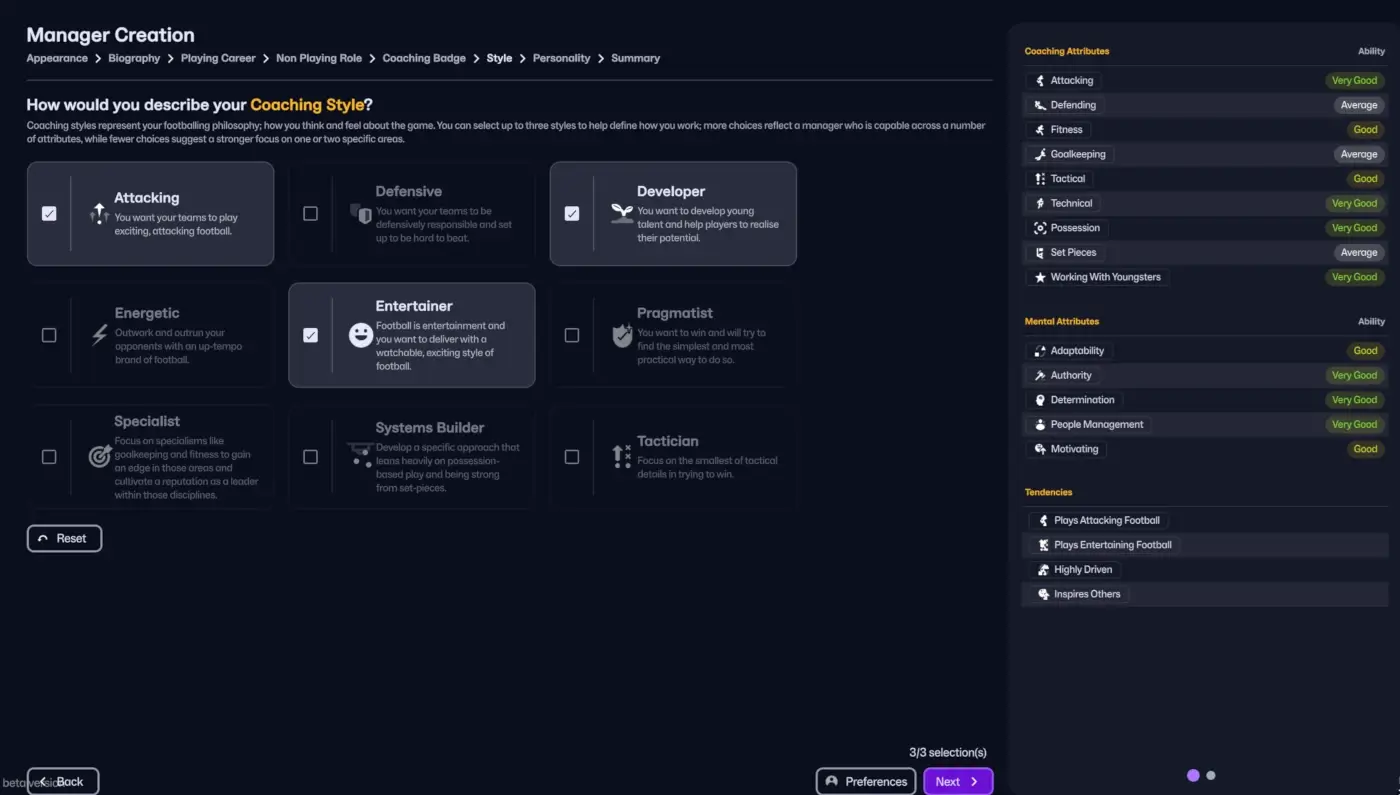
How you select your coaching style in Football Manager 26 is brand new. Whilst what you’ve selected within the previous steps of setting up your game’s Manager profile by allocating points that goes to your level of attributes, your Coaching style enables you to prioritize certain attributes.
With the new and improved interface for describing your Coaching style, which replaces the previous Tactical or Tracksuit manager, you’ll be able to pick three different styles that defines your coaching style and preferred football philosophy.
In Football Manager 26, you’ll be able to choose up to three out of nine different coaching styles. What you pick here will let you experience that your Manager will be given certain Manager tendencies. These tendencies may change according to what you do in-game and according to tactical styles you prefer.
Attacking – You want your teams to play exciting, attacking football.
Selecting this style will affect your Manager’s profiles attributes related to Attacking Coaching, Tactical coaching and Technical Coaching with the consequence that Defending coaching and Set Pieces are reduced.
Related Tendencies: Plays Attacking Football
Defensive – You want your teams to be defensively responsible and set up to be hard to beat.
Selecting this coaching style will increase the coaching attributes relating to Defending Coaching, Tactical Coaching, Technical Coaching and Set Pieces. As a consequence Attacking Coaching and Goalkeeping is reduced.
NB! You will not be able to pick both the Attacking and Defensive style – you can only pick one of them as they are opposite of eachother.
Related Tendencies: Plays Defensively sound football.
Developer – You want to develop young talent and help players to realise their potential.
Selecting this coaching style will increase the coaching attributes Attacking coaching, Fitness and Working with Youngsters. As a consequence, Set Pieces and Goalkeeping will be slightly reduced.
Related Tendencies: Develops Young Players
Energetic – Outwork and outrun your opponents with an up-tempo brand of football.
This coaching style will be best suited for manager’s who prefer to play a high-octane brand of football focusing on gegenpressing and/or counter-attacking football. It increases the relevant coaching attributes to Fitness and Working with Youngsters.
Related Tendencies: Plays Energetic Football
Entertainer – Football is entertainment and you want to deliver with a watchable, exciting style of football.
This coaching style is probably best suited for possession-based tactics and for those managers who enjoys to play expansive fluid attacking football. Selecting this coaching style will increase the coaching attributes relating to Attacking -, Technical – and Possession Coaching.
It will come at the expense of Set Pieces which will be reduced.
Related Tendencies: Plays Entertaining Football
Pragmatist – You want to win and will try to find the simplest and most practical way to do so.
A pragmatist is the opposite of the Entertainer – resulting in that you can only pick one or the other. Selecting this style will increase the coaching attributes of Defending, Tactical and Set Pieces.
It’s probably the best fit for any Manager who prefers a more direct style of football and likes to sit back, protect a lead and try to hit your opponent on counter-attacks.
Related Tendencies: Plays Direct Football
Specialist – Focus on specialissms like goalkeeping and fitness to gain an edge in those areas to cultivate a reputation as a leader within those disciplines.
By selecting this coaching style you will automatically increase attributes related to Fitness, Goalkeeping Coaching, Technical, Set Pieces and Working with Youngsters.
Related Tendencies: Specialist Coach
Systems Builder – Develop a specific approach that leans heavily on possession-based play and being strong from set-pieces
A choice that fits perfectly with the Attacking Coaching Style, Developer and/or the Entertainer, the System Builder will see coaching attributes relating to Tactical, Technical, Possession and Set Pieces being increased, whilst Goalkeeping and Working with youngsters are reduced.
Related Tendencies: Makes the Most of Set Pieces
Tactician – Focus on the smallest of tactical details in trying to win.
A manager who has great knowledge about the tactical side of the game. He’s able to be more versatile in learning and switching between various tactics, educate his players into the requirements of his system and basically work on the player’s mentality on the training ground to make them psychological strong in matches.
This coaching style will fit perfectly with either the Attacking or the Defensive Coaching style. you may even conside the Systems Builder or the Developer.
It increases the attributes of Attacking and Tactical coaching without reducing any other attributes.
Related Tendencies: Tactical Tinkerer
Our guide to staff attributes in Football Manager will give you a deeper insight to the Manager Attributes and their meaning, alongside giving you the low-down on manager tendencies and non-tactical attributes.
Whether you decide to go all in and select the maximum number of coaching styles or pick a limited number is all up to you. However, pay attention to how certain coaching styles may affect your Manager abilities towards the left side. Using a specific combination may reduce vital mental attributes such as Adaptability, Authority or Motivating.
8. Selecting your Manager’s Personality
The final step in the process of creating your manager is to decide on your characters personality traits.
Each of the different Personalities will make under-the-hood changes to both Mental attributes, tendencies as well as influencing on the level of coaching attributes, which we primarily determined in the step before.
Here you’ll be able to pick up to two traits that you feel defines your personality out of maximum six different personality traits. Each will have a tendency attached to them which provides a better picture of what attributes it influences the most.
Driven – You are a highly determined with a clear focus on what you want to achieve, with a drive to control every aspect of management.
Selecting this trait will increase mental attributes such as Authority and Determination.
Tendency: Highly Driven
Disciplined – Your priority is to install a high level of discipline and standards at the club, ensuring people are held accountable each and every day.
You will be seen as a strict manager who doesn’t tolerate fuss. With a higher level of discipline, the player’s are less likely to come to you with their concerns and bring up minor issues. The manager is also better at coaching the mental aspects of the game in training.
Real-life examples: Alex Ferguson and Louis van Gaal
It will increase mental attributes such as Authority and Motivating but may come at the expense of reducing other coaching attributes.
Tendency: Strict Disciplinarian
Resilient – You value the ability to bounce back from disappointment more than anything else; when you get knocked down, you get back up.
This trait will increase mental attributes such as Authority and Adaptability.
Tendency: Natural Leader
Convincing – You have a way with people that persuades and convinces them to be a part of your journey to success.
This is a type of manager who are able to motivate his players in team talks and team meetings but are also capable of greatly interact with players on an individual basis. They can easily adapt to their surroundings – a useful trait for journeyman managers.
This trait will increase mental attributes such as Adaptability and Motivating.
Tendency: Keen Motivator
Inspirational – You want to be a srong and recognisable leader for your team, placing a premium on motivation and inspiration.
This trait will increase mental attributes such as Adaptability and Motivating.
Tendency: Inspires Others
Accomplished – You feel you can adapt to any situation in any league or country and deliver on expectations.
This trait will increase mental attributes such as Adaptability, Authority and Motivating.
Tendency: Acclaimed Achiever
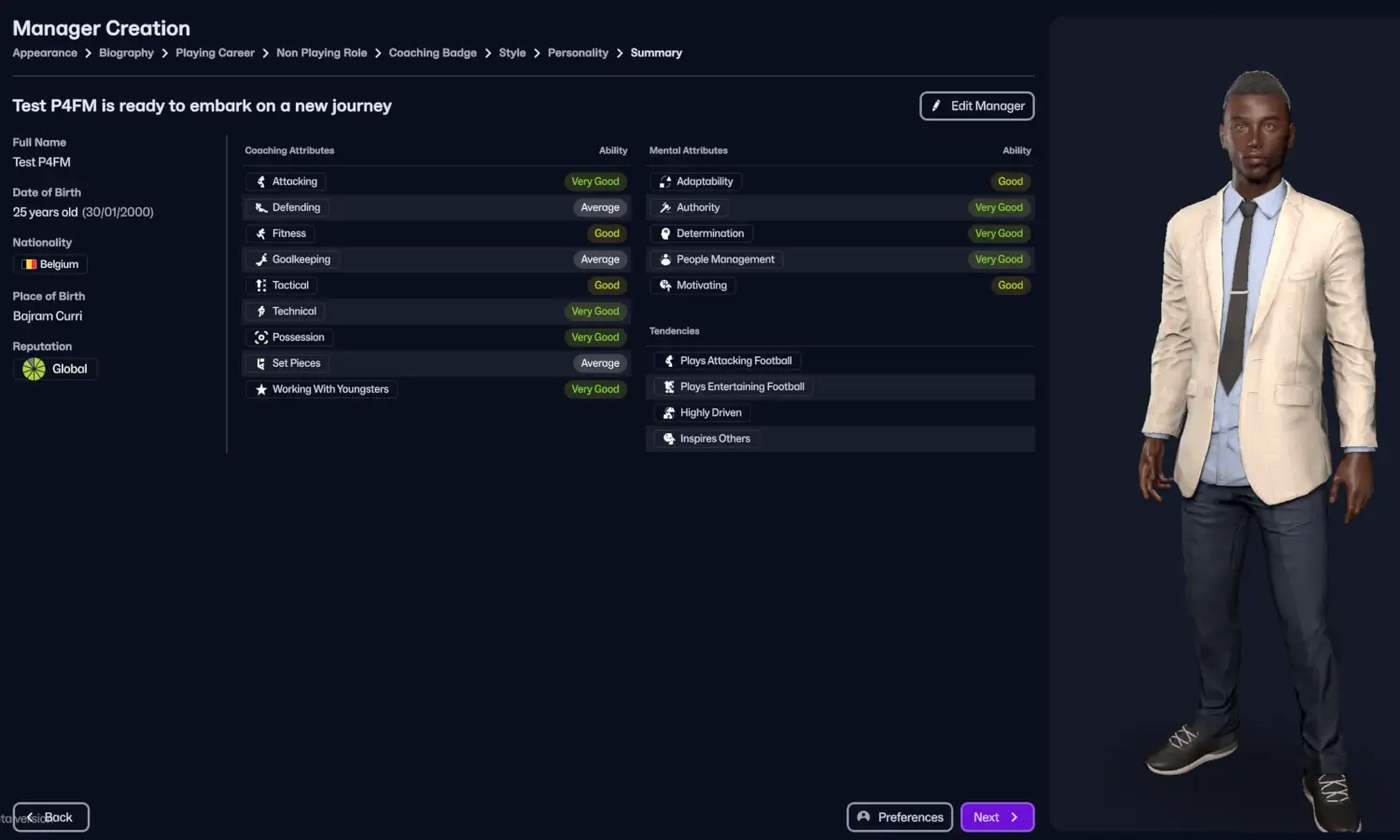
Whether you wish to be smart by picking certain personality traits, coaching qualifications and a previous experience that provides you with certain advantageous within the game, or you want to create a character which fits your storytelling is all up to you.
What’s Next?
With your Manager profile and backstory to your character set up, you’re ready to embark on your new managerial journey and step into the dugout with the identity that defines you!
The next step in Football Manager is to familiarize yourself with the squad and your backroom staff at your new club and eventually create your first tactic on Football Manager 26.
To continue your journey to master Football Manager, we have written a number of different guides and tutorials which will help beginners and more advanced users to enjoy Football Manager. Here’s a quick list of other useful beginners guides for Football Manager.

Mastering Day One on Football Manager | What you need to do in the first hours of a new save!

Football Manager Beginners Tips & Tricks | How to get better at Football Manager 2024
Welcome to Football Manager 26!
We hope you have found this guide to Football Manager 26 useful and that it has enhanced your knowledge about the game mechanics around starting your first Football Manager save. It’s nothing else for us to do by now than to welcome you to Football Manager. Let the fun begin and we wish you lots of success in your next Football Manager save!
Now that we have come to the end of this beginners guide to Football Manager, it’s time to download some essential add-ons for your save.
To improve the experience and efficiency within your Football Manager career, we have created a number of useful tools to identify the best players to sign in Football Manager, by using custom views or search filters to identify the best staff in Football Manager.
Browse our Football Manager 26 essentials containing files to get the real names of competitions and clubs in Football Manager, custom views megapack and a large range of shortlists.
If you got some additional tips or things you like us to cover in the next episode of beginners guide to Football Manager, use the comment field below.
Stay tuned for more Football Manager 26 content coming to you soon!
Thanks for reading!