With less than 25 days to the FIFA World Cup 2026™ kicks off in USA, Mexico and Canada, Sports Interactive announced the return of International Management for FM26! With the chance to experience the biggest sporting event on the planet, brought into Football Manager, the brand new FIFA World Cup 2026 mode in FM26 arrives with several new improvements and game upgrades that restores the fun of managing an international team on Football Manager!
Today we’ll guide you through what to expect from the new FIFA World Cup 2026 mode for FM26! You’ll discover what improvements has been made to international management for Football Manager 26 – a feature that was removed from the game from FM24 to FM26, and why it might save the last bits of the game!
When is the Release Date of the World Cup 2026 Mode for FM26?
International management will return to FM26 as a free game upgrade for Football Manager 26, Football Manager 26 Console and Football Manager 26 Touch on May 26, 2026, with further game upgrades arriving over the next month to enhance the experience of managing a National Team on FM26.
Following the release of this massive update to FM26, you’ll be able to load your existing FM23 and FM24 saves and continue your national team saves on FM26!
If you’ve already started a club save on FM26, international management can be seamlessly integrated into your current save file – meaning you can manage both a club and a national team on FM26, if you desire! Or, if you doesn’t like to bring international management into your existing save, you can of course start a new save game, focusing on only managing a National Team on FM26.

Two New Game Modes for FM26: International Management & FIFA World Cup 2026 Mode
When loading up the game for the first time after the international management update arrives for Football Manager 26, you’ll experience there are two new Quick Start Modes: an unique FIFA World Cup 2026 mode which replicates the tournament on FM26, and the overall ability to manage a National Team on FM26 – a feature which has not been available since the launch of FM26 back in November.
With International Management fully integrated in Football Manager 26, a whole new world opens up! It enables you to either manage a Men’s or Women’s National Team on FM26, either simultaneously by managing both a Club and a National Team, or simply embarking on a unique FIFA World Cup 2026 adventure, where the quest is to lift the legendary FIFA World Cup trophy in FM26.
About the FIFA World Cup 2026™ Mode for FM26

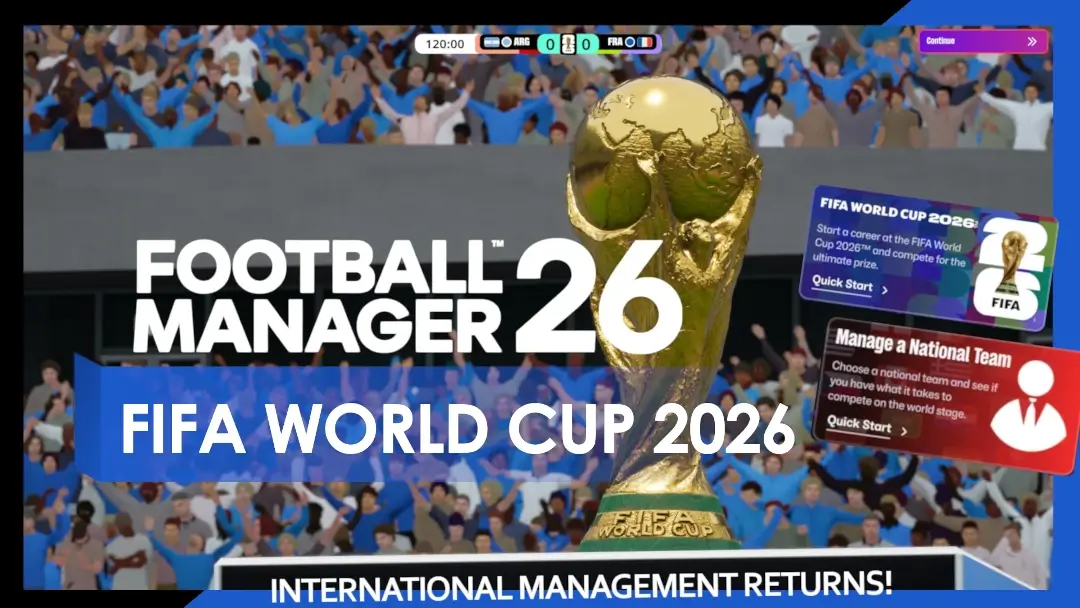
When international management returns on FM26 with the dedicated FIFA World Cup 2026 mode, you’ll discover that you’ll be able to dive straight into the World Cup action by hitting the Quick Start option. (see screenshot above).
When entering the FIFA World Cup 2026 mode on FM26, Sports Interactive has acquired an licensing agreement with FIFA that makes the FIFA World Cup 2026 come to life.
To elevate the entire in-game experience when you’re advancing through the World Cup sequence on FM26, the game incorporates official FIFA World Cup 2026™ branding on a host of assets throughout the competition.
To give you the feel of playing at the World Cup, a bespoken header in the Portal and a dedicated themed background as you navigate through the pre-match preparations will bring more immersion and tournament feel to your FM26 save game.
The licencing agreement with FIFA will be visible across the game in several ways.
FM26 will feature the official FIFA World Cup 2026™ branding on match day graphics, licensed kits of almost every 48 teams in the competition* and the FIFA World Cup 2026™ Adidas Trionda match ball as you try to lead your nation to glory in a virtual game world who is as close to reality as possible.


On top of that, there are new cutscenes, replicated teamsheets that aligns to FIFA’s branding for World Cup 2026 as well as enhanced broadcast graphics.
…and if you happen to win the entire competition, you’ll be able to experience your team’s captain lift the FIFA World Cup 2026™ Trophy in a new, authentic trophy lift sequence, as seen in the video above!

June Start Date Arrives!
When embarking on the quest to win the World Cup 2026 on FM26, one of the new features arriving with the international management update is the availability to kickoff your international management journey at two different start dates.
- At May 26th, when the international management update arrives, you’ll get the ability kick off your save on May 11th, 2026. For anyone desiring to manage your nation in the World Cup 2026, it enables you to play two friendly matches and complete squad selection before the World Cup 2026 kicks off between Mexico and South Africa on June 11th.
- In early June, another FM26 update from Sports Interactive arrives featuring both a June start date availability alongside the final 26-man squad selected for all World Cup 2026 participants
If you opt to begin in May or June, your club’s season will simulate in the background ahead up to the point of your start date.
*At the initial launch of this feature, 47 of the 48 qualified nations for FIFA World Cup 2026™ will be playable. We will provide further updates should that status change in future updates.
*While we previously indicated that official kits would be included as part of the international management feature, licensing approvals are still ongoing. As a result, not all FIFA World Cup 2026™ team kits will be available upon launch of the feature and some may be added at a later date.
New Features & Game Upgrades for International Management on FM26
With international management finally brought back into Football Manager, the developers of FM26 has spent time and effort to improve how international management is experienced within the game through a host of game upgrades.
The return of International Management returned with the release of 26.3.1 update on May 26th, 2025. At its release, you can now start a new career by managing a National Team across the world in FM26. With its release, Japan won’t be playable due to licensing issues in both the World Cup 2026 mode and in the International Career Mode.

Improved Squad Selection & Squad Building in FM26 International Management Game Mode

Prior to Match Days and the astonishing experience of managing a national team on FM26, Sports Interactive has reworked the entire squad registration flow within the game to make it more intuitive.
Improvements has been made to how you pick your squad, which sees the introduction of a new Provisional Squad selection system.
Apart from seeing the existing Squad Planner better embedded in the squad selection process with the ability to pick your Provisional Squad directly from the Squad Planner, it allows you to call-up a wider selection of players before carving out your final squad for the upcoming competition, next friendlies or continental qualifiers.
As you’ll discover, these changes to the squad registration process are connected to wider adaptions of the National Pool and the National Shortlist, which now works more similarly to how your shortlists work at club level.
Within the National shortlist features new views and displays that helps you to pick your final squad. The Player Discovery view helps you to track down their recent Club form. Alongside it, there’s a column entitled Player Expactations, which clearly outlines the player’s international expectations, ranging from none to those player’s expected to be first names on the team sheet.
Managing the player’s expectations will be as important when managing a National Team as when managing a club. With international management incorporated into FM26, there are a range of new interactions you can have with your players – meaning the visibility of expectations will be an important part of keeping your players happy.
You’ll discover that there are more ways to let a player know whether they are likely to be called-up to your squad, or not, to inform them about whether they will be moved from youth to senior teams or encourage them to reconsider retirement.
To help you to find players with dual nationality of players who are yet to be declared for you and can represent your nation through family heritage, the update brings new Scouting Focuses that helps to track down exciting young players of your nation’s future.
While the interface is quite similar to Recruitment Focuses at Clubs, the Scouting Focuses for National Teams enables you to adjust the search for players across several variables, and your national team Scouts will look at identifying players outside of your existing national shortlist to bolster your options.

With new game upgrades for player identification and squad registrations, there are more tools to discover within the game that allows you to make smarter decisions. But be mindful, there are also a range of new press conference questions to probe more into who is and isn’t in your squads.
Improved Match Preparations Training
Whilst match days is the main event of international management, the developers of FM26 has also improved how match preparations work for National Teams.
One of the new tools is that before every match, you’ll be prompted to select Match Preparation training focuses for your team – enabling you to select specific In Possession, Out of Possession and Set Pieces priorities for each match to try to gain advantage on the next opponent.
Similar to match preparations for Clubs, there are two training slots to let your team focus on a particular area of their game for either in and out of possession, as well as two slots for preparing for specific set-piece strategies to try to counter specific strengths within the opposition, or work on a particular weakness that may help your team to score more goals from deadball situations.
In regards to training and match day preparations, there has been added several under-the-hood changes to player conditions to ensure that players recover better during international tournaments – resulting in that your players are capable to play more consecutive matches more frequently.
Other minor additions to international management on Football Manager 26 is the ability to recruit Set-Piece coaches for national teams, whilst the Data Hub will provide you with more team-level data for national teams – helping you to better understand the player’s performances and how you might need to change your tactics to get the most out of your team.
When international management returns to Football Manager, the new mode will definitely represents an improvement on FM24, but be aware that the full revamp will not be realised at launch and will instead be developed further over time.
As you’ll discover through the integrated FIFA 2026 World Cup mode for FM26, the return on International Managements and its game upgrades brings one of the biggest updates to the game since the Main data update arrived at the end of March. From now on, international management will be fully playable within the game – returning the possibility to Build a Nation on Football Manager!
Just imagine the tough challenge to try to get Curaçao qualify from the group stage in FIFA World Cup 2026, or try to lift the World Cup trophy with Norway for the first time in 28 years!
By immersing yourself in the brand new FM26 World Cup 2026 game mode there are 48 different stories and 1248 players to write history in this edition of the tournament. Who will win the World Cup 2026, or which players will be awarded the player of the tournament… these are all questions you can answer by conducting a FIFA World Cup 2026 experiment on Football Manager 26!
Get ready ahead of May 26th when international management returns on Football Manager!
Changelist FM26 26.3.1 Update
On 26 May, a new major update to Football Manager 26 was released, entitled the 26.3.1 update. Here’s a non-exhaustive list of changes and improvements to the latest FM26 update.
FM26 (26.3.1) Changelist (Non-Exhaustive)
- Added International Management to new and existing save files
- Added a FIFA World Cup 2026™ Quick Start Mode
Technical Issues
- Improved UI speed and performance when playing in Large Online Lobbies
- Improved loading times for very large save files
- The ‘Show Fixtures & Results Screens’ preference is now enabled by default
- Fixed various crashes caused by mass Custom Database changes
- Fixed a rare crash caused by removing certain loan clauses
- Fixed a rare crash caused by responding ‘No Comment’ to journalist question about a player retiring
- Fixed an issue that would cause User Account logs to take up excessive storage space on certain spec Macs
User Interface (UI)
- Intensity is no longer locked to being High or Very High when playing with an ultra-defensive style
- Added a dropdown signifying which position the role selector is currently highlighting
- Improved the Right-Click functionality on the Tactics pitch
- Fixed an issue causing the Position Warning icon to still be present after fixing the IP/OOP positions of players
- Scroll bar functionality has been reinstated on the Tactical Styles section of the Training Schedules card
- Fixed an issue causing the horizontal scroll bar to disappear when multiple columns were added to tables
- Fixed the functionality of sorting staff by nationalities when on the Club Staff screen
- Fixed an issue causing the down arrows not to function when selecting the taker order during a penalty shootout
- Fixed an issue that would sometimes show ‘-1’ as the squad number for Newgen players within the opposition instructions
- Added a ‘Take Off’ option within the match tactics panel when a player is slightly injured but the manager is out of available substitutes
- Fixed an issue causing both squad numbers to appear the same on the substitution caption
- Filtering by Adaptability within the staff database now functions as intended
- The Competition Tree within the Stages tile has now been correctly aligned
- Fixed a visual issue where players would appear out of place on the Match Squad Bar after changing their position in the tactics pitch
- Shirt icons now correctly display for youth players who were called up to play a first team match
- Fixed the information displayed within the Form tooltip in the Competition > Stages card
- Restored the Traits button on the Player Report card
- Added a filter button to the Managerial Vacancies screen
- Hovering over tile carousels will now display a tooltip
- Fixed an issue causing the Youth Setup feedback to be blank
- Fixed an issue causing duplicate message titles to appear when viewing Player Reports from consecutive Scouting Report messages
- Adding Player Report tile to various Scouting Portal messages
- Tweaks made to AI manager appointment logic
- Tweaks made to Supporter Expectations logic when managing a team with a point deduction
- Fixed an issue with players declaring they want to represent the country of their birth but instead playing elsewhere
- Fixed an issue to prevent AI hiring for B-Team roles when the user oversees all staff hiring
- Fixed a rare issue of players refusing to sign a new deal due to ‘waiting on a promise to complete’, with no promise actually active
- Fixed an issue preventing the user to tell an unhappy player you’ll loan them out if they’re already listed for loan
Gameplay
Match, Art & Animation
- Tweaked the Dynamic Highlight Mode setting to fix an issue causing them to last excessively long
- Ensured captains will always be the ones to lead teams out during the opening cut scene
- Ensured captains will always be the one to collect and lift the trophy during celebration cutscenes
- Fixed a rare instance of the ball crossing the goal line in game but not awarding a goal when checking the goal-line technology camera
- Fixed an issue causing substituted players to occasionally remain visible on the touchline in the 2D pitch tile
Competitions and Rule Groups
- Fixed an issue causing the same Mexican clubs to qualify via the league for the North American Champions Cup every season
- Fixed an issue in Sweden to ensure the correct teams qualify for the correct UEFA competitions in the initial season
- Fixed an issue causing Youth Exemption rules not to be enforced within the WSL
- Reflected the real-world postponement of the women’s Africa Cup of Nations in game