Pondering on how to remove fake names of competitions and clubs on Football Manager 26? To help you get the real names appearing in Football Manager, Passion4FM’s FM26 Real Names licence fix brings everything you need for a more realistic experience in FM26!
Welcome to the most essential add-on for Football Manager 26 –the FM26 real names fix by Passion4FM.
Whether you arrive here because you’re tired to see Real San Sebastian instead of Real Sociedad, Internazionale Milano changed to Blu-Neri, or simply discovered that the Spanish top division is referred to as First Division rather than LaLiga EA Sports, fixing the licensing issues in Football Manager 26 can be done in a few simple steps.
Over the coming chapters we will guide you through the step-by-step process of reverting the fake names of clubs, competitions and otherwise fix other licencing issues on Football Manager, such as unlocking the German National team, or remove abbreviations for Brazilian clubs.
Download the FM26 real names fix today and enjoy Football Manager the way it was meant to be played – with full licensing realism.
The ultimate Football Manager 26 Real Names Licence fix guide returns!
Our real names fix guide for FM26 is designed to bring back authenticity in Football Manager by restoring all the real-world names of men’s clubs and competitions for 2025/26 season in FM26 – regardless of where in the world you’re managing in.
Apart from guiding you through the process of correcting any licensing issues in Football Manager 26, we present our FM26 Real Names Fix files – your go-to solution to remove all the fake names caused by licensing restrictions in Football Manager.
In a few easy steps, you will learn how to remove fake names of clubs, competitions and awards in Football Manager 26 and thereby enhance the overall realism of FM26 by downloading ONE essential mod.
Download the most essential add-on for FM26! Get our Football Manager 2026 Real Names Licence Fix and discover how to get real club names or the German National in Football Manager with our step-to-step guide!
Step 1: Download Passion4FM’s FM26 Real Names Fix – Your Ultimate FM26 Licence Fix
One of the first things experienced managers do before loading up Football Manager 26 for the very first time is to install the essential Passion4FM FM26 Real Names Fix.
This Football Manager 2026 real names fix is 100% safe, regularly updated, and easy to install. Whether you are a new player or a long-time FM fan, correcting these names adds a crucial layer of realism to your save.
For years, our real names fix has been the go-to solution for everyone desiring to enhance realism in Football Manager. This year is no different despite Sports Interactive have taken great measures to acquire new licences for playable nations and leagues.
Although Premier League is fully licensed, there are lots of other clubs, competitions, and leagues with a fake name throughout the game world.
This year, the files are more powerful than ever before, as we have taken greater measures to improve our coverage of edited nations!
WORTH TO KNOW!
One of the biggest benefits of this file is that you do not need to create a new save for the files to be working! Simply add the files to the correct folder and restart Football Manager, and the real names will appear!
By downloading the Passion4FM FM26 Real Names Fix files you will be able to update the men’s game of Football Manager 26 with the actual real sponsorship name, or its full name, of unlicensed football clubs, tournaments, competitions and divisions, as well as real awards, across the world.
It makes leagues, competitions, and cups 99.99% authentic for Football Manager 26.
Important! This mod should be used together with applying the recommended steps in our FM26 Licences Fix available further down in this guide.
What does the Passion4FM’s FM26 Real Names Fix Files correct?
- Fix Fake names of clubs e.g. Blu-Neri to Inter Milan or VIZ to Vizela.
- Real Club names from all playable top clubs across the world
- All major tournaments & leagues names according to their sponsorship names
- Real Names for all non-playable top division clubs throughout Europe
- Minor competitions and leagues outside those playable by default
- All Continental, National and National Cups names
- Stadium names e.g. Spotify Nou Camp or Strawberry Arena
- Notable Player Awards (England, Spain, Continental) NEW
Available Files Included in Passion4FM’s Real Names Fix Files:
- Competitions (Domestic Leagues, International Tournaments & Cups)
- Club Names
- Stadiums & Other Fixes
- Awards NEW
NB! The files are compatible with all versions of Football Manager as long as the IDs are identical. All while the fixes are save-game compatible, which means you don’t need to start a new save, unless you do the Brazilian club’s name fix.
PS! Please carefully read the readme file within the megapack to sort any other licencing issues on Football Manager 26.
By completing this walkthrough and with the Passion4FM Football Manager 26 real names fix files in your repository, you’ll be able to experience this:
Real Competition Names in FM26
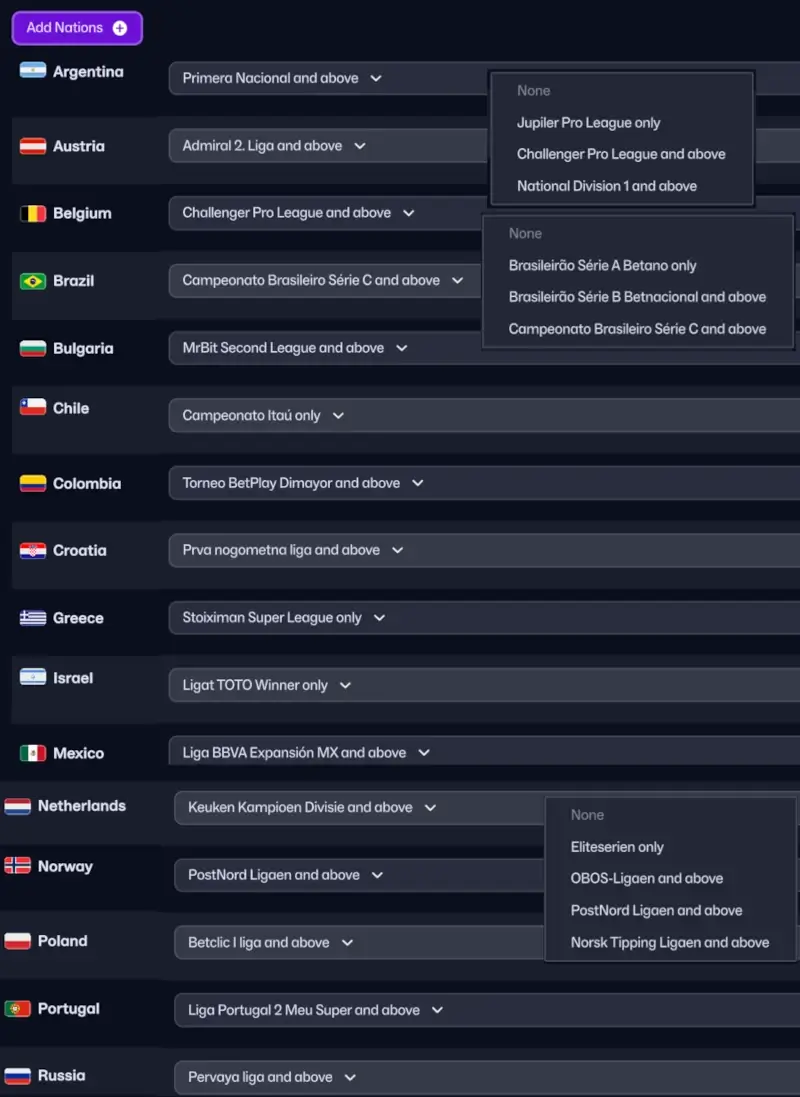
By applying the real competition names fix you’ll be able to update both unlicensed playable and unplayable leagues to their actual sponsorship name. You’ll experience the Swedish First Division being renamed to Allsvenskan, the Spanish First Division updated to La Liga EA Sports, or discover that divisions in Croatia, Egypt or Argentina are corrected until the lowest active level.
It also corrects the real names of international tournaments and cups, such as fixing the major competitions in Africa, Asia or America – enabling you to play in the Copa CONMEBOL Libertadores, AFC Champions League Elite or TotalEnergies CAF Champions League.
In overall, we have changed the competition names and league names to their real sponsorship name for all the nations across the world*.
*That are known for their football and is likely to be competitive in major competitions like the World Cup, Copa America and so on. We have not prioritized minor African nations or smaller islands in the Pacific Ocean.
Real Club Names in FM26
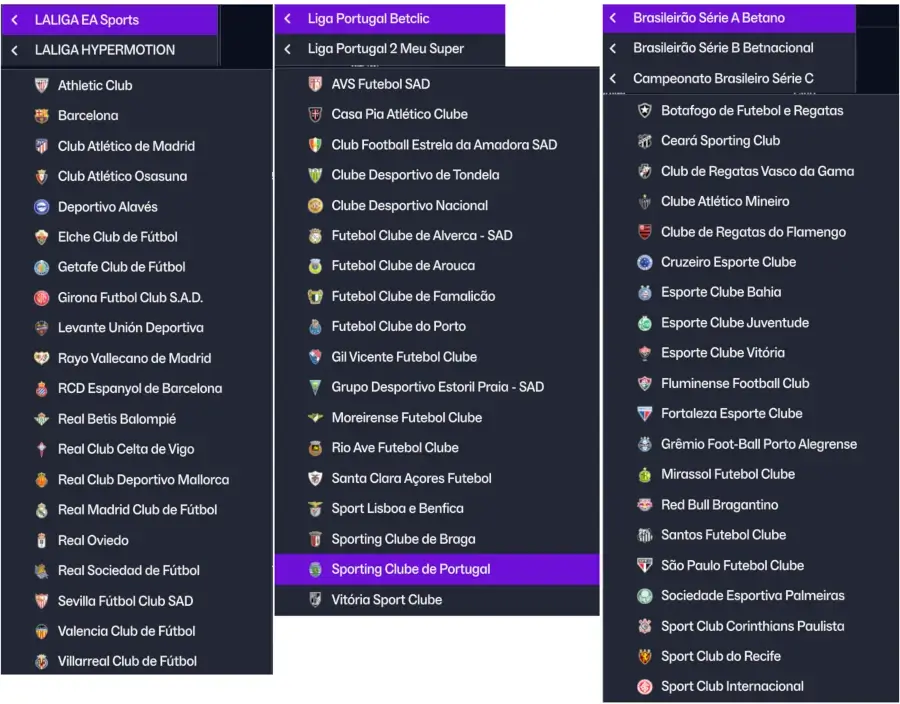
We have also included a real club name file, which sorts issues like removing the abbreviation used on some of the Portuguese clubs (BRG changed to Braga) or removing fake names of clubs in Spain (e.g Atlético Pamplona to Club Atlético Osasuna).
A long list of other clubs in the world has also received their original names, such as real club names in Albania, Brazil, Spain, France and/or Serbia, amongst others.
If you have found any mistakes, get in touch with us either by using the comments below or reach out to us on X (forrmerly known as Twitter).
Step 2: How to fix other licensing issues on Football Manager 26
While FM26 is more immersive and realistic than ever, licensing restrictions continue to prevent the use of official club names, competition titles, and national team data for certain regions.
If you’re diving into Football Manager 2026 and noticed that some clubs, competitions, or national teams have incorrect or fake names, you’re not alone. Due to licensing restrictions, FM26 doesn’t include official names, logos, or kits for certain teams and leagues – especially in countries like Germany, Brazil, or for other major continental competitions.
Once the FM26 Real Names fix files is within your repository, it is time to apply the other licensing fixes for Football Manager 26.
This is a crucial step to fully fix other licensing issues on Football Manager 26. Below we will guide you through the process of removing fake names of unlicensed football clubs, unlock National team’s selections, players, and staff, or in general revert competition names to their real names.
Let us get started and unlock the full potential of Football Manager 2026. It’s time to bring your game closer to reality with our step-by-step instructions to make your coming save more authentic and immersive as it deserves to be!
2.1 How to restore the fake names of AC Milan, Lazio & Internazionale on Football Manager 26?
Whilst the Serie B in Italy is fully licensed, there are a few teams in Serie A on Football Manager 26 that has received a fake name. We are all familiar with Casciavit and Blu-Neri from previous iterations of FM. For FM26 Lazio has also been renamed.
To get the real names of these Italian clubs in Football Manager 26 proceed with the following steps:

- For instance, you can go to your Steam Library and find Football Manager 26. On the overview page of FM26, click that minor cog and select browse local files. This will let you get directly to your Football Manager installation directory.
Steam: \Steam\steamapps\common\Football Manager 26\fm_Data\StreamingAssets\aa\StandaloneWindows64\
MacOS: ~/Library/Application Support/Steam/steamapps/common/Football Manager 26/fm.app/Contents/Resources/Data/StreamingAssets/aa/StandaloneOSX
1. Locate the folder;
Windows: \Program Files (x86)\Steam\steamapps\common\Football Manager 26\shared\data\database\db\2600\lnc\all
Mac: /Users/[username]/Library/Application Support/Steam/steamapps/common/Football Manager 2026/fm.app (right click to show package content)/Contents/PlugIns/game_plugin.bundle (right click to show package content)/Contents/Resources/shared/data/database/db/260*/
How to find these files on Epic Games:
MacOS: /users/shared/epicgames/footballmanager26/fm.app (right click and press show package content)/contents/PlugIns/game_plugin.bundle (show package content again)/Contents/Resources/shared/data/database/db/2600/Inc/all- Credits to Zain for being so kind to find this path for us!
2. delete the following files:
- men lazio.lnc
- lazio (wom).lnc
- acmilan unlic 24.lnc
- ac milan (wom).lnc
- acc Inter unlic 24.lnc
- inter unlic 24.lnc
- men.atalanta.lnc
2.1 IMPORTANT! Make sure to delete these files within all the different database versions ‘24.3’, ‘24.0’ and so on!
2.2 How to restore the German, Dutch & Japanese National Teams on Football Manager | The German Licensing Fix for Football Manager
In Football Manager 26 as in FM24, the German, Dutch and Japanese National teams is greyed out and filled with fake players. To enable the German National Team with real players to be called up, you need to apply this fix.
1. Locate the folder;
- Windows: \Program Files (x86)\Steam\steamapps\common\Football Manager 2024\shared\data\database\db\2600\lnc\all

- MacOS: /Users/[username]/Library/Application Support/Steam/steamapps/common/Football Manager 2026/fm.app (right click to show package content)/Contents/PlugIns/game_plugin.bundle (right click to show package content)/Contents/Resources/shared/data/database/db/260*/lnc/all2. delete the file: fake.lnc

IMPORTANT! Make sure to delete the file within all the different database versions '24.3', '24.0' and so on!

NB! You might need to start a new save to experience the changes.
2.3 How To Remove Brazilian Clubs’ Three Letter Abbreviation & Enable Kits?
Get the real Brazilian club names, real kits and sort any licencing issues with Brazilian clubs in Football Manager 26 by applying this quick fix – without the need to download a single file!
In Football Manager 26 as well as in FM24, all Brazilian clubs are listed with a three letter abbreviation. Gremio would be listed as GRE, Cruzeiro as CEC or Athletico Paranaense as ATP.
To remove the fake namaes of Brazilian clubs on Football Manager you will need to go through the process of deleting several files within several folders.
1. Locate the folder:
- Windows: \Program Files (x86)\Steam\steamapps\common\Football Manager 26\shared\data\database\db\26*0\dbc\permanent

- MacOS: /Users/[username]/Library/Application Support/Steam/steamapps/common/Football Manager 2026/fm.app (right click to show package content)/Contents/PlugIns/game_plugin.bundle (right click to show package content)/Contents/Resources/shared/data/database/db/260*/dbc/permanent
1.1. delete the files: brazil_kits.dbc and forbidden names.dbc

2. Locate the folder:
- Windows: \Program Files (x86)\Steam\steamapps\common\Football Manager 26\shared\data\database\db\26*0\dbc\permanent\language

- MacOS: /Users/[username]/Library/Application Support/Steam/steamapps/common/Football Manager 2026/fm.app (right click to show package content)/Contents/PlugIns/game_plugin.bundle (right click to show package content)/Contents/Resources/shared/data/database/db/260*/dbc/permanent\language
2.2. Delete the file Licensing2.dbc

NB! You MUST delete these files from all the different database folders, e.g 2300, 2340, 2400 and 2430, regardless of which db version you are going to play with.
Download Passion4FM FM26 Real Names Fix Files
Download the Passion4FM’s Football Manager 26 real names fix files and get the real names of competitions and clubs in FM26 or FM24.
Compatibility: FM24 or older versions.
Released: 24.10.2025
Updated: 04.06.2026
File Size: 43.74Kb
Step 3. How to install the Passion4FM Real Names fix for FM26?
Installing Passion4FM’s real names fix files for Football Manager couldn’t be easier!
In fact, you can even add the files without having to start a new save! Simply follow the download instructions below.
Download Instructions
- Download the latest version of Passion4FM’s real names fix files.
- Use a tool such as 7-zip, or WinRar for Windows to extract its contents. Mac users need The Unarchiver in order to extract the content.
- Extract the files to:
Windows: \Program Files (x86)\Steam\steamapps\common\Football Manager 26\shared\data\database\db\2600\lnc- Mac:
/Users/[username]/Library/Application Support/Steam/steamapps/common/Football Manager 26/shared\database/data/db/2600/lnc- … or add the files to the latest database version, e.g 26.1 whenever a new update arrives.
- Quit and Re-start Football Manager if you’re playing it
- Experience an even more realistic Football Manager 26!
Important Notice!
Whenever the official Football Manager 26 database is updated, all original files and modifications will be removed. This means that once a new database update is released, you will need to re-apply the fixes within this post. This means that you will need to re-download, or move our files into the latest Database folder.
You can simply delete the folders dbc, edt and lnc if you wish to. These folders must be deleted for every database update and new version released. But we recommend keeping them as there are files within it that feature translations and fixes to specific languages for awards and letters.
You will also need to re-add the Passion4FM Football Manager real names fix file to the newest database version, for example db 24.1.0.
Simply copy and paste the files from the main database version to the newest update.
The Different Paths for Footbal Manager 26’s Local Files:
| Platform | Location |
|---|---|
| Windows (Steam) | C:\Program Files (x86)\Steam\steamapps\common\Football Manager 26\fm_Data\StreamingAssets\aa\StandaloneWindows64 |
| Windows (Epic) | C:\Program Files\Epic Games\Football Manager 26\data\StreamingAssets\aa\StandaloneWindows64 |
| Windows (Game Pass) | C:\XboxGames\Football Manager 26\Content\fm_Data\StreamingAssets\aa\StandaloneWindows64 (or D:, E: drives) |
| macOS (Steam) | ~/Library/Application Support/Steam/steamapps/common/Football Manager 26/fm.app/Contents/Resources/Data/StreamingAssets/aa/StandaloneOSX |
| macOS (Epic) | ~/Library/Application Support/Epic/Football Manager 26/fm_Data/StreamingAssets/aa/StandaloneOSXUniversal |
| Linux/Steam Deck | ~/.local/share/Steam/steamapps/common/Football Manager 26/fm_Data/StreamingAssets/aa/StandaloneLinux64 |