If you’ve ever signed a hyped 5-star wonderkid for big money only to watch him flop, or missed a bargain because star ratings hid the real story, you know the frustration of traditional FM scouting. Oftenly, you end up scouting by star ratings or reputation rather than the player’s actual performance.
That’s exactly why FM Value Scout exists and why pairing it with richer export data is currently the most powerful free scouting setup in FM26.
The FM Value Scout makes Moneyball scouting more accessible in Football Manager – helping you with scouting for players based on statistics and performance. This brand new free moneyball tool can completely change how you recruit players on Football Manager 26.
Over the coming chapters, I’ll guide you through the FM Value Scout and what it is, explaining:
- What Moneyball really is and why it beats traditional scouting.
- How FM Value Scout turns raw data into actionable Value Scores – transforming how you find good players in FM26
- How to get much richer exports for even better results.
- A full step-by-step guide with screenshots.
Let’s take a closer look at what the FM Value Scout
What is Moneyball?
Moneyball is the strategy of winning with data instead of money.
The method of Moneyball scouting can best described as an advanced data-driven scouting method, where you look to recruit players with smarter data models with the aim to identify hidden potential, reduce uncertainty and overall make better decisions within the meticulous task of recruiting players.
It shows that small-budget teams can compete with rich clubs by focusing on undervalued players rather than famous names or subjective opinions. The core idea: instead of chasing star players based on reputation or “the eye test”, you look for players who deliver statistically strong results in metrics the market ignores and acquire them at a fair or low price.
The same principles works perfectly in Football Manager.

What is the FM Value Scout
The FM Value Scout is your free companion for anyone desiring to get into Moneyball scouting on Football Manager 26. This newly launched website helps you to make smarter decisions when it comes to recruiting players on FM26.
By letting you export player lists from Football Manager, it streamlines the process of searching for players and identifying potential signings by giving all player targets a value score that helps you to more easily compare players, for instance if you’re delving into the transfer market for a new attacking midfielder but isn’t sure which player to target.
For anyone who would like to take player recruitment in Football Manager to the next step, FM Value Scout is a simple but effective tool driven by player’s performances, such as key statistics per position, relative to their age and transfer cost – helping you to more easily uncover those players with hidden potential – bringing another dimension to your Moneyball save in Football Manager.
Key Features:
- Smarter Insights
- Squad builder with formation view
- Player comparison tool
- Shareable shortlist links
- One-click PDF export for shortlists
How to Use The FM Value Scout (Full Step-by-Step)
To take advantage of the FM Value Scout and all it has to offers, you must first be able to export player search from Football Manager and enable the Print Screen functionality on FM26 by using the BepInEx Player Export mod. This will enable you to export data from Player Search or the Scouting Centre and export lists of players into a CSV format.
A full guide on how to enable this feature in FM26 is available further down.
Let us take a closer look at how to use the FM Value Scout and why it’s advantagous.
Step 1: Go to FM Value scout and drag & drop your CSV.
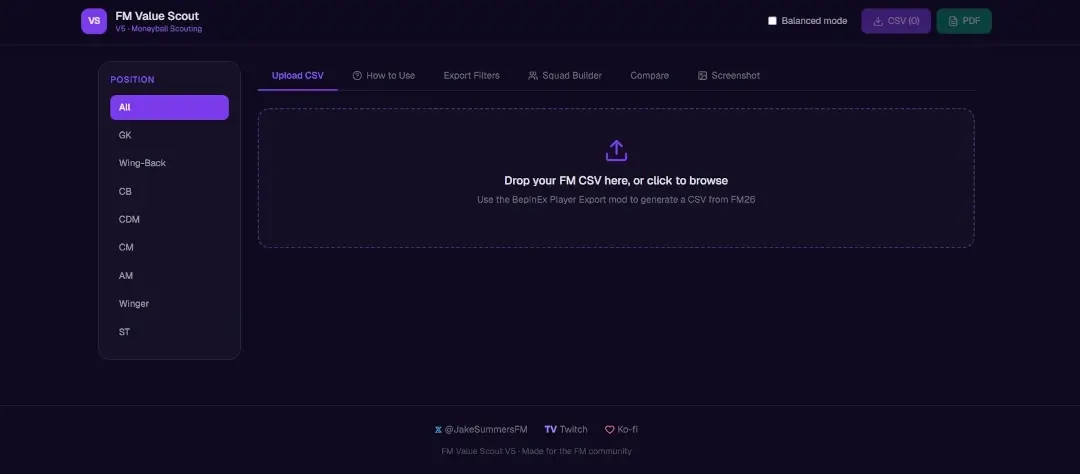
You’ll see a ranked table with Value Scores, badges (Hidden Gem, Overpriced, etc.), and clickable player cards with breakdown bars. You can then click on any player to bring a detailed breakdown of the score and stats.
The interface also gives you the possibility to save players to a shortlist.
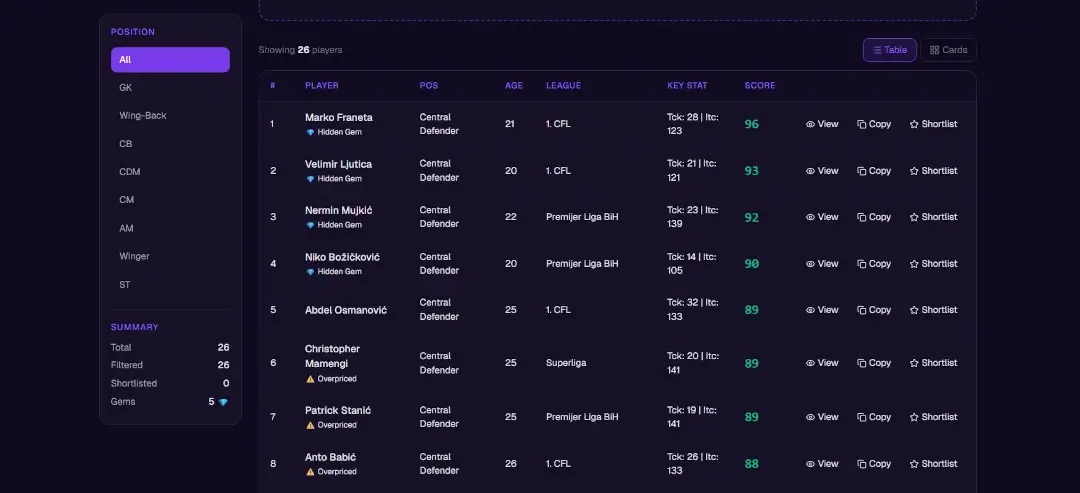
Click on any player you wish to expand on. For example Marko Franeta.
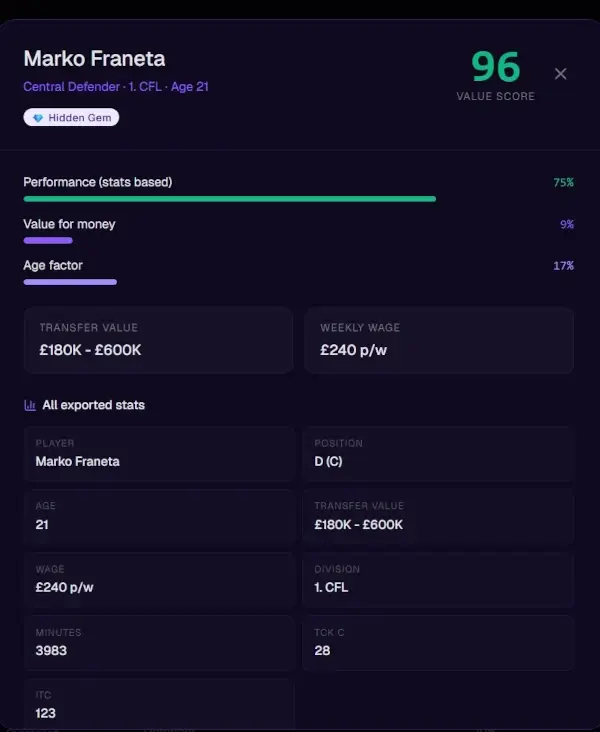
You will see his “value score” is broken down into 3 sections: Performance, Value for money and Age factor. You will also see the key stats used to measure his overall score, the number of minutes played, which division he’s playing in and what position he can play.
How the Value Score is Calculated?
The Value Score (48–97) is the heart of FM Value Scout. It’s not just another “overall rating” it’s a true Moneyball number that answers the question: “How good is this player relative to their cost and age?”
The score is built from three main components:
1. Performance (≈55% of the final score)
This measures how well the player actually performs on the pitch, normalised per 90 minutes.
- Each position has its own specific weighting so defenders aren’t penalised for having zero goals.
- Strikers / Wingers / Attacking Mids: Goals, xG, Shots, Assists, Key Passes
- CDMs / Centre Mids / Defenders: Tackles (Tck C), Interceptions (Itc), Key Passes, Pass %
- Goalkeepers: Save %, Clean Sheets per 90
- Minutes played matter. Players with very low minutes (<1,200) get a penalty to stop bench warmers from looking artificially strong.
2. Value for Money (≈33% of the final score)
This is the “bargain detector”.
It looks at:
- Transfer Value (lower = better)
- Weekly Wage (lower = better)
A player delivering strong performance on a low wage and low transfer fee gets a big boost. This is what separates a 5-star wonderkid costing £30M from a 3-star player who might actually be the smarter signing.
3. Age & League Factor (≈12% of the final score)
- Youth bonus: Players aged 21 and under get a meaningful uplift (future potential).
- Veteran penalty: Players aged 33+ get a small deduction.
- League difficulty: Playing in the Premier League or Bundesliga gives a small multiplier compared to lower leagues.
Final Calculation Summary
Value Score = (Performance × 0.55) + (Value for Money × 0.33) + (Age & League adjustment)
The final number is clamped between 48 and 97 for readability.
Why This Matters?!
- A high score doesn’t just mean “good stats” it means good value.
- A defender with modest tackle numbers can still score highly if his wage and transfer fee are low.
- A wonderkid with amazing potential can score lower if he’s extremely expensive and hasn’t played many minutes yet.
Real-World Examples.
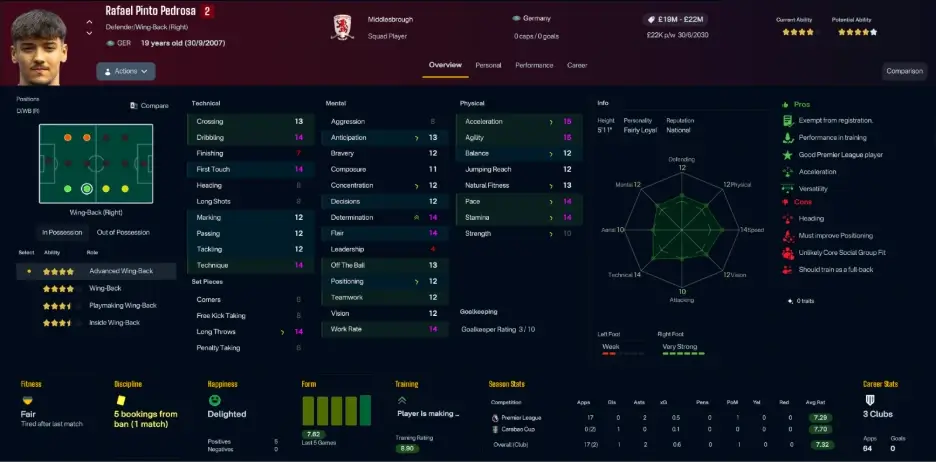
Take a 19-year-old wing-back signed for £4.1M. Value Scout flagged him highly because of strong physicals (15 acceleration/agility), decent technicals, and excellent value relative to his £19M–£22M potential range.
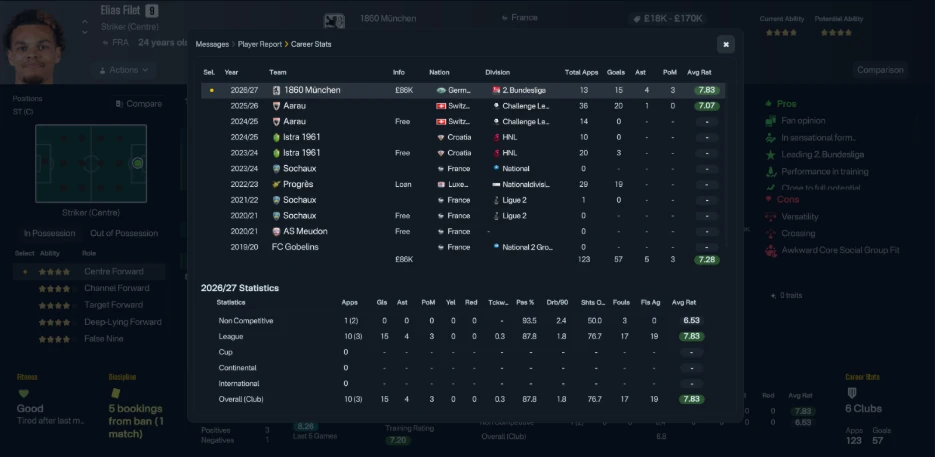
A further example unearthed this hidden gem, a player the user openly admitted they wouldn’t have touched! Scoring 15 times, assisting 4 in only 13 appearances.
Why This Setup Is So Powerful?
With richer exports + FM Value Scout you get:
- Far more accurate scoring than default data.
- Objective Moneyball analysis instead of guesswork.
- Practical tools (Squad Builder, Comparison) to test your shortlist.
- Everything completely free and will remain free forever.
Whether you’re rebuilding on a budget, hunting gems in lower leagues, or running a sustainable club, this setup gives you a real edge over your opponents, and/or your friends!
How to Install the FM26 Player Export Mod (Step-by-Step Guide)
To make FM Value Scout even more powerful, we recommend using a popular community mod that exports far more detailed player stats than the default FM export. Personally, I can recommend the FM26PlayerExport by VintesetFM. The latest version of his data extraction mod for Football Manager 26 is a paid mod but he also has a free mod available which we direct you to in the link below.
Important: This is a simple one-time setup. The mod is safe and does not change your save files.
Step 1: Install BepInEx (the required framework)
- Go to the BepInEx Bleeding Edge builds page. BepInBuilds – BepInEx Bleeding Edge
- Scroll down and click the top arrow to show the latest build.
- Download BepInEx Unity (IL2CPP) for Windows (x64) games.
Step 2: Download the FM26 Player Export DLL
Search the FM community (Discord, Reddit, or forums) for the latest “FM26 Player Export DLL” and download it. Altough a link to the free FM26 Player Export by VintesetFM is provided above, we encourage you to search for the latest version, and download it.
Step 3: Install into Your FM26 Folder
- Right-click Football Manager 2026 in Steam → Manage → Browse local files.
- Extract the BepInEx zip file directly into this FM26 folder.
- Load Football manager a short installation window will appear, let it finish.
- Close the game down.
Step 4: Add the Player Export Plugin
- In the FM26 folder, open the new BepInEx folder, then open the plugins folder inside it.
- Create a new folder called Fm26PlayerExport (no spaces).
- Drag and drop the downloaded Player Export DLL into this folder.
Step 5: First Launch
- Start Football Manager 2026. The game may take longer the first time.
- Once loaded, go to any scouting list or player view.
- Select the players you want (hold Shift to multi-select).
- Press Ctrl + P.
- The mod will process the data in the background and save it as CSV files.
- All screen shots will be saved in the PlayerExport folder.
Tip: All exported files must be saved as .csv for Value Scout to read them. Videos are available on YouTube should you need further assistance. Please note I personally have not created any other FM creators have.
That’s it, the mod is now ready. From now on you can quickly export much richer player data with just a few clicks.
Try The FM Value Scout Now!
With everything accessible, it’s time to try the FM Value Scout yourself!
- Set up the improved export method (widely available in the FM community)
- Export your next shortlist.
- Upload to valuescout.vercel.app
- Find & Recruit your next hidden gem
FM Value Scout is still evolving. We’ve already gone through five major versions in a short time, and I plan to keep updating it regularly based on real feedback from the community. Future updates will include even more features like advanced custom weight sliders, shareable shortlists, deeper squad analysis, and more.
If you’ve found the tool useful, the best way to stay involved is simple:
- Join the FM Value Scout Discord it’s where we share test CSVs, discuss new features, and help each other find better signings. https://discord.gg/KMesYaDQ
- Follow me on X @JakeSummersFM for update announcements and scouting tips
- Subscribe to me on YouTube – JakeSummersFM – for actionable tips on Moneyball scouting
- Drop your results or screenshots in the comments below. I read every single one.
Whether you’re rebuilding on a budget, hunting for hidden gems in the lower leagues, or trying to run a sustainable club, this setup gives you a genuine edge.
Thank you for reading. Big thanks to everyone in the Discord and the wider FM community who helped test and shape the tool. This only exists because of passionate players like you.
Let’s keep making smarter saves together!
– Jake Summers FM
Creator of FM Value Scout.