How you create tactics in Football Manager 26 has undergone a revolution! Bringing you more flexibility, clearer and more descriptive instructions, FM26 Tactics Creation will be an insane process to provide you with the biggest tactical development in Football Manager’s entire history!
Tactics creation has always been the bread and butter of Football Manager. Whether you are picking up the game for the very first time, or is a returning tactical thinker, creating tactics in Football Manager has always let you define how you believe football should be played by giving you a host of tactical styles, team instructions and player roles to select from – enabling you to create that winning formula.
In Football Manager 26, how you create your tactics has been revolutionized by incorporating not only split tactics into in and out of possession formations, (often abbreviated into IP and OOP) but a range of new tools such as the Visualiser makes its debut – enabling you to recreate real-life tactics to a greater degree!
With tactics creation in Football Manager taking a great leap forward, it offers more flexibility, more freedom but also adds more complexity – bringing you the ability to tailor your tactics exactly how you envision it!
Today, we’ll look closer at how to create tactics in FM26. This beginners guide will take a closer look at everything new in FM26’s tactics department. From the new in and out of possession tactics to the player role visualizer, or the evolvement gone into micro-manage your FM26 tactics. The improved Tactics Planner in FM26 caters both those who picks up the game for the first time to those Tactical Experts, who likes to tailor your game plans far more extensively.
To reduce the length of this tactics guide, you will notice that we will refer to more in-depth articles previously written to give you all you need to know, without repeating ourselves or make it too lengthy.
Over the coming sections, we will look closer at the dramatic changes coming to tactics creation in FM26 and why we believe it’s one of the best features for Football Manager 26 that we could have ever wished for!
Let us take a closer look at what these dramatic changes to tactics creations in Football Manager 26 and what that means to you!
The Dramatic Changes to FM26 Tactics Creation
How to Create Tactics in Football Manager 26: The Tactical Planner
When you shall create your first tactics in Football Manager 26, you can either visit the Match Day hub to begin the process of creating tactics on FM26 or you can begin the process within the Tactics Induction which is passed over by your assistant manager as soon as you’ve entered a new club.
The Tactical Planner will offer you the opportunity to choose your formations – one for ‘In Possession‘, and one for ‘Out of Possession‘, along with your desired tactical style.
You’ll be able to set three tactics – one primary and two secondary tactics but at first your primary focus should be focusing on your primary tactic and then later you can set up a variation of your preferred tactic that differ slightly to your preferred shape but maintains the key ingredients of your preferred football philosophy.
When being guided through the Tactics Induction you can also customize your set-piece routines, set up who shall take penalties and finally set up opposition instructions. Since opposition instructions will vary between matches since whichever OI’s you choose for whom, depends on how you wish to counter specific strengths or weaknesses within the opposition team, we will leave that out for this beginners guide.
Step 1 – Select The Tactical Styles
In Football Manager 26, you’ll have 10 different tactical styles to choose from along with the ability to create a Clean Slate where you can customize and create your own tactical style – either you prefer to mix and match the best of the other tactical styles or simply create a unique style of football the world has not yet seen before.
When choosing your tactical style, you’ll get a quick insight into the pros and cons of each style of play – providing you with a deeper insight into the team instructions each of the tactical styles applies.
Whether you love to play extreme short passing football such as the Tiki-Taka or enjoy a more direct style of football that involves intense pressure, your FM26 tactics must fit your team!

In the Tactics Planner, your Assistant Manager will recommend three different tactical styles that he believes will fit your team – either because of it’s familiarity to play with a certain style of football or because of the squad’s overall abilities to perform under a specific football philosophy.
Once you’ce selected your tactical style, you’ll continue the process by choosing your desired shape – your team’s In and Out of possession formation.
Step 2: Selecting The In Possession Formation
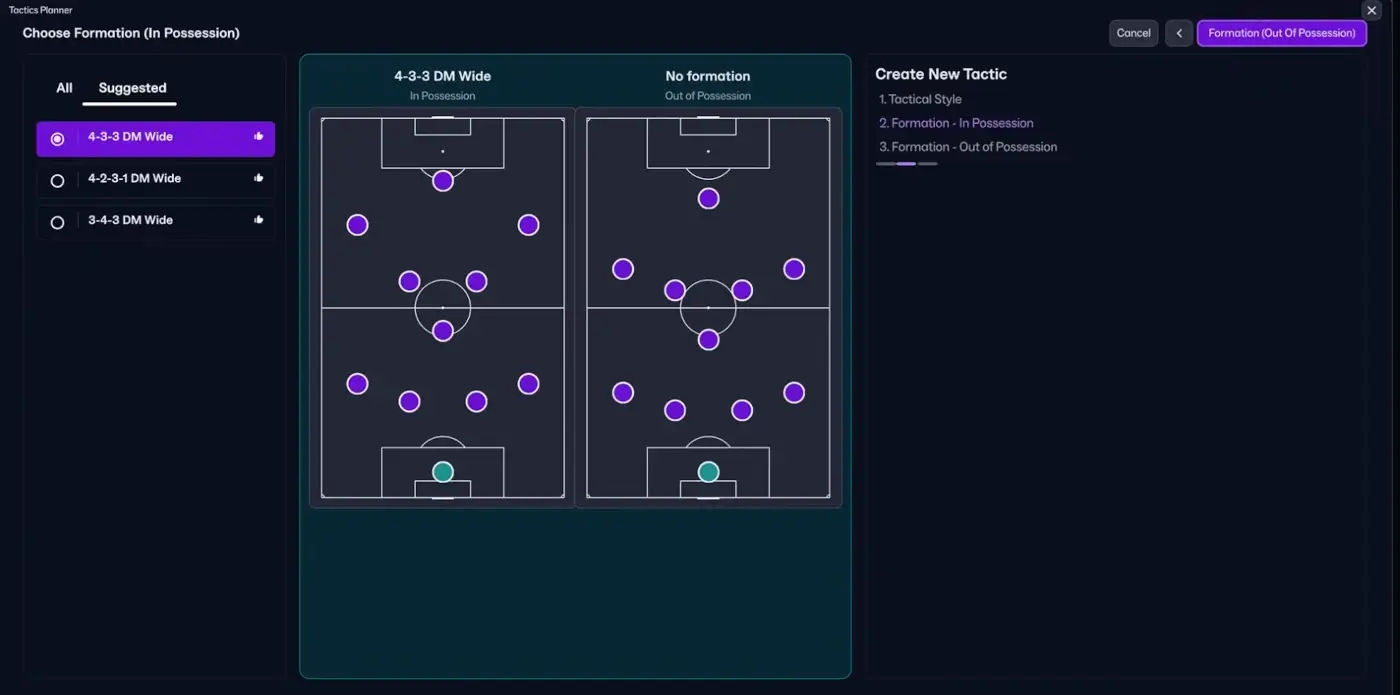
In the next step, you’ll decide upon your team’s shape in possession – deciding your base structure for when your team has the ball.
When determining your In Possession Formation, you’ll decide how you want your players to position themselves in the build-up, attacking transition or progression, and when entering the final third.
In FM26, you’ll have at least 12 different ‘In Possession formations’ to select by. From 3-4-2-1 to a more fluid 4-2-2-2 shape.
As always, your assistant manager will give you three recommendations for suitable formations for your team – based on the club’s players, their natural position, player role familiarity and overall abilities.
In this phase, you should pick the formation and shape for In Possession that you believe fits your team the best. What formation you select depends on who you want to build your team around and what type of players you got and what position your best players can play.
You can also consider what formations the other team’s within your league might play and the quality of your team compared to the rest. For instance, if up against teams who mainly plays 4-4-2, you could either go 4-2-3-1 or 4-3-3 to aim for numerical superiority in the middle of the pitch.
At this stage, you can’t drag and drop positions anywhere on the screen, so if you wish to use an asymmetric formation, simply pick the closest shape to your desired formation. But fear not, the ability to drag and drop players arrives as soon as you enter the Tactics Planner.
Step 3. Out of Possession Formation
In the next stage of the process of creating your tactic you must set your team’s structure Out of Possession. Here you will get 3 suggestions of Out of Possession shapes with 12 different OP formations to choose from.
Naturally, these choices of formations for out of possession will complement your preferred In Possession formation. If you select a 4-3-3 formation on the ball, the game will suggest a 4-1-4-1 shape when your team is off the ball.
If you select a back three formation in possession, you’ll be suggested a complementing or cohorent formation that enables the team to defend with a solid shape.
The two formations – displayed side by side, individually – gives you a clearer picture of how your tactics will play out.
Previously, your formation determined how your team would defend, and duties and player roles made your team’s shape in attacking phase come to life.
Now, fluidity along with duties are eradicated.
Now, you’ll need to set up your in- and out of possession tactics to completely decide how you want your team to attack, or defend – using specific player roles for in and out of possession that completely alters the picture of FM26 tactics creation!
The ability to select a totally different in possession tactic compared to your out of possession tactic can give you a winning edge prior to match days. Imagine, against an opponent you’re favorite to win over, or at home games, you might want to press higher by asking your central midfielder to press as an attacking midfielder when out of position – looking at creating high turnovers that aims to dominate the match in the opposing side – using a 4-3-3 in possession but defend in a 4-2-3-1 or 4-2-2-2 asymmetric.
However, if you’re an underdog, you might instruct your midfielder to screen or perhaps even track back to set up a low mid-block that is more difficult to penetrate through – and which leaves no spaces to attack in – defending in a 5-4-1 / 4-5-1 shape.
In another scenario, you might want your winger or full-back to behave completely different from when the team is on or off the ball – asking them to move inside in possession but stay wide out of possession.
More about this in the section about the new player roles!
New Tactics Planner: Combined or Both
Once you’ve selected your team’s two desirable formations, you’ll enter the Tactics Planner – or the brand new Tactics Overview screen.
In Football Manager 26, it will be your home for tactics creation or customizing. You’ll be able to see your tactics in four different views – providing you with a clearer picture of how your tactics, on and off the ball, will look like, and behave.

Apart from being the one-stop shop for team selection, the redesigned Tactics Overview gives you better control – at your fingertips – with four different types of views enabling you to make adjustments to player roles and player’s positioning for In Possession or Out of Possession.
Choose from specific views for each phase, or see it all in one screen! The opportunities to see your formation ranges from:
- Combined
- In Possession Tactic
- Out of Possession Tactic
- Both
Combined View
The Combined Tactics Overview incorporates both the In- and Out of Possession Player Roles and merge on and off the ball structures into one view – giving you more control and better understanding!
Since the Combined view is an aggregate of the two formations – in & out of possession shapes, it might seem messy with players in asymmetric positions. However, this is only the case if there are drastic differences between the in possession tactic and the out of possession formation.
For instance, if you use a formation that looks more or less similar, e.g. 4-3-3 / 4-1-4-1, there won’t be as drastic changes to the Combined view. However, if you wish to defend in a 4-2-3-1 but use a 2-3-2-3 in possession, the view will take into account the average positioning of the players of both IP and OOP to give you an overview.
Working at this screen, it’s important to keep in mind several things apart from just the average positioning.
1. The star ratings of players abilities within the Combined view for the position and role will be the average of their star ratings for their ability to play in a position or role for in or out of possession formation.
Put the striker as a centre back and his overall star rating will decrease and differ within the Combined View compared to either Both or the specific views for IP and OP formations.
2. Dragging and dropping players within the Combined View is not possible but changing player roles for IP and OOP is possible!
NB! Be aware that if you are making changes in the Combined View these changes will be transferred into the In & Out of Possession Formation and vice versa.
The Both View
Personally, I preferred the Both View more than the combined view.
It will list the In Possession Formation and Out of Possession side by side, rather than showing your tactics on and off the ball individually – making you have to make additional clicks to browse between IP and OOP Tactics Planner.
The Both View will more precisely show the greater difference between the two shapes on and off the ball.
In fact, it gives you a better focus to visualize the differences between your team’s shape on and off the ball.

Due to player’s star rating of their role, you’ll get a clearer picture of their abilities and familarity to play a certain role – enabling you to select your team ahead of match day by considering the players abilities for their role for both on and off the ball – in one view!
Working at this screen enables you to drag and drop players anywhere you like. Keep in mind that if you decide to change players positioning at either the IP or OP view and there are drastic differences of their positioning from when the team is on the ball to when they are off the ball, you will receive a little warning message stating that the players’ position between in and out of possession is too far apart.
With too much distance between the positioning of a player in IP and OP formation, it may hurt the overall balance of your team’s shape – creating vulnerable zones and channels that the opposition may take advantage of.
Read More | Explaining In & Out of Possession Formations
What is the benefit of In & Out of Possession Tactics?
The greatest benefit of the tactic being split into In- and Out of Possession formation is two-fold.
The primary reason is more flexibility than ever before!
Now you can actually determine your team’s structure, and game plan in each phase of the game. From wanting your winger to tuck inside and become some sort of a false winger in your 4-3-3 system to asking him to defend wide areas in a 4-1-4-1 defensive structure.
The other reason is better control & how practical it will be to split your tactics into In Possession/Out of Possession!
For anyone, like me, who enjoys recreating real-life manager’s tactics, the new tactical innovations in FM26 gives you the opportunity to fine-tune every aspects of the play – from selecting team instructions designed for wing-play to how you want your team to offer supporting runs.
To mimic real manager’s tactics the previous Tactics Planner didn’t give you all the tools needed to replicate how real teams behave differently from when they are in possession, or off the ball.
Especially, in the modern era of football tactics where the language has evolved dramatically and structures moves fluidily between on and off the ball in a more complex manner – with players interchange positions, moves between channels or transits from one end of the half to the other both to overload areas, or to defend each of the five channels with rest attack and rest defence becoming natural terms.
Keep in mind that if your ideas and vision goes beyond what’s practical, your assistant manager, or backroom staff, will flag that your approach carries a certain risk – aiding you to make adjustments in your desired instructions, your choice of player roles, or how you want your team to play.
Revamped Team Instructions in FM26
Similar to the split formations in FM26, you’ll also have tailored team instructions for in and out of possession.
Rather than the old-school way of selecting team instructions, where you had different instructions for in possession, in transition and out of possession, FM26 arrives with a grid view of specific team instructions that relies to either the attacking phase or the attacking transition, and the defensive phase and defensive transition.
The layout of team instructions in Football Manager 26 is far more intuitive than before. Now, it’s immediately clear what each of the instructions affect – aiding you in the process of FM26 tactics creation.
All the different team instructions comes with a description and pros and cons providing you with a better insight into how it may affect your team’s performance or style of play.
To change your team’s instructions in Football Manager 26 you will need to click on the ‘Team Instruction’ button.

The Football Manager team instructions is split into three sections – the pitch, the Instructions and the Overview with all instructions listed – as you’ll see to the far right in the above screenshot.
At this screen you have multiple options to change or edit the team instructions on FM26.
- All Instructions will list every possible team instruction regardless of the phase of play for In Possession or Out of Possession according to which screen you’re on.
- Through the drop down menu in the middle, you can quickly change team team instructions for specific phases of play, e.g. for the build-up (IP), final third (IP), mid block (OP) or high press (OP). Here you can simply move your mouse cursor over a team instruction and toggle between the different levels – whether you want to encourage / discourage dribbles or keep it at balanced.
- By using the Overview section to identify related team instructions for a specific phase of play.
Keep in mind!
It’s within the All Instruction page you’ll be able to edit traditional team instructions such as Passing Directness, Tempo, Creative Freedom, Attacking Width, Attacking Transition and Time Wasting. These settings CAN’T be changed anywhere else!
All these instructions will also be affected by the Match Mentality you use. A more Attacking Mentality will naturally see the team play with much more width, at an higher tempo and take more risks without wasting time at every opportunity, than on the Defensive Mentality.
The Pitch is split into three different phases of play with three more zones, left flank, middle and right flank, to better visualize your tactics and the team instructions that relies to each of those phases.
Another method is to click on the pitch view, which will open up the Visualiser. Here you can click on different zones on the pitch and the available team instructions for that specific phase of play will erupt in the middle coloumn of the screen.
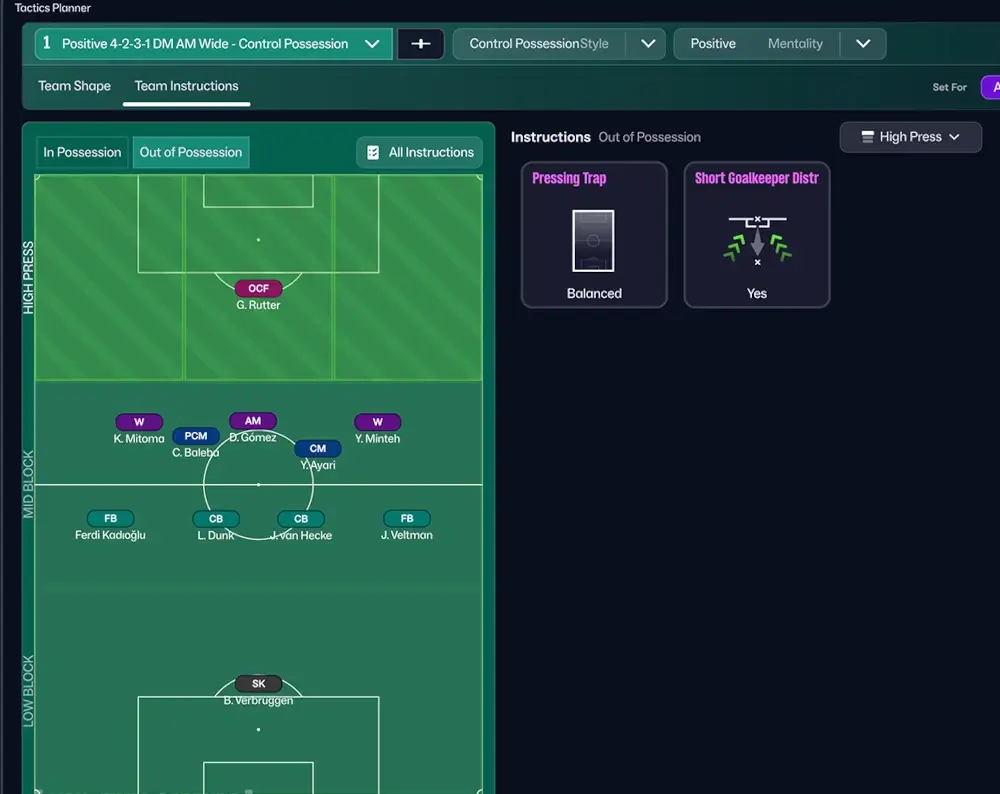
Here’s a quick overview of the different phases of play and specific zones – all providing related team instructions for that phase of play.
Team Instructions for In Possession
- Final Third
- Final Third – Zone (Left, Middle, Right)
- Progression
- Progression – Zone (Left, Middle, Right)
- Buildup
- Buildup – Zone (Left, Middle, Right)
For instance, available Team Instructions in the Final Third are Dribbling, Patience, ‘Shots from Distance‘ and ‘Crossing Style‘.
There are four different types of Progression team instructions – they are: ‘Supporting Runs‘, Dribbling, ‘Progress Through‘ and ‘Pass Reception‘.
The Buildup team instructions are ‘Buildup strategy‘, ‘Goal Kicks‘, ‘GK Distribution (speed)‘, and ‘GK Distribution‘.
The Team Instructions for Out of Possession are also split into three phases of play:
- Low Block
- Low Block – Zone (Left, Middle, Right)
- Mid Block
- Mid Block – Zone (Left, Middle, Right)
- High Press
The Low Block will enable you to edit the team instructions for Cross Engagement.
The Mid Block enables you to customize the Pressing Trap.
At High Press you’ll be able to customize your team’s tactical instructions to ‘Pressing Traps‘ and ‘Short Goalkeeper Distribution‘.
To change the settings of one particular team instruction, you can either click on the Tile – e.g. Tempo which opens up a Card with more information about the different settings, or hover your mouse over the Tile and use the arrows that pop up to increase or decrease settings.
As far as we can understand, when Balanced, the team instruction will be set according to a mix of Mentality and overall behaviour of the selected player roles.
In Possession Team Instructions:
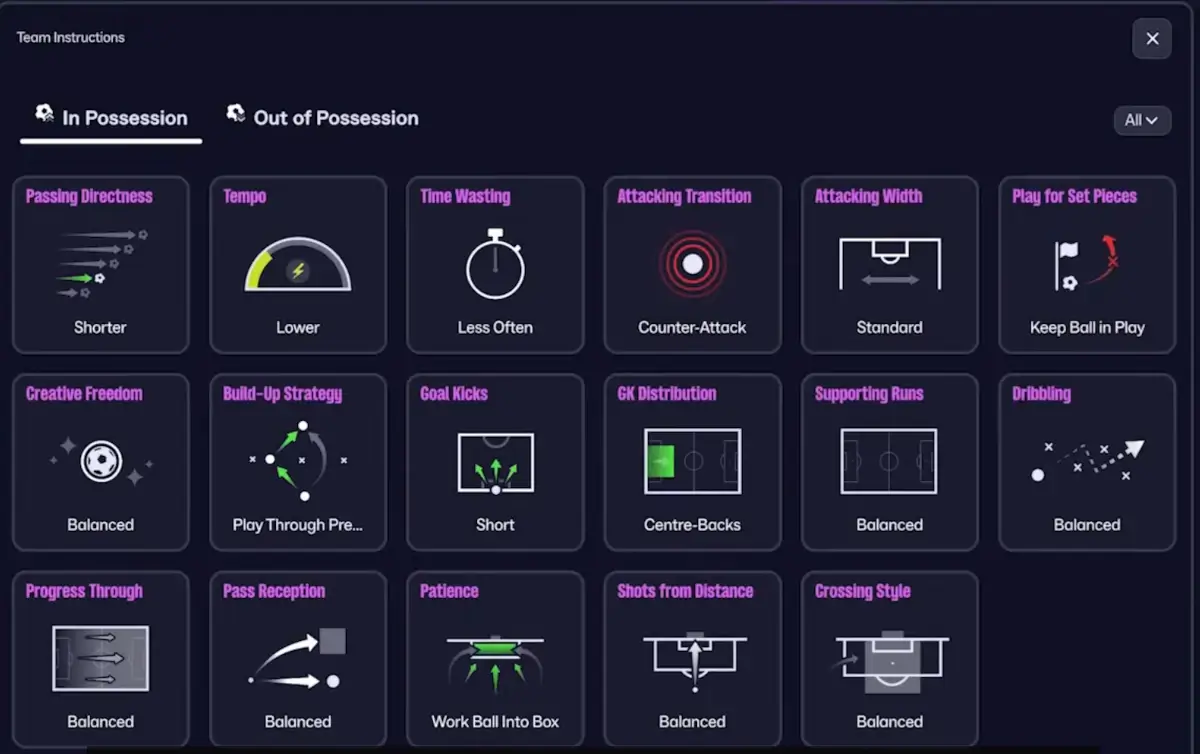
In Football Manager, you’ll have 17 In Possession team instructions to choose from – where five of them are brand new for FM26. This enables you to better decide how your team should act, or react to every aspect of play – from traditional settings of passing directness to how the players should behave in terms of Pass Reception.
One of the brand new team instructions is the Pass to Feet option. Rather than ask your team to build their attacks around channeling the ball into space, the Pass to Feet instruction gives you greater control over how your side build their attacks.
This instruction comes on top of the traditional Passing Directness – where you can determine whether your side should prioritize shorter passes, or play more direct.
Another new instruction is the option to select your team’s build-up strategy. Here you can instruct the team to ‘Play through press’ or ‘Bypass press’ – setting the level of risk in the build-up phase according to how the opposition engage your team with their intensity of press.
The entire interface enables you to get a clear understanding of what each of the instructions does along with the benefits and vulnerabilities by prioritizing one over the other.
Throughout the entire process of customizing your team’s instruction it’s important to keep the entire picture of how you envision your team to play – trying to avoid contradictions and keep in mind the overall level of risk attached to each of the settings.
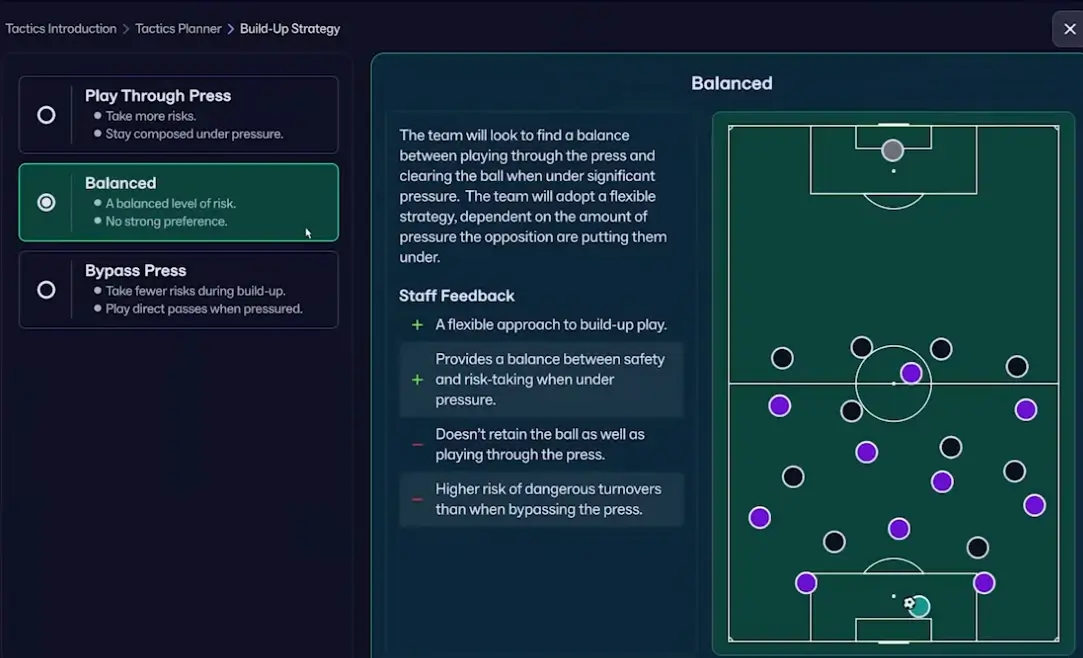
All these new team instructions comes on top of those we have become accustomed to from previous iterations of Football Manager, e.g. creative freedom, tempo, attacking width, passing directness or GK distribution, and so on.
Out of Possession Team Instructions:
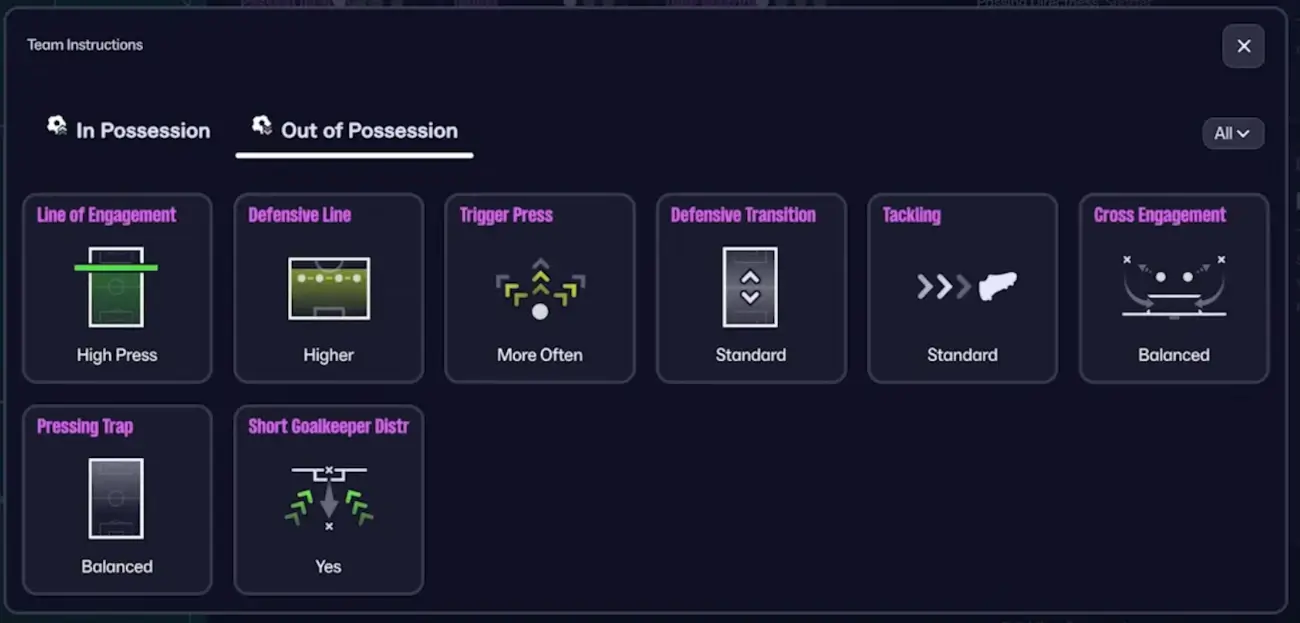
In Football Manager you’ll have a total of 8 different out of possession team instructions to select from.
It’s only on the All Instructions for Out of Possession you’ll be able to customize:
- Line of Engagement
- Defensive Line
- Trigger Press
- Defensive Transition
- Tackling
Yet again, some of these instructions, such as the line of engagement and defensive line will relate to your chosen Match Mentality. By using the Defensive Mentality, the team will naturally defend deeper and more narrowly than if you where using an Attacking Mentality.
By changing your team instructions and the team’s shape you can literally change your everything – from average positioning of your players in each of the phases to how your team will go about playing the game.
What about Player Instructions in Football Manager 26?
While the team instructions will tailor your team’s performance for certain aspects of play, Football Manager brings the ability to adjust the behaviour of each player within your tactics.
This enables you to customize the player’s role to take advantage of certain player strengths, or limit their weaknesses.
If you want to make adjustments to player role behaviour by editing the player instructions on Football Manager 26, you need to right click on a players’ shirt within the Tactics Planner. This opens up a sub-menu where you can advance to the player instruction card for that player – providing you the ability to customize his behaviour to a greater degree.
On the Player Instruction screen there are 11 different player instructions to choose from.
If there are any role specific instructions, these are listed at the bottom of the screen but a key lock icon is also visible for any instructions you’re not able to edit.
Editing the player role instructions might provide an extra layer to your tactics. If you’re tactical instructions are fairly balanced, you can ask your creative player to act more freely using his vision and anticipation to move around the pitch or take more risks when passing the ball.
This enables the player to go beyond your tactical instructions and prioritize specific strengths of a players’ abilities.
Within the Football Manager player instruction screen, you can either apply your preferred instructions for the role to the position, or for a specific player.
New Player Roles: Specific roles for In / Out of Possession

As you’ve might have come to grips with from the Football Manager 26 Features & game upgrades thread, FM26 arrives with new and evolved player roles – changing the landscape of selecting player roles within your tactical framework.
To replace the removal of duties, we have several new player roles in Football Manager 26. Some have seen a greater rework, such as the Inside Forward, others have been modified slightly by removing default instructions.
Gone are the Mezzala, Trequartista and the Enganche – quite specific roles back in the days. Instead, the changes to player roles offer far more flexibility.
Their names are made more descriptive, whilst the biggest change of it all is that roles are split into unique roles for in- and out of possession.
With the refined player roles in Football Manager the player roles is now split into in possession roles and out of possession roles with different instructions and behaviour patterns between on and off the ball.
To enable more freedom and flexibility in tactics creation in Football Manager 26, hard-coded instructions within player roles has been stripped back to a minimum – enabling you to micro-manage and customize your tactics.
The reality is that these new and refined player roles has been made to incorporate the duties of the past. In FM26 we have the Attacking Midfielder in a CM position whilst in previous iterations of FM it was known as the CM-A.
As you’ll see the behaviour pattern and how the role acts is more or less similar – finding space between the lines and offering a goal threat from deep.
The same applies to the Wide Covering Midfielder. In FM24 it was known as the Carrilero.
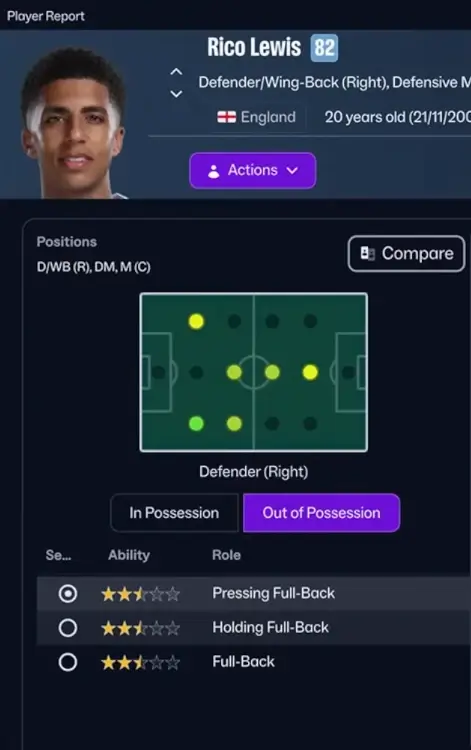
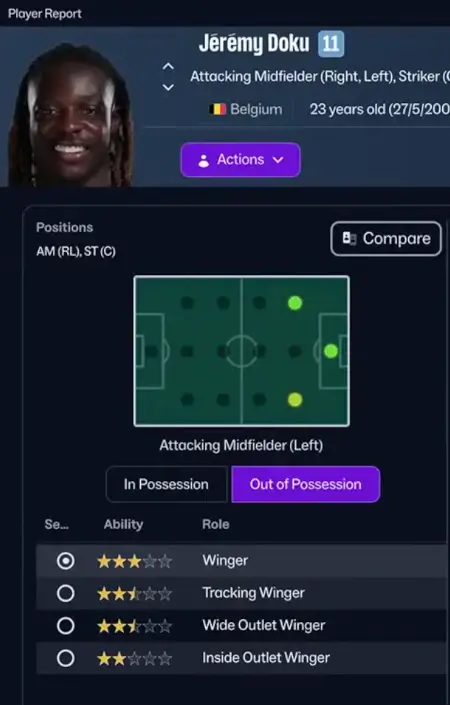
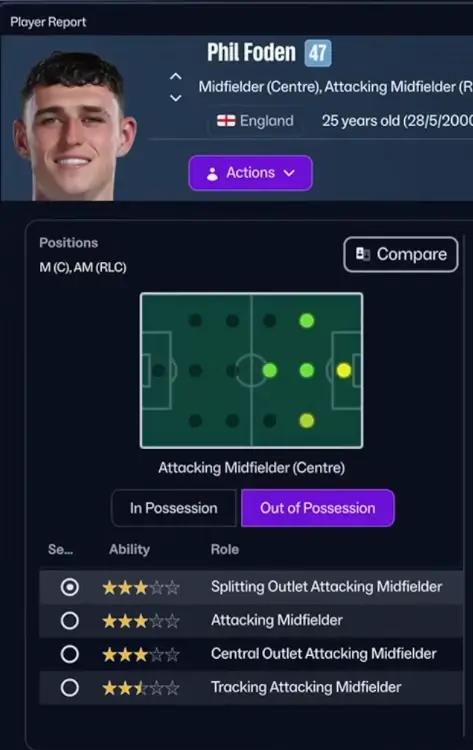
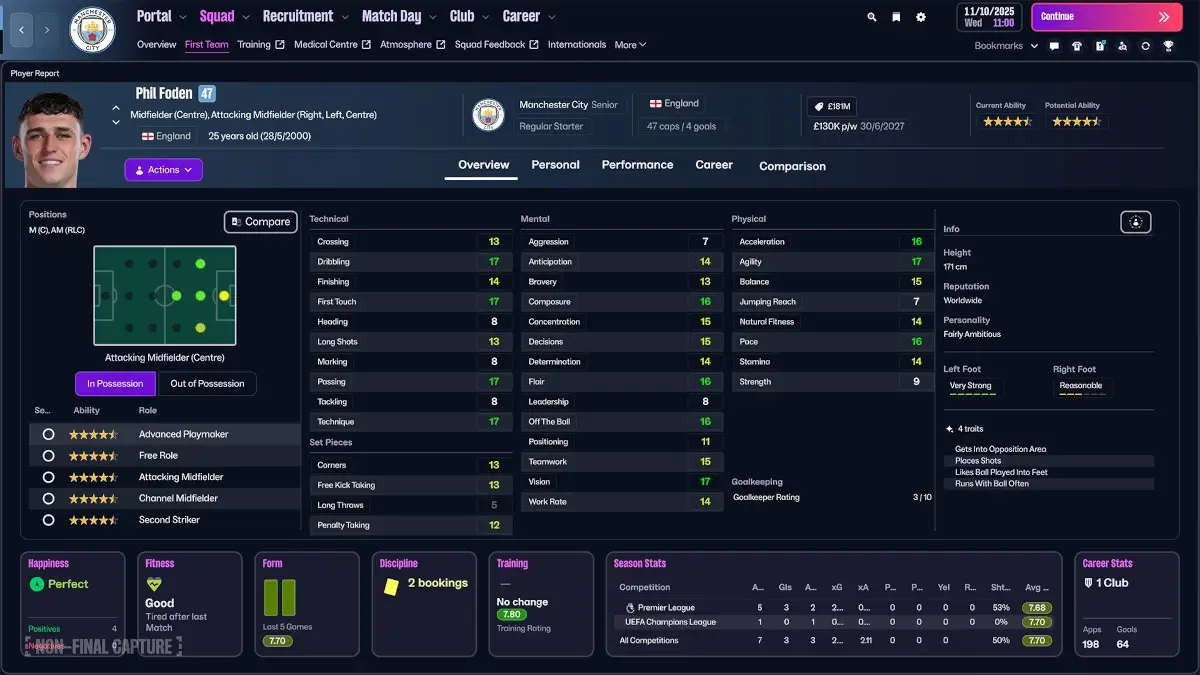
A quick list of some of the In-Possession Player Roles:
- No-Nonsense Goalkeeper
- Ball-Playing Goalkeeper
- Overlapping Centre-Back
- Inside Full-back
- Playmaking Wing-back
- Inside Wing-back
- Advanced Wing-back
- Free Role
- Midfield Playmaker
- Wide Central Midfielder
- Channel Midfielder
- Playmaking Winger
- Wide Forward
- Channel Forward
These roles comes on top of the many new Out of Possession Player Roles:
- Holding Full-Back
- Pressing Full-Back
- Pressing Defensive Midfielder
- Screening Midfielder
- Pressing Central Midfielder
- Wide Covering Central Midfielder
- Splitting Outlet Attacking Midfielder
- Central Outlet Attacking Midfielder
- Tracking Attacking Midfielder
- Tracking Winger
- Wide Outlet Winger
- Inside Outlet Winger
An Example: The Screening Midfielder
The new interface for player roles enables you to quickly understand how the player role behaves with a brief overview of how they will operate, their creative freedom and specific locked-in instructions.
You’ll easily see which player instructions the role comes with by default and what key attributes necessary for a player to operate in the role with the greatest effect.
Let us give you an example with the Screening Central Midfielder – an out of possession role on Football Manager 26.
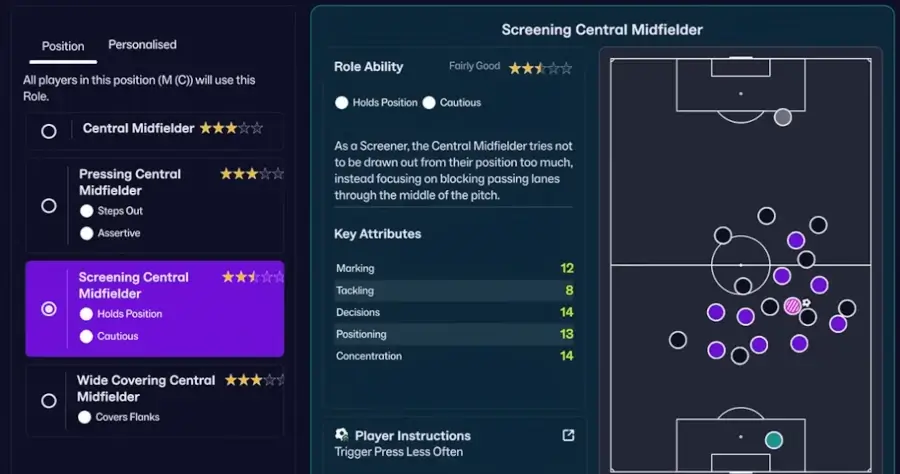
The Screening Central Midfielder role will be available for any central midfielders in the out of possession tactics. The role tries not to be drawn out of position too much but holds position within the team’s defensive shape – focusing on blocking passing lanes through the middle of the pitch.
The player role is instructed to trigger press less often and will be Cautious in their approach to the game.
Due to their player role behaviour, player’s tasked to fulfill the duties of the screening central midfielder requires primarily good positioning, concentration, decisions, and secondary marking and tackling.
The above player role tooltip is a great example of how you can assess in-game information to select player roles for your tactics – combining all key information in one view.
More roles will be available in FM26 to explore. We will deep dive into the new player roles on FM26 once the game is launched.
How to choose player roles?
All players will have certain preferences for IP Roles and OP Roles – something to keep in mind when recruiting players.
Your choice of player roles will depend on what type of football you envision.
When creating your team’s tactic or selecting your in & out of possession formation, you need to think about both aspects of the player role – considering both their attributes and positional abilities and how they will fit into the dual formations.
Choosing the ‘right’ out of possession player roles enables you to shape your tactics by consequently pick how you want your players to operate when defending, initiating a press, or settling into your desired defensive block. Too many outlet roles will make your system vulnerable in the defensive phase. Too many players defending in the low block will leave greater spaces in front of your compact block – making your team vulnerable from long shots.
At the same time, when considering the in possession player roles to fit into your tactical system you need to think about how roles may complement each other. Which zones of the pitch players move into, how they operate on the ball in terms of passing risk and / or dribbling is as important to where they run. If one player moves inside, another could run forward to fill the vacant space.
What roles you choose will enable you to see your tactical vision come to life. If you want to defend in a deep low-block, the tracking attacking midfielder may be advantagous. Using a counter-attacking tactic, may see the central outlet midfielder be useful.
Or, if you desire to utilize a high-pressing tactic, the pressuring central midfielder may be your desired option to try to counter-press high up the pitch.
In fact, with different player roles and instructions selected, different team instructions set for on and off the ball, your 4-2-3-1 tactic may be quite different than your friends 4-2-3-1 tactic, despite using similar tactical style.
With the option to customize phases of play in a brand new way, how you set up your tactics will bring another layer of smartness.
Welcome the Visualiser
One of the most powerful tools in Football Manager 26, except from the FMPedia, is the new tactics and player role Visualiser.

The FM26 Tactics Visualiser enables you to see your tactics and team’s shape in all phases of play. It brings not only a deeper understanding of the positioning of your players in build-up phase, in attacking or defending transition but also in attacking or defensive situations.
Once you’ve selected your preferred player roles, the Visualiser is available under the Team Instructions menu – giving you the opportunity to visualize your team’s shape in specific scenarios.
The greatest benefit of this tool is to see your player roles come to life. It gives you a clear picture of how the player role behaviour shifts through the different phases of play – and how the player links to other players on the pitch.
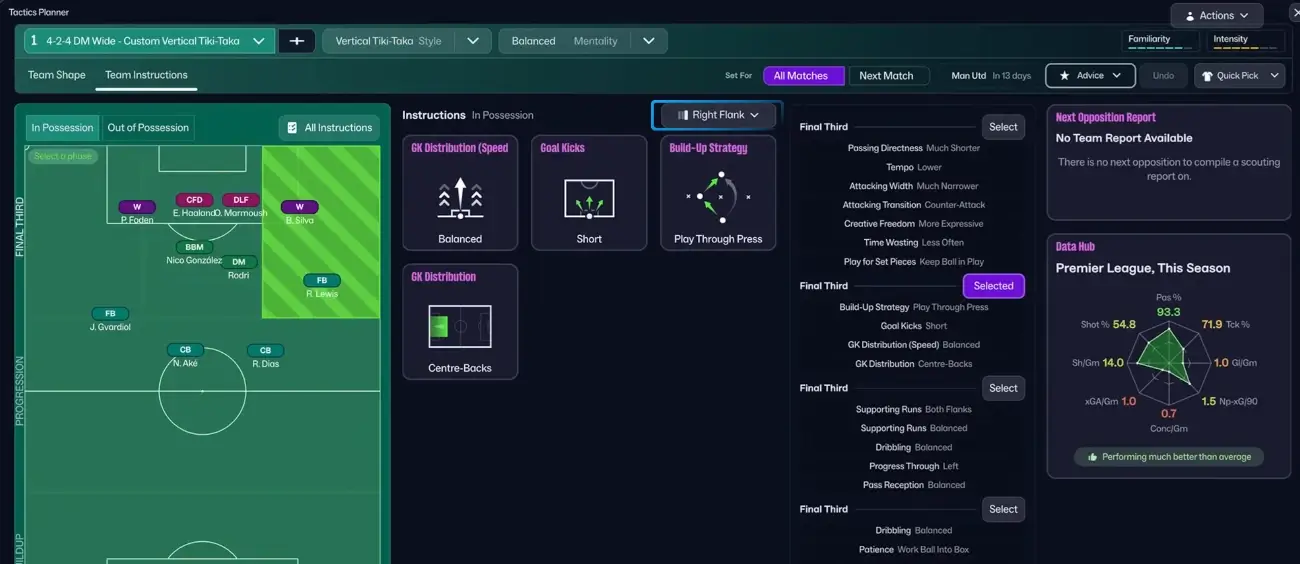
On the left, you’ll have the positioning of the players in the exact phase, e.g. build-up with a grid view of the team instructions in the middle. On the left side, you’ll see an overview of the underlying tactical options, and how extreme or balanced your instructions are.
You’ll examine specific parameters relating to the build-up stage with an overview of the selected instructions.
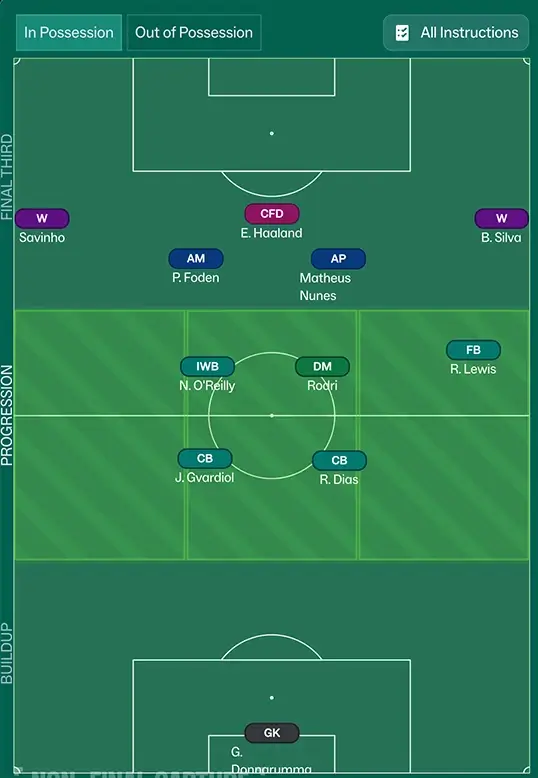
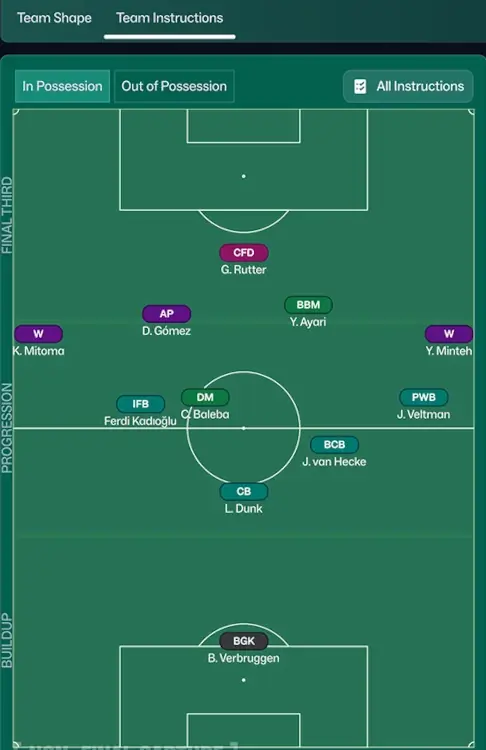
Through the ability to visualise the player role movements and overall behaviour you get an unique insight into your tactics – enabling you to spot weaknesses, create overloads or create a solid foundation to bring your tactical plan to life.
You’ll be able to discover how the Inverted Wing-Back drifts inside from build-up phase to attacking transition – and how your team’s shape transit from a 3-2-4-1 shape when building out from the back, to a 2-3-5 shape in attack.
For instance, through the Visualiser of Team Instructions, you’ll better see how changes to attacking or defending width impacts your team’s shape, or how certain team instructions may affect player positioning and/or movements, through all the different phases of play.
By clicking the ‘Team Instructions’ button you can shift between the Visualiser for In Possession/Out of Possession for these phases of play:
- Build-Up
- In Transition
- Progression
- Right/Left Flank
- Final Third
- Low Block
- High Press
Along with the team’s structure and shape you’ll get deeper insight into the team instructions that influences the exact phase of play – with the option to make adjustments directly.
Buildup Instructions
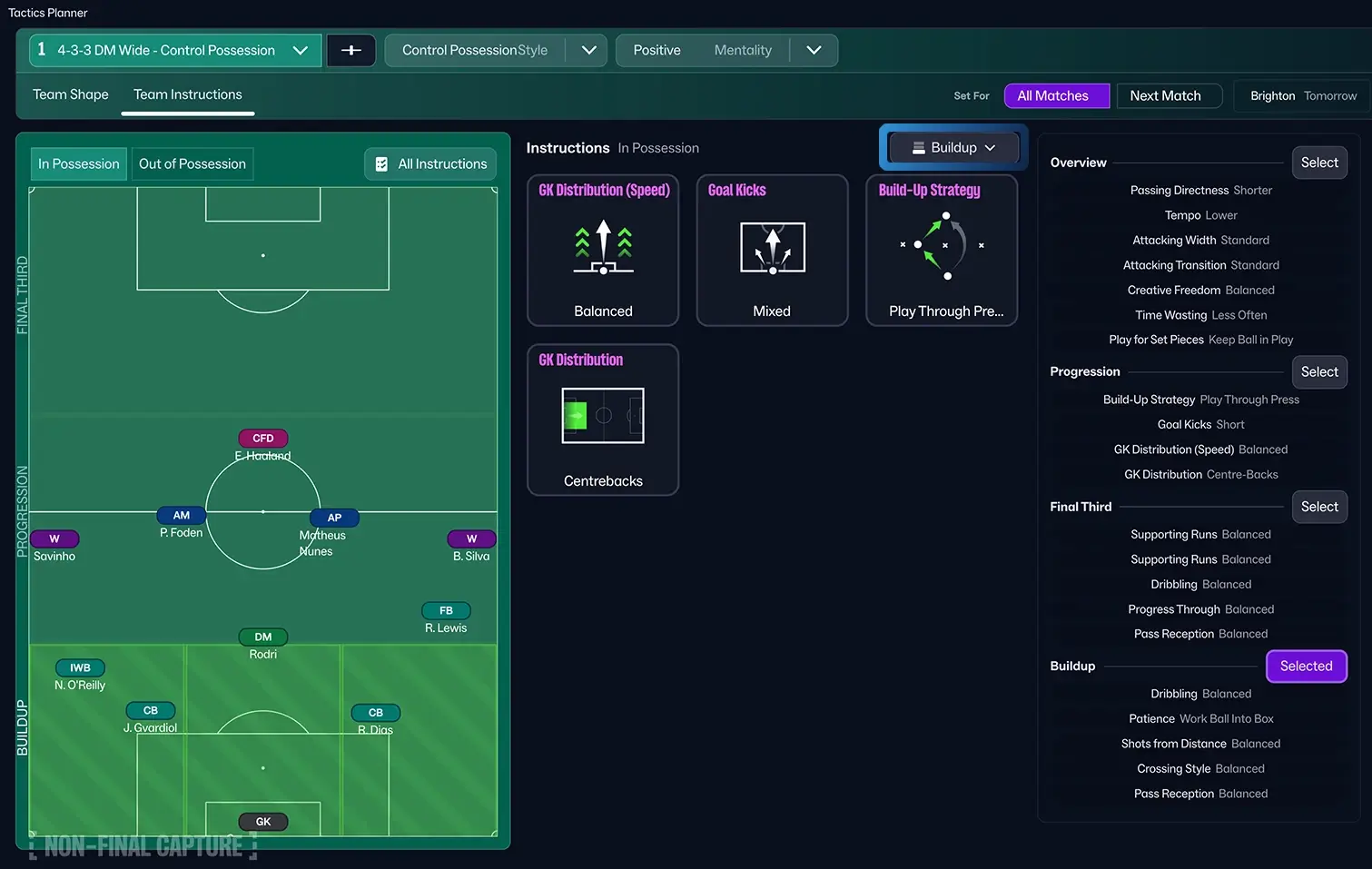
The visualiser of Buildup play reveals that there are four main team instructions that you can customize to your preference.
GK Distribution:
You can ask how your goalkeeper should distribute the ball – feed the ball to the centrebacks, towards the flank, or aim at a target higher up the pitch.
Goal Kicks:
You can instruct your goalkeeper to either kick the ball long, short or mixed – depending on whether you prioritize a certain build-up strategy from goal kicks, or wish them to be made according to how the GK sees fit.
Build-up Strategy:
New in FM26 is the ability to determine your team’s build-up strategy. Do you want your team to play through the press, or kick it long…?
Low Block
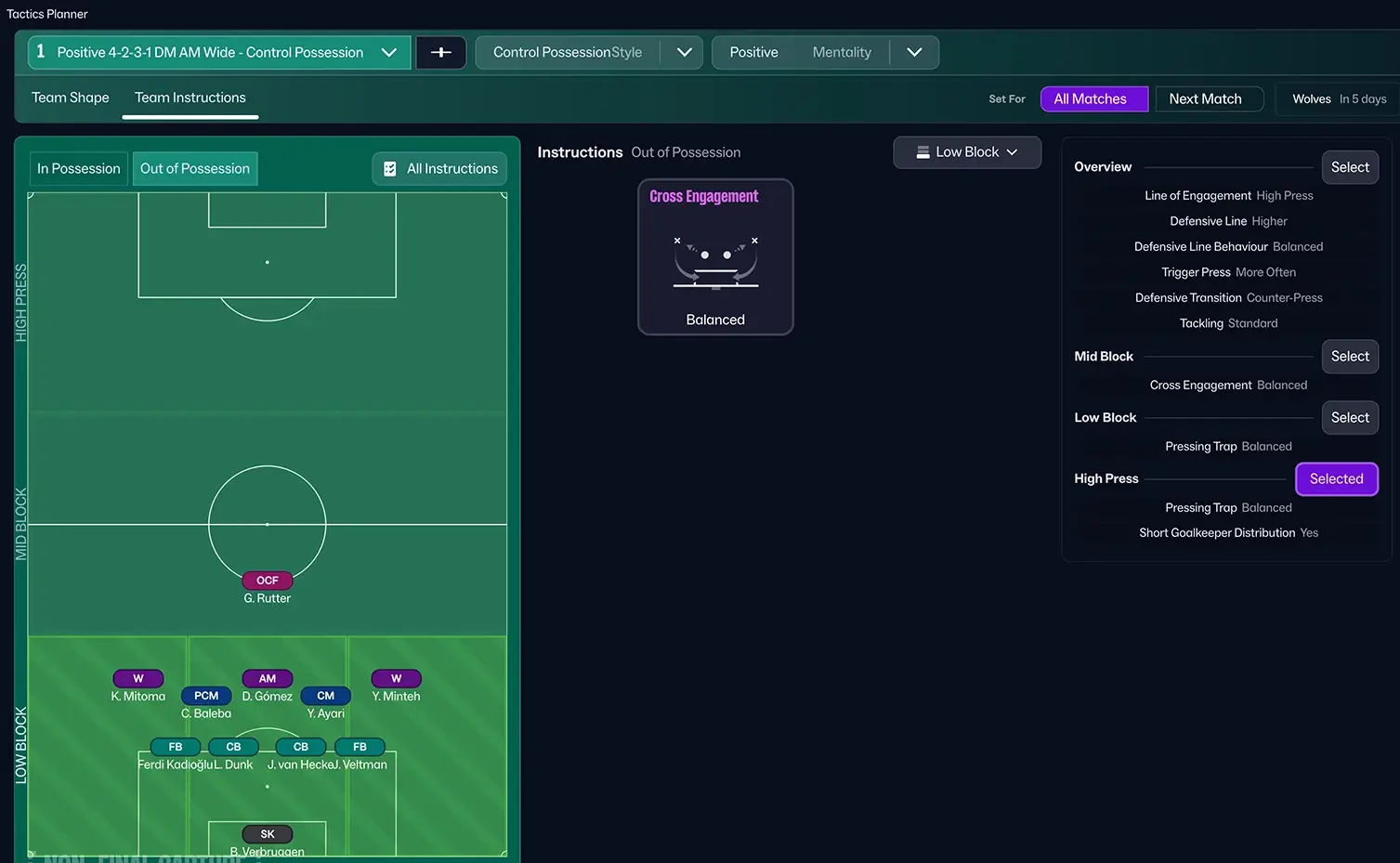
The Visualiser also gives you an unique insight into your team’s shape in low block and how they will position themselves – both in terms of how narrow the structure is, your settings to defensive line, line of engagement and what type of triggering press and pressing trap you’ve chosen.
The most important team instruction for the phase where your team has to set up the Low Block is Cross Engagement.
Analyze your team’s performance
Alongside the Tactics and player role Visualiser, the Tactics Instruction screen comes with an integrated Data Hub Card which let you see your team’s performance relating to the average statistics within your league.
This means that you can use the Visualiser to not only understand how the different player roles work, but also use it to analyze your tactics in a basic way.
Featuring the statistics and performance of your team within the Tactics’ Team instructions, you’ll be able to make more informed decisions, and try to maximize your team’s strengths.
In fact, there are several ways to analyse your team’s performance and tactics in Football Manager 26 but the greatest of them all is the Tactics Visualiser which we’ve talked about above. Over the next few weeks, we’ll dive deeper into how to create tactics in Football Manager 26!
We hope this beginners guide to tactics creation on FM26 gives you a wonderful overview to the newest game.
As you’ll discover, FM26 delivers the most innovative tactical changes since the removal of the sliders. Apart from transforming the way you create tactics in FM26, it comes with many useful and powerful tools that helps you in the process.
Stay tuned for more insight to tactical changes and more guides about tactics creation in FM26 over the coming weeks and months!