Football Manager 2026 has already sparked a new era for UI modding, and among the early standout projects is the FM26 Darkside Skin created by xxx Darkside xxx. Among one of the best Football Manager 26 skins currently on the market, the darkblue Football Manager skin gives a visual overhaul that enhances the entire playing experience of FM26.
With its greatly overhauled interface, designed to modernize, declutter and bring back some familiarity, the Football Manager 26 Darkside Skin has quickly emerged as one of the most clean and polished skins available.
Incorporating a consistent dark theme layout and several notable enhancements that improves the visual aspects of Football Manager, this skin is build for anyone investing hundreds of hours inside Football Manager.
For anyone searching for the best skins for FM26, let us take a closer look at the Football Manager 26 Darkside skin and what it has to offer!
Released: 13 February 2026
Updated: 14 April 2026
This skin is created for Text Scaling Small. It’s recommended to change this to make the skin appear as intended.
About FM26 Darkside Skin v5 | The Ultimate Dark UI Upgrade for Football Manager 2026
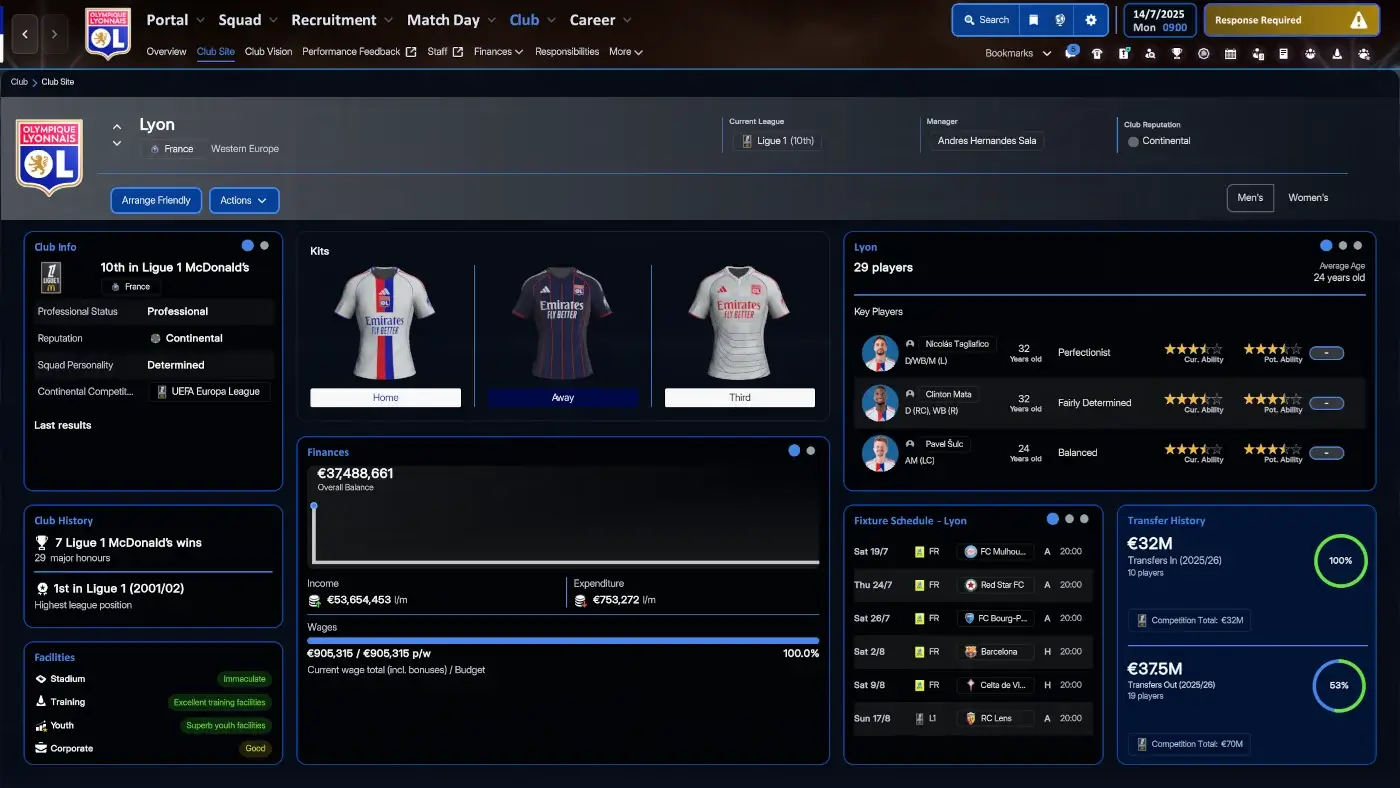
The latest addition of the FM26 Darkside Skin continues its vision on improving the game’s tedious user interface and overall layout by incorporating hundreds of changes. From switching out the font to changing its colours and backgrounds, the Darkside skin has quickly become one of the most exciting skins in the FM26 ecosystem.
Aiming at reducing visual clutter to improve how information is presented, break up the overall layout to modernize the overall appearance and help to reduce eye-strainness, it refreshes the appearance of Football Manager 26 by deliver a modern dark aesthetic.
The Darkside skin for Football Manager 26 brings several addition that we believe you’d love!
Key Features:
- Added Background images to Dynamic Tiles e.g. the Portal, News Site or messages as well as for the Start Screen
- Added Background images to Squad Overview, Match Day and etc.
– Mapped base background picture to all licensed leagues - features 16 different Adboards
- features 22 different pre-match lineup graphics created by Ferrigi97
- added Lotsgon’s polygon to Player profile
- complete new layout for Profile Overview
More Visual Appealing Overview Pages
One of the most significant improvements to the Darkside skin for FM26 is the work that has been done to re-define every Overview pages within Football Manager 26 by embracing the customization options the FM Skin Builder allows us to make!
The Club Overview
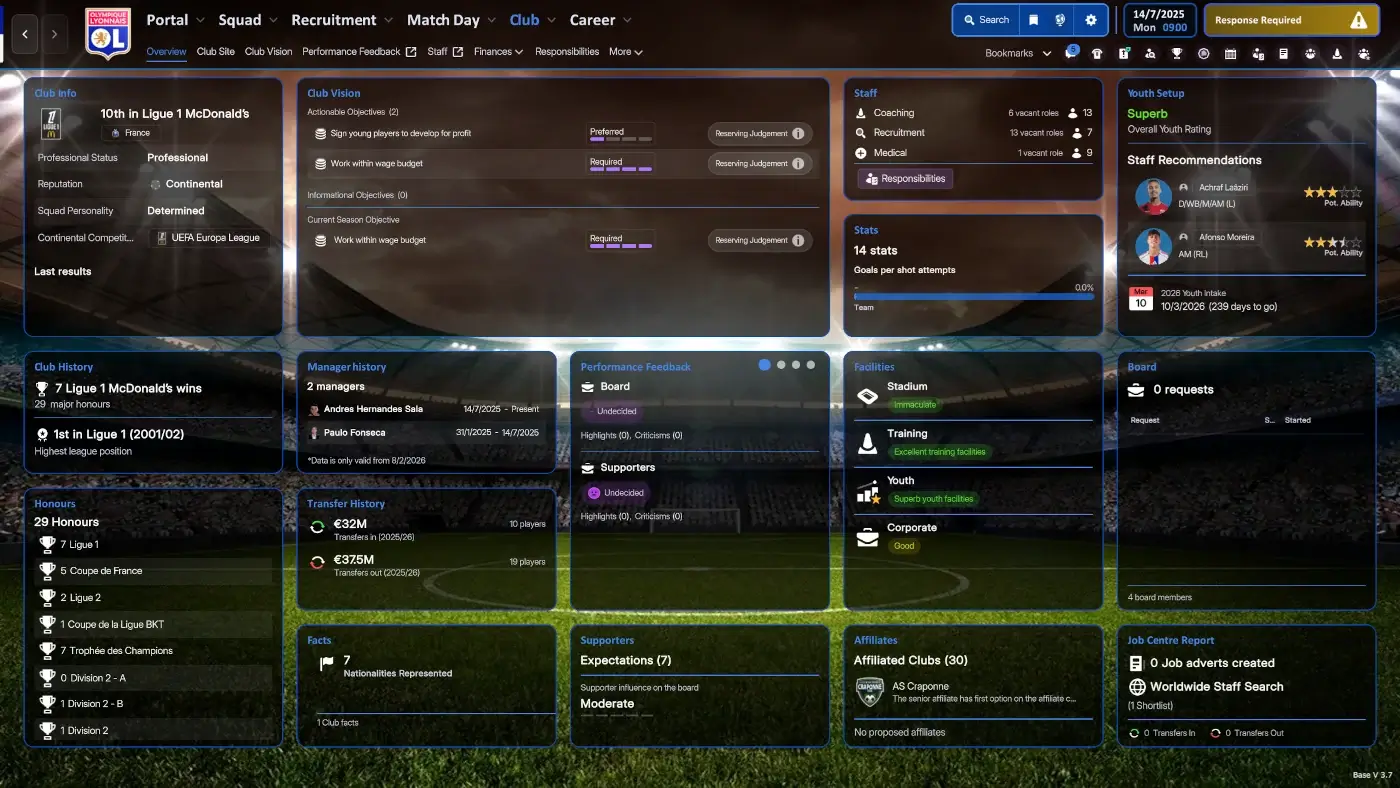
The Darkside skin has revamped the Club Overview by re-position Tiles and information boxes – helping you to easily find key information about your club quickly and easily – without having to search around for important information about your club.
The Club Site has also seen a massive upgrade by incorporating a bigger Kits block and Finances section – giving you a better overview about your club or those around you. This makes the game feel more similar to FM24 as the visual presentation is more user-friendly.
In the Club Site you’ll discover that there are several Dynamic Tiles – giving you the option to browse through information without cluttering the screen with lots of Cards and Tiles on the page. This is also one of my personal favorites with this skin!
The same applies to the Competition Overview – giving you a more pleasant break-down of the club’s participating competitions.
The Youth Setup Re-done
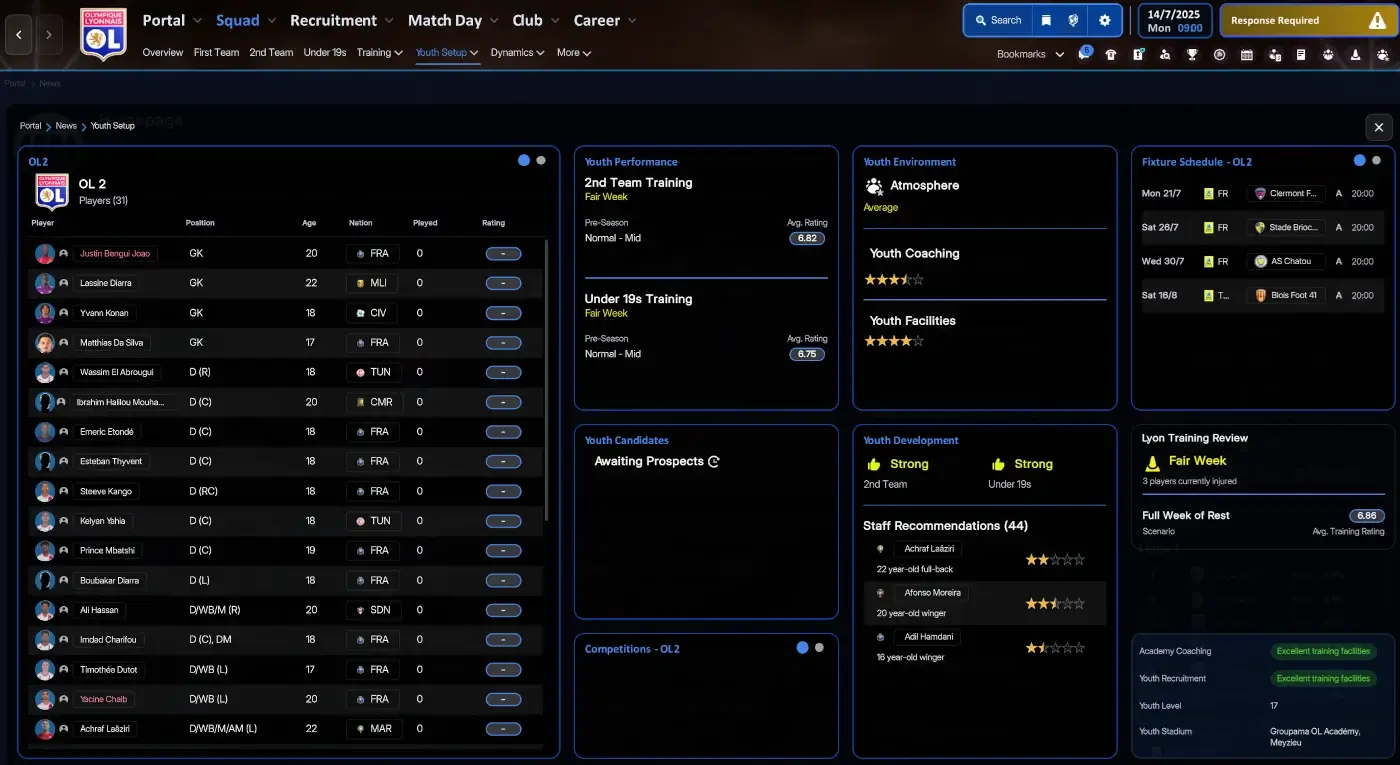
Apart from improving the visual appearance of all Overview pages within Football Manager 26 comes the Darkside skin with a new and improved layout for the Youth Setup screen.
The revamped Youth Setup screen gives you all the tools to manage the development of your best young talents. From incorporating a larger Squad Tile to learn more about your youth players in the U23 or U18 team, or providing you dedicated Tiles to track their development via the Youth Performance, to assign friendles via the Fixture Schedule tile, the new and improved Youth Setup is a saviour for anyone looking to spend hours on training your homegrown talents in a youth development save.
Revamped Training Screen
Another wonderful enhancement within the FM26 Darkside skin is the work gone into re-doing the Training screen. From having a pop-up window in the default FM26 skin, has Darkside changed the Training screen to a full-window mode.
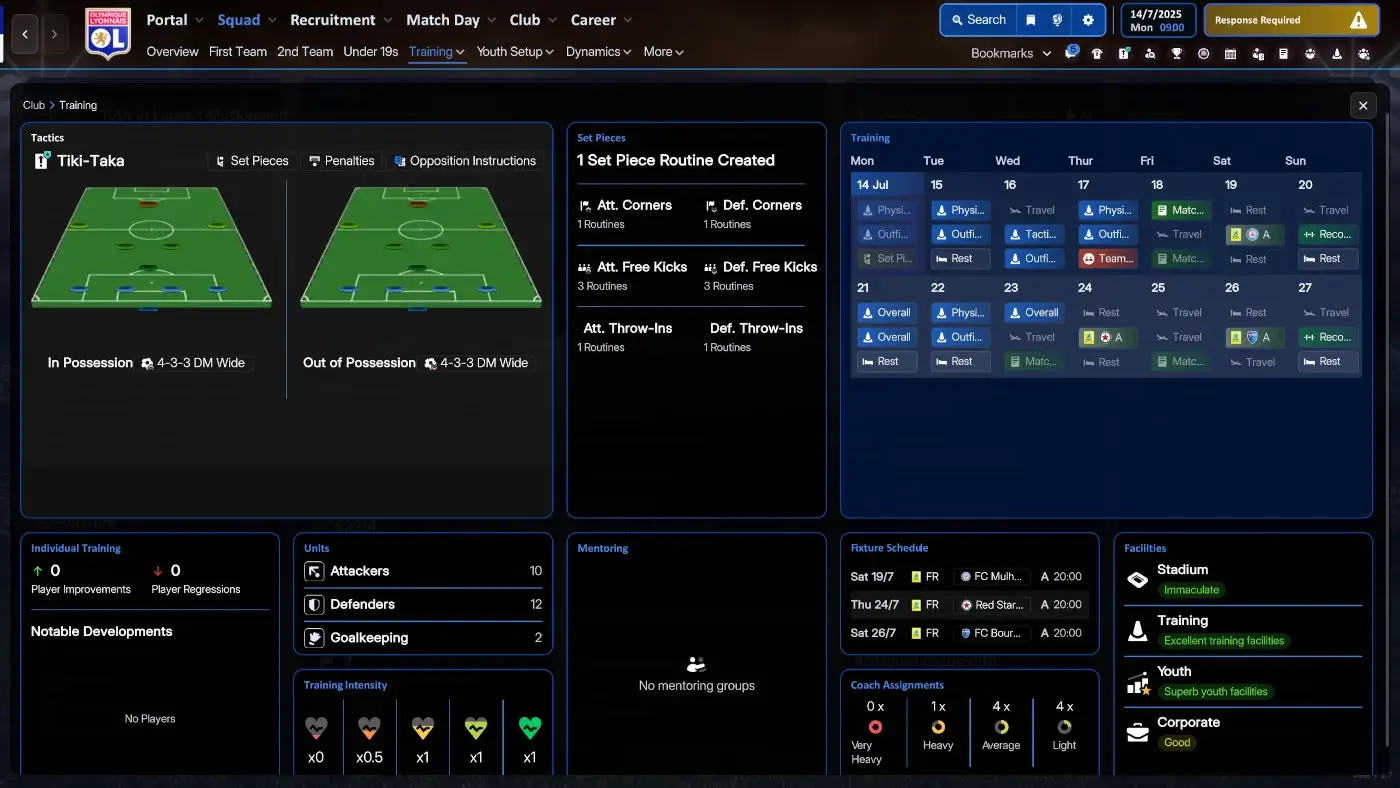
Here you’ll experience that Fixture Schedule and in and out of possession formations has found it’s way into the page. The Mentoring, Individual Training, Units, Club Facilities and Coach Assignments Tiles has also been made bigger – making it all look more polished and better.
Player Profile Screen feat Polygon
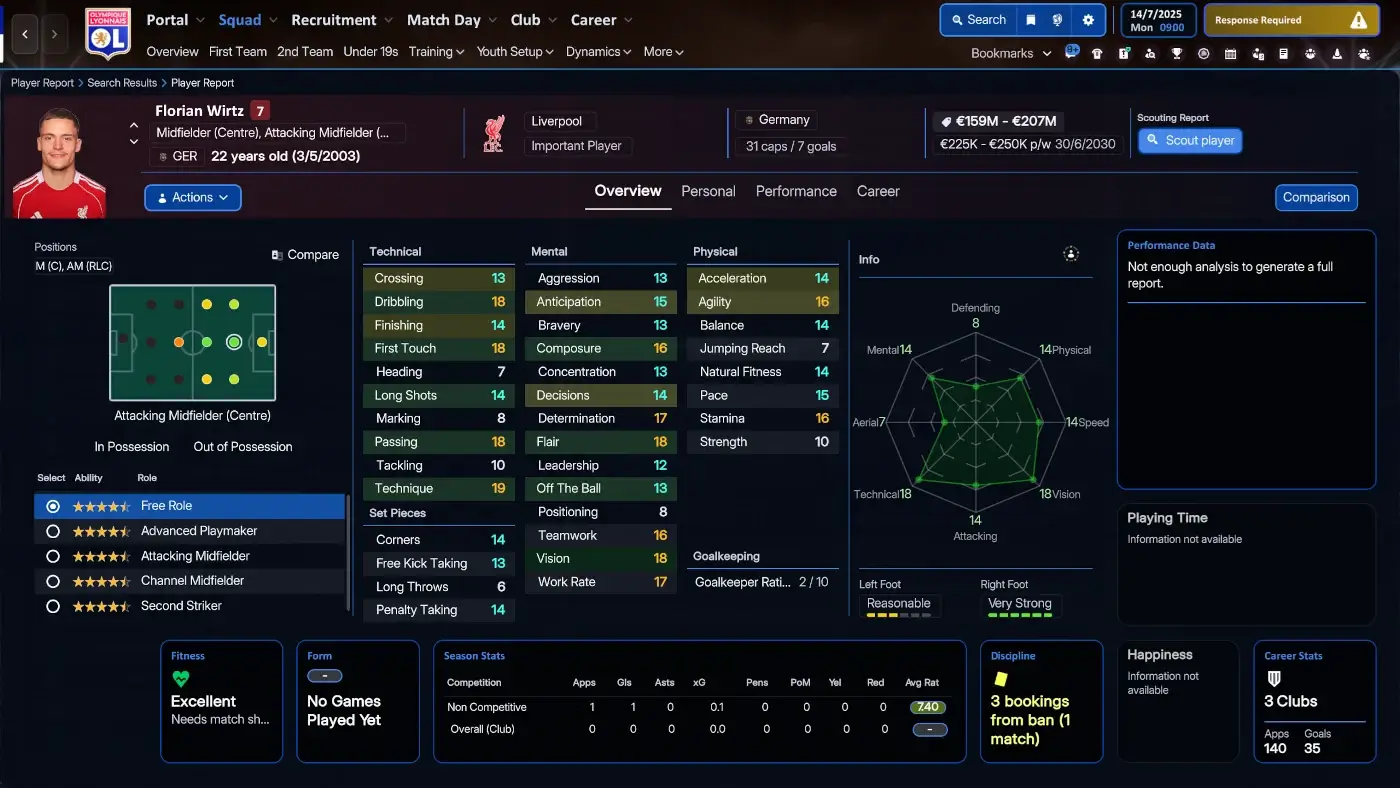
The FM26 Darkside skin shares a lot of similarities to the MrTini23 skin as some additional layout options has been shared and incorporated into this skin. With the player profile polygon mod made available within the skin, it’s one less mod you need to download and apply.
Redone Individual Training Screen
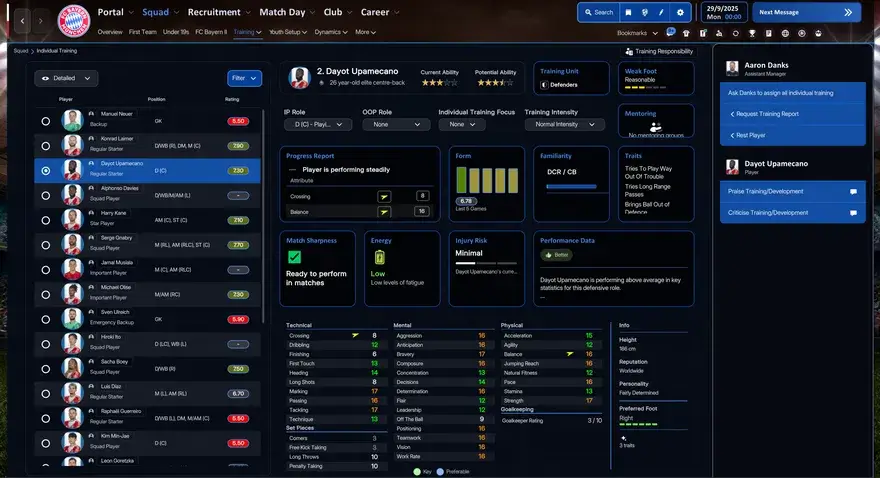
Another major improvement for version 3.7 is the major work that has gone into re-doing the Individual Training screen.
Featuring several more Tiles about the player’s progress, fitness and information about his training development of attributes and player role familiarity, the new and improved Individual Training screen is a one-stop shop for assessing a player’s development and progress.
DISCLAIMER!
Due to frequent updates, any screenshots above of the skin may appear slightly different than when you download it. We recommend you to download the skin to fully see all the new features and changes to it.
Changelist
Version 5.1
- New Startmenu Background! Added player picture to right side of tactics screen
- minor patch, adjusting clubboard negations at start of save/season to theme style
- Added themecolors to squadoverview and menu buttons in 3D Game
Version 5
- made the skin compatible for the 26.3 update after some heavy breaks…
- All features incl. the PlayerPics still alive in tactics and 3D game
Version 4.8
- adding the PlayerPic to the combined tactics view and into the 3D game
Version 4.7
- fixed a visual annyoance in Messages inbox
- fixed a minor Color tab issue in Fixtures&Results/Matchday Roundup page
- added Player Picture to IP/OOP/Both view in tactics page
Version 4.6
- Aligned Scoreboards to left (not MacOs for now)
- Playereport Pros/Cons now proper 50:50 splitted
- minor Color adjustement
- added new Background Mappings for tunnel interviews/press conferences
- fixed a visual issue with Board Targets and expectation when starting a save
Version 4.5
- minor Color Adjustment
- Slightly enlarged Playerprofile popup
Version 4.4
compatible with SI Patch 11.03.2026
- released macOS bundle for FM26.2 update
Version 4.3
(ready for SI Patch as of 9.03.2026)
- fixed minor issue in Staff search Filter
- minor Color Adjustment in Messages footer
- Major clean up of unused variables and classes – if something suddenly changed (color-wise) let me know so I can investigate…
- Adjusted new SI Fixtures page pre/postgame
Summarizing, all features which had been in 4.2 should be fully reinstated.
Version 4.2
(ready for SI Hotfix as of 19.02.2026)
- Fixed bug in indiviual Training, readded missing Player interaction
- Added improved PlayerRecommendation View (tnx to SAS for creating and approving using this)
- Added new PlayerPerformance Report for loaned out Players
- added detailed player form overview to Player Report
- added comprehensive Player analytics to the PlayerPerformance screen for easy Access
- added Player Milestones view to Player Career page
- some minor adjustments
Version 4.1
(ready for SI Hotfix as of 19.02.2026)
- add some Logos on Startup Screens
- doing some more button adjustments
- added new transfer history panel (tnx MrTini for sharing)
- redid PlayerReport Career tab
- redid PlayerReport Performance tab
- adjusted key/preferred Attributes in PlayerReport for better readability
- PlayerProfile fully redesigned – tnx to sic and mw90 for the amazing Attributes Panel, making that possible in the first place.
Version 4.0:
(ready for SI Hotfix as of 19.02.2026)
- 2D back in Match in between highlihts (just switch live table view)
- Keystats and Morestats fixed in 3D Game
- redone Clubsite for unmanaged Clubs
- completely redid the buttons on tactics page
- added new Portal overview for low-res
- added a new match in between Highlights screen for low-res
- Extended Squadoverview adding additional elements, added low-res Version for it as well
- some more Color finetunings
- added pro/cons to PlayerProfile – just switch the tab in Attributes panel…
Version 3.9:
- new background for even smoother theme visualization
- redone carousel tile-layer buttons wiht new accent color
- added accent highlight to tab switchhing
- added switchable pro/cons view to player profile (thanks Lucky!)
- redone various overview and popup screens
- further minor color adjustments
- added full detailed wage overview to recruitment overview page
10
Update V3.8:
- changed presentation of player/person pictures accross the skin
- Slightly modified Startmenu
- Fixed issue with messages backgrounds after last SI patch
- Fixed messed up set-pieces page
- more finetuning on buttons for comprehensive experience
- enlarged both passmaps (single/comparison) in date hub
- added extended statistics in 3d match (match in between highlights screen) – thanks to Whisperio for sharing with the community!
Update v3.7:
- Redone Club overview and Clubsite pages
- Redone clubsite for non-managed clubs
- Extended Keyplayer tile
- redone individual training
- redid main menu header
- more color adjustments in various locations
Final Thoughts
The FM26 Darkside Skin is more than a visual refresh. It’s a proof of concept for the rebirth of Football Manager skinning.
As the game evolves, Darkside’s skin is positioned to become one of the flagship skins of the FM26 generation. Whilst the FM Community thrives at customization, the latest skins released represents an early glimpse into what’s possible in the FM26 era. While this skin provides a vastly improved UI overhaul, it’s also a foundation for further customization by taking advantage of the FM Skin Builder tool.
If you love long saves, night-time sessions and a cleaner interface, this is a skin worth keeping on your radar!
How to download the FM26 Darkside Skin
Using FM Skin Builder
We recommend you to follow the instructions on how to install the FM26 Darkside skin via the FM Skin Builder by following our tutorial on how to install custom-made skins for Football Manager 26 [opens in a new window]. Here you’ll learn how to download and install the tool at the FM Skin Builder site.
As a prerequisite, the tool needs the game to be in original state. So if you have any mod(s) installed, make sure to uninstall them before proceeding to workt with the tool.
This is required to compile your own patched bundle files while the tool will backup your original gamefiles.
Make sure to always download the latest beta version (currently being 0.7.0-2). You can also find support for this tool in the FMML (FM Matchlab) Discord.
It is a good practice to make a backup of anything you replace before installing, although the FM Skin Builder enables you to restore the default bundles without any hassle.
IMPORTANT INFO!
Due to people stealing the work of other skin creators and publishing them as their own work, I have unfortunately been forced to remove the Skinbuilder version as a download option.
We (the Skinbuilder community) have put hundreds of hours into our projects and it’s not acceptable to simply copy/paste it and publish it as your product. We gladly share our work with the community but “stealing” is unacceptable.
6:05 PM
Credits
Thanks to xxx Darkside xxx for giving us permission to re-distribute his clean dark skin for FM26. You can follow the development and progess of this skin at:
X: Darkside
My special thanks goes to lotsgon, sic, MW90, MrTini23, LuckyLuke – and in general to the community on FMML discord, for massive support and sharing stuff and ideas while trying to work into this new environment, as well as ongoing – as this is and has been incredibly valuable – and finally to my old friend Flut who teached me so many things in the past. To show my respect, I selected two of his backgrounds for the Startmenu.
Additional credits going to:
- TinyHips for sharing his prematch lineups
- Ferrigi97 for providing a load of additional prematch lineups as of V3.0
- Tangfu, for sharing the way how we can add PlayerPics to the tactics views as of version 4.7
An additional big hug to @lotsgon for making it possible to release a patch for the FM26.2 Update and fixing the Skin Builder so quickly!!!! The whole community owes you on this!